Bug Tracker Features Built for Dev and QA Teams
Zunoy Bug Tracker gives teams the bug tracker features they need to capture complete issue context, assign ownership, track progress, verify fixes, and learn from every resolved bug. It is focused bug tracking software for dev and QA workflows, not a heavy project management tool with bug tickets added on top.

Free to start
No credit card required
Visual Bug Reporting
Multi-channel tracking
Full context from day one.
Core Features
Manage Every Bug With Full Context
Zunoy’s defect tracking software features help teams keep every bug visible, organized, and actionable from the moment it is reported. Screenshots, severity, priority, ownership, attachments, comments, and status stay connected, so developers and QA teams can move faster without chasing missing context

Flexible Bug Views
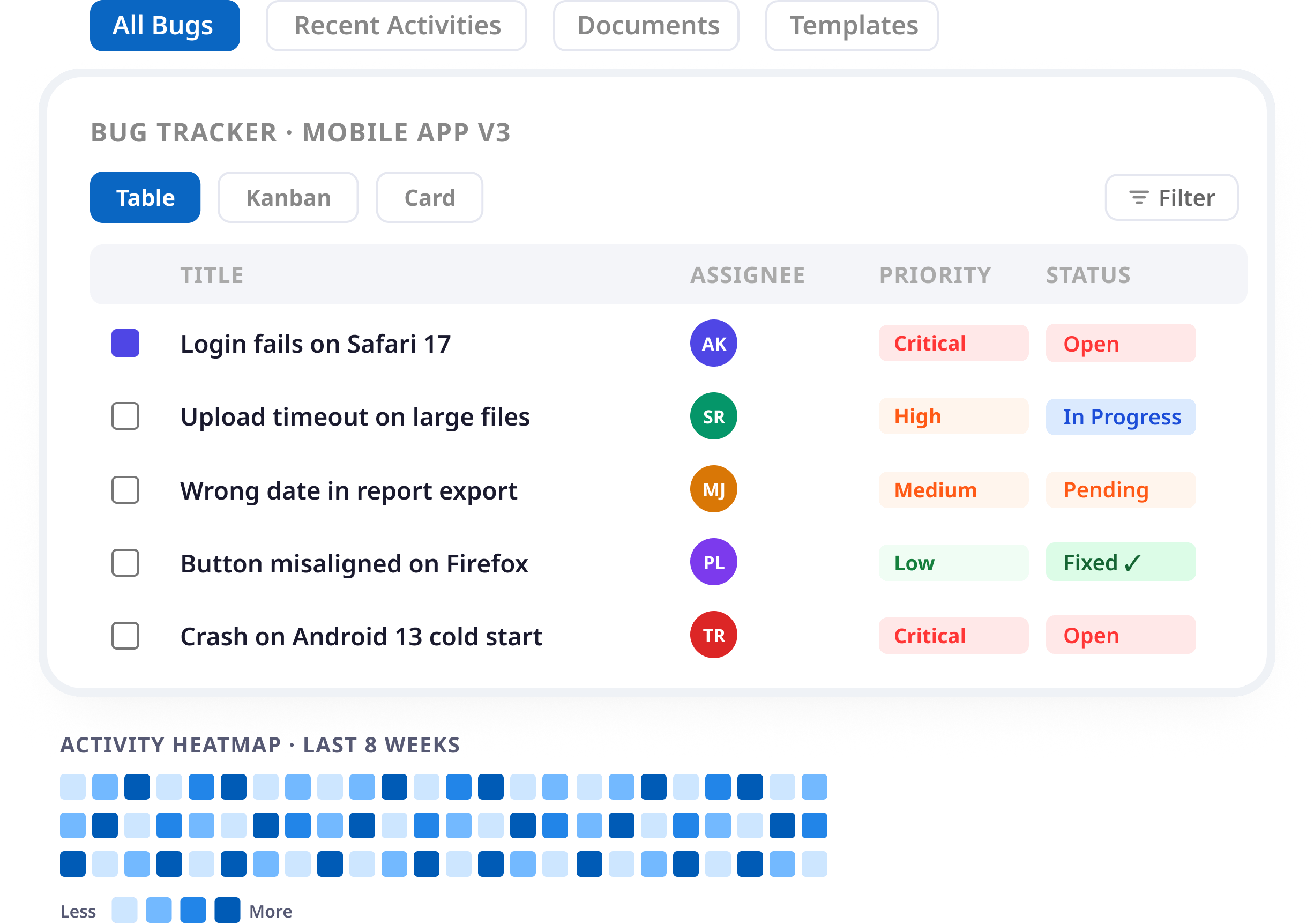
Manage bugs in Table, Kanban, or Card view so teams can review, prioritize, and resolve issues in the format that fits their workflow.

Priority and Status Tracking
Track priority, severity, status, assignee, timestamps, and workflow stage so teams know which bugs need attention first.

Assignment and Followers
Assign bugs to the right owner and let teammates follow issues to stay updated without becoming responsible for the fix.
Saved Filters and Search
Filter bugs by status, priority, assignee, tag, date, project, or release, then save useful views and find issues faster.
Linked Bugs and Sub-Bugs
Break complex issues into sub-bugs, connect duplicates, track blockers, and link related bugs before closing issues.
Tags and Attachments
Add tags, screenshots, logs, files, crash reports, and evidence so developers get the context they need in one place.
Bug Lifecycle
Support the Complete Bug Lifecycle
Beyond core bug management, Zunoy Bug Tracker helps teams standardize projects, organize files, track recent activities, and understand bug movement across the full lifecycle from report to verified fix.

Project Templates
Save reusable project setups with statuses, fields, views, and filters so teams can start new QA cycles, client projects, or release tracks faster.

Document Manager
Keep QA notes, reproduction guides, test plans, environment details, and technical documentation close to the bugs they support.

Recent Activities
Review a chronological feed of bug reports, comments, assignments, status changes, and updates across a project.
Activity Heatmap
See bug activity over time with a contribution-style view that helps teams understand reporting, fixing, and closure patterns.
Anaytics
Project Analytics for Bugs
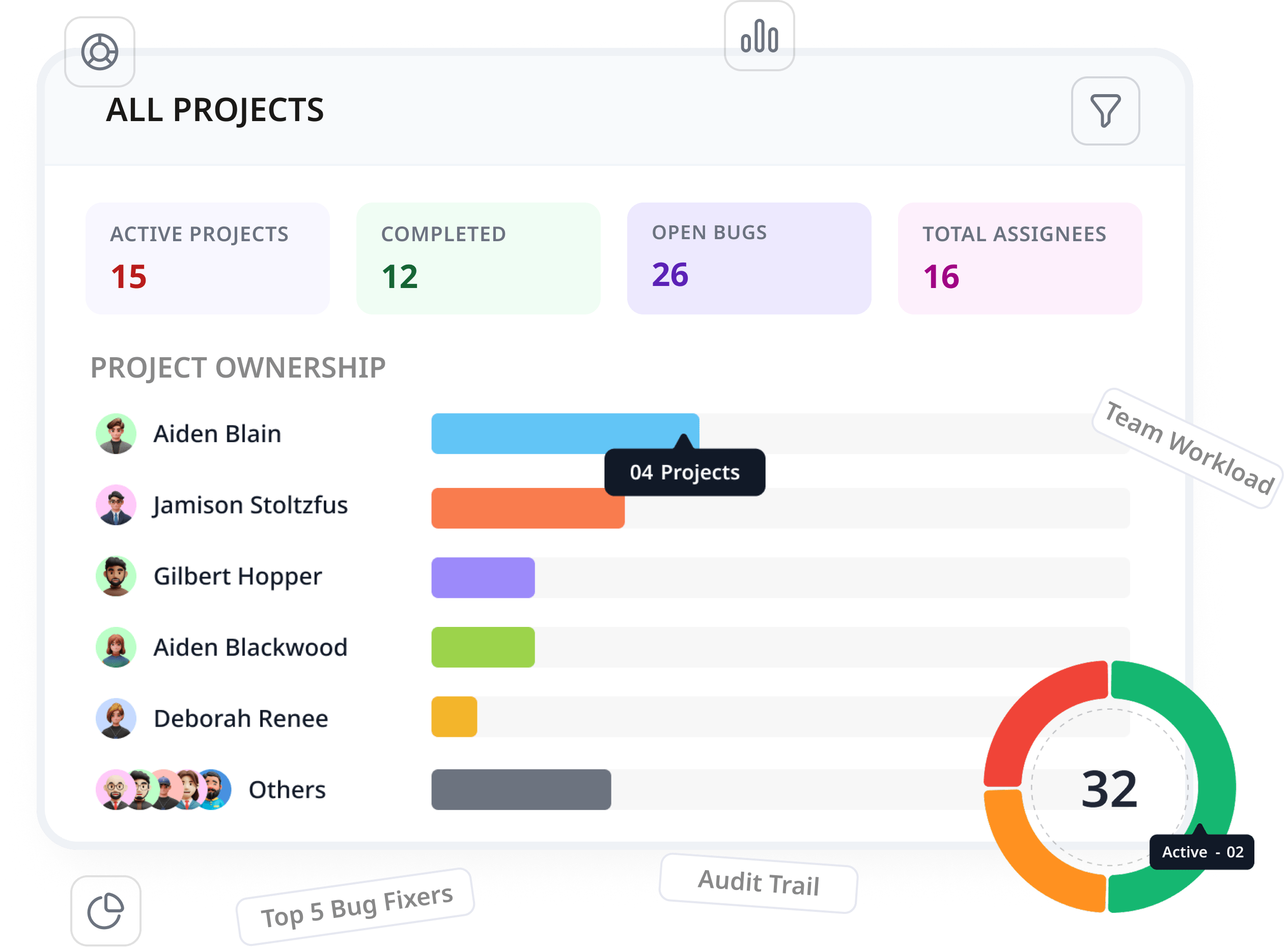
Zunoy Bug Tracker helps teams understand bug volume, workload, open issues, resolved bugs, and project health with project analytics built for bug tracking decisions. Managers get visibility into quality and delivery risks without turning Zunoy Bug Tracker into bloated project management software.
Project-Level Analytics
Track open bugs, closed bugs, resolution trends, team workload, and issue movement across each project.
Cross-Project Visibility
Compare bug progress across different projects, products, clients, or teams without switching between disconnected tools.
Team Workload Insights
See where bugs are assigned, where work is building up, and which owners or teams need attention.
Audit Trail
Track workspace actions with timestamps, users, action types, and linked bug details for clear activity history.
CUSTOM FEATURES
Customize Bug Tracking to Your Workflow
Every team tracks bugs differently. Zunoy works as a custom fields bug tracker that lets teams adapt fields, statuses, tags, and closure records without forcing every project into the same rigid process.
Custom Bug Fields
Add fields to bug forms so teams can capture module, device, environment, customer, release, or reproduction details during reporting and triage.

Closure Fields
Capture fix summaries, root causes, verification notes, regression risks, and lessons learned before closing bugs.

Custom Statuses
Create workflows that match how your team manages bugs, from Open and In Progress to Review, Hold, Retest, and Closed.
Custom Tags
Create tag structures for components, platforms, customers, releases, severity groups, or recurring issue types.
Ready to Move Bugs Out of Spreadsheets?

200 Free AI Credits

No Credit Card required

Free Forever
Capture bugs from 8+ channels
Keep full context attached to every issue
Track the complete bug lifecycle
Give dev and QA teams one focused workflow
CREATION CHANNELS
Track Effort and Learn From Fixes
Zunoy connects bug tracking with time logging and resolution documentation, helping teams understand engineering effort and turn every verified fix into reusable knowledge.
Timesheets
Log time directly against bugs, track developer and QA effort, and review work by team member, issue type, or date range.

Knowledge Base
Turn resolved bugs into reusable records with root causes, fixes, verification notes, related bugs, and lessons learned.
ENTERPRISE CONTROLS
Enterprise Control, No Bloat
Zunoy Bug Tracker gives growing teams and enterprise bug tracker workflows the control they need without turning bug tracking into heavy project management. Manage roles, permissions, workspace access, project access, and audit history while keeping every workflow focused on bugs and issue resolution.
- Track
Audit Trail
Track important activity across bugs and workspace actions. Teams can review status changes, ownership updates, comments, assignments, and key workflow movement, so every bug has a traceable history from report to closure.
- Workspace
Workspace Management
Manage your bug tracking workspace as your team grows. Create projects, invite members, organize access, and keep development, QA, product, and support teams working inside one controlled environment.
- Team
Team & Access Management
Control who can view, create, edit, assign, verify, or close bugs. This helps teams collaborate without giving every member the same level of access across every project.
- Roles
Project-Level Roles
Assign access based on each project’s needs. Developers, QA engineers, managers, clients, or external collaborators can get the right permissions for the bugs they are responsible for.
- Permission
Permission-Based Workflows
Use roles like Read, Write, Admin, and Member to keep bug work organized. Teams can move fast while still protecting project settings, workspace access, and critical bug data.
The things Developers actually ask.
What features does Zunoy Bug Tracker include?
Zunoy includes bug views, priority and status tracking, assignments, followers, saved filters, search, linked bugs, sub-bugs, tags, attachments, project templates, document manager, recent activities, project analytics, timesheets, knowledge base, custom fields, notification settings, audit trail, and access controls. Together, these bug management features keep every issue organized from first report to verified fix.
What are the most important bug tracker features for dev and QA teams?
The most important bug tracker features are the ones that keep bug context complete. Zunoy Bug Tracker helps teams capture screenshots, files, logs, severity, priority, ownership, status, comments, related bugs, and resolution notes in one workflow.
What bug tracking software features help teams fix bugs faster?
Bug tracking software features like visual evidence, clear ownership, priority, severity, saved filters, search, linked bugs, attachments, comments, project analytics, and knowledge base records help teams reduce missing context and fix bugs faster.
What are the best bug tracker features for growing teams?
The best bug tracker features for growing teams include flexible bug views, assignments, priorities, saved filters, search, project analytics, custom fields, timesheets, knowledge base records, audit trail, notification settings, and access controls.
What are the important features of bug tracking software?
The important features of bug tracking software, including its defect tracking software features, are context capture, ownership, priority tracking, workflow visibility, search, reporting, time tracking, documentation, access control, and a clear path from bug report to verified fix.
What features of bug tracking tools matter most?
The best features of bug tracking tools are the ones that help teams report bugs clearly, assign the right owner, track progress, verify fixes, document root causes, and avoid losing context across chats, files, or spreadsheets.
Get started
Start Tracking Bugs With Full Context
Zunoy Bug Tracker gives dev and QA teams the bug tracking tool and defect tracking software features they need to capture bugs with context, manage issues clearly, collaborate faster, track effort, and learn from every fix without adding project management bloat.
Setup in seconds
Capture full bug context
Assign clear ownership
Timesheet included
Free tier available