Bug Tracker Timesheet Management
Zunoy Bug Tracker helps dev and QA teams track time spent on bug fixes directly inside the bug workflow. Log developer effort, QA testing time, bug resolution time, and review work without moving into a heavy project management tool. Track time on bug fixes without ever leaving the bug tracker.

Free to Start.
No Credit Card required
Visual Bug Reporting
Multi-Channel Tracking
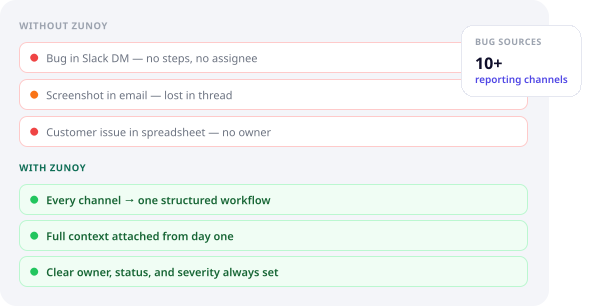
Full Context from Day One
HOW IT WORKS
Track Time Where Bugs Are Fixed
Zunoy Bug Tracker connects time tracking with the bug lifecycle, so every hour logged stays attached to the issue, owner, project, status, and resolution history.
KEY FEATURES
Timesheets Built for Bug Work
Zunoy Bug Tracker's bug tracking timesheet features are designed for real dev and QA workflows, not generic task timers.

Bug-Level Time Logs
Log time directly on bugs so every fix, test, review, or investigation stays connected to the issue.

Developer Timesheets
Track developer effort across bug fixes, blockers, regressions, code reviews, and release-critical issues.

QA Time Tracking
Log QA effort for testing, retesting, verification, reproduction checks, and closure review.

Work Notes
Add notes to each time entry so managers understand what was worked on and why time was spent

Manager Approval
Review, approve, or validate timesheet entries before using them for reporting, planning, or billing.

Billing Accuracy
Track billable and non-billable effort against bugs, projects, clients, or releases with clearer records.
Timesheet Manager
One View for Bug Effort
The central timesheet manager helps teams review time entries across bugs, owners, projects, and dates, giving them timesheet management for bug tracking in one place. Instead of tracking bug effort in spreadsheets, managers get one view to see who worked on what, how long it took, and which issues consumed the most time.
Key Points
View time entries across bugs and projects
Filter by developer, QA member, date, project, or issue type
Review work notes and linked bug records
Track approved, pending, or reviewed entries
Understand effort without leaving the bug tracker
Support QA timesheet management alongside developer time logs
WHO IT IS FOR
Built for Teams That Fix Bugs
Zunoy’s bug tracker time tracking is useful for teams that need to understand effort without separating timesheets from the actual issue context.
Developers
Log time spent on bug fixes, investigation, code changes, regressions, and technical review.
QA Teams
Track time spent reproducing bugs, testing fixes, retesting failed issues, and verifying closure.
Engineering Managers
Review workload, approve timesheets, understand blockers, and plan team capacity with better visibility.
Agencies and Client Teams
Improve billing accuracy by connecting bug work, time entries, owners, and project records.
Understand Where Bug Time Goes
Zunoy Bug Tracker helps teams connect time tracking for bug fixes with real issue context, so managers can understand effort across bugs, people, projects, and releases without reading every ticket manually.
Bug Resolution Time
Bug Resolution Time
Developer Effort
Developer Effort
Track time spent by developers across fixes, blockers, regressions, and recurring defects.
QA Effort
QA Effort
Review QA time spent on testing, retesting, reproduction, and verification work.
Billing Records
Billing Records
Use approved time logs for client, project, or internal billing accuracy.
Project Workload
Project Workload
Understand which projects, releases, or issue types consume the most bug-fixing effort.
Billing Records
Billing Records
Use approved time logs for client, project, or internal billing accuracy.
BENEFITS
More Than a Timer
Zunoy Bug Tracker's timesheet management helps teams connect effort with issue context. Every time entry is tied to the bug, the owner, the status, and the resolution workflow.
INTEGRATIONS
Keep Bug Time Connected
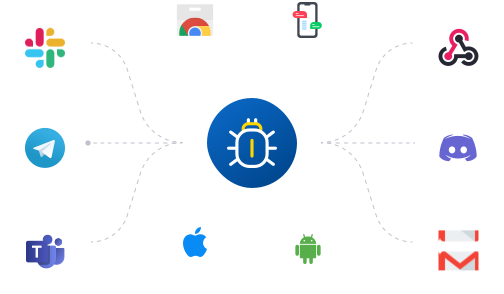
Zunoy Bug Tracker keeps time tracking inside the bug tracker, while integrations help teams receive updates, route work, and keep stakeholders informed. Bug activity, comments, assignments, and status changes can stay connected across tools without moving time tracking into disconnected spreadsheets.
Examples
Send bug updates to Slack or Microsoft Teams
Track time against bugs created from email, widget, mobile app, or API
Keep manager reviews connected to issue status and ownership
Use bug activity and timesheets together for clearer project reporting
FAQs
Things Customers Generally Ask
What is bug tracker timesheet management?
Bug tracker timesheet management means tracking time directly against bugs, fixes, testing work, verification, and issue resolution instead of using separate spreadsheets or generic timers.
Does Zunoy Bug Tracker support developer timesheets?
Yes. Developers can log time against bugs so teams can understand effort across fixes, regressions, blockers, and technical work.
Can I track time spent on bug fixes in Zunoy Bug Tracker?
Yes. Zunoy Bug Tracker lets teams track time spent on bug fixes, investigation, QA testing, retesting, review, and closure inside the bug tracking workflow.
Does Zunoy Bug Tracker support QA time tracking?
Yes. QA teams can track time spent reproducing issues, testing fixes, retesting bugs, and verifying resolution.
Track Bug Time With Full Context
Use Zunoy Bug Tracker to track developer timesheets, QA time tracking, bug resolution time, manager approval, and billing accuracy inside one focused bug tracking workflow.