IT Asset Management Software That Knows Where Every Laptop Actually Is
Laptops, monitors, tools, accessories — one directory across every branch, with real-time status instead of a guess.
STRUCTURE MEETS VISIBILITY
Built for IT and HR Admins Who Need to Know What’s Where
Not just a spreadsheet of serial numbers — a structured directory with the categories and status logic your admin team actually needs.

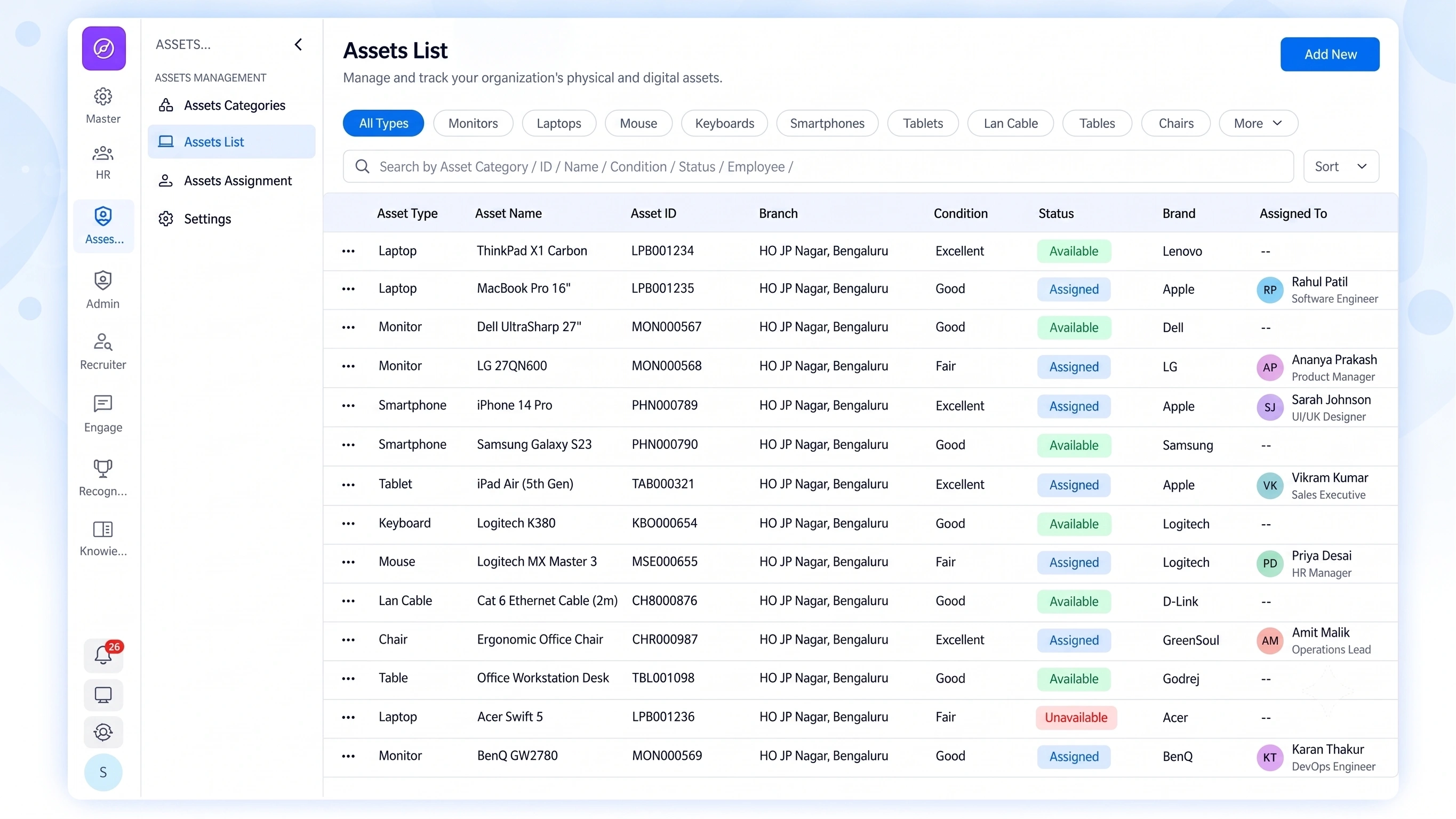
Master Inventory List
Every physical asset, across every branch, in one centralized directory.

Category & Attribute Builder
Custom categories and specification fields, built around your own asset types.

Asset Lifecycle Status
Health states and real-time availability tracked per device.
FIELDS THAT FIT
Hardware Asset Management That Doesn’t Force Every Device Into the Same Template
A laptop and a mobile device don’t need the same tracked fields. Category & Attribute Builder lets you define custom categories — Laptops, Mobile Devices, or anything else — each with its own specification fields, so the directory actually reflects what matters for that asset type.
Custom categories for any asset type
Specification fields tailored per category
No forced one-size-fits-all template

IT Inventory Software That Shows a Device's Full Story, Not Just Its Location
Every asset carries two layers of status — condition and availability — visible together.
Health States
Condition set on every asset record
Critical devices surfaced for replacement planning
Condition captured again on recovery
Availability Status
Status changes the moment an asset is assigned
Reason captured when an asset is unavailable
Sold and retired assets kept on record
Branch Visibility
One directory spanning all locations
Filter by branch, category, or status
No separate per-office spreadsheets
NOTHING UNTRACKED
Centralized Asset Tracking Built for Admins Who Are Tired of Asking Around
“Does anyone know where that spare monitor went?” shouldn’t be a real question anymore.

One Directory, Every Branch
No separate spreadsheets per location.

Custom-Fit Categories
Track what actually matters per asset type.

Health and Status Together
Condition and availability visible on the same record.

Admin-Ready by Design
Built specifically for IT and HR admin workflows.
QUESTIONS, ANSWERED
Frequently Asked Questions
What is IT asset management software?
It’s a system that lets organizations track physical assets like laptops, monitors, and accessories through a centralized directory, covering categorization, specifications, and real-time status across every branch.
What health states can be tracked per device?
Devices can be marked as Excellent, Fair, or Critical, giving admins a quick way to identify which assets may need attention or replacement soon.
What statuses can an asset have besides health?
Assets can be marked Available, Assigned, Under Repair, or Sold, tracking real-time availability separately from the device’s overall condition.
Can I create custom asset categories?
Yes, the Category & Attribute Builder lets you define custom categories like Laptops or Mobile Devices, each with its own specification fields tailored to that asset type.
Is this considered hardware asset management?
Yes, it functions as complete hardware asset management, covering laptops, monitors, accessories, and tools through one centralized, categorized inventory system.
Is this suitable as IT inventory software across multiple branches?
Yes, the Master Inventory List centralizes assets across every branch, making it function as complete IT inventory software rather than a single-location tracker.
Know Every Asset’s Location, Condition, and Status — Instantly
One directory, custom categories, and real-time lifecycle tracking across every branch you operate in.
Master Inventory
Custom Categories
Health States
Real-Time Status