Employee Offboarding Software That Closes Every Loop
Track every approval, form, and handover from one dashboard — no chasing emails when someone leaves. Zunoy's employee offboarding software keeps HR, IT, and finance on the same page from resignation to final settlement.
What It Handles
One Screen, Every Exit Detail
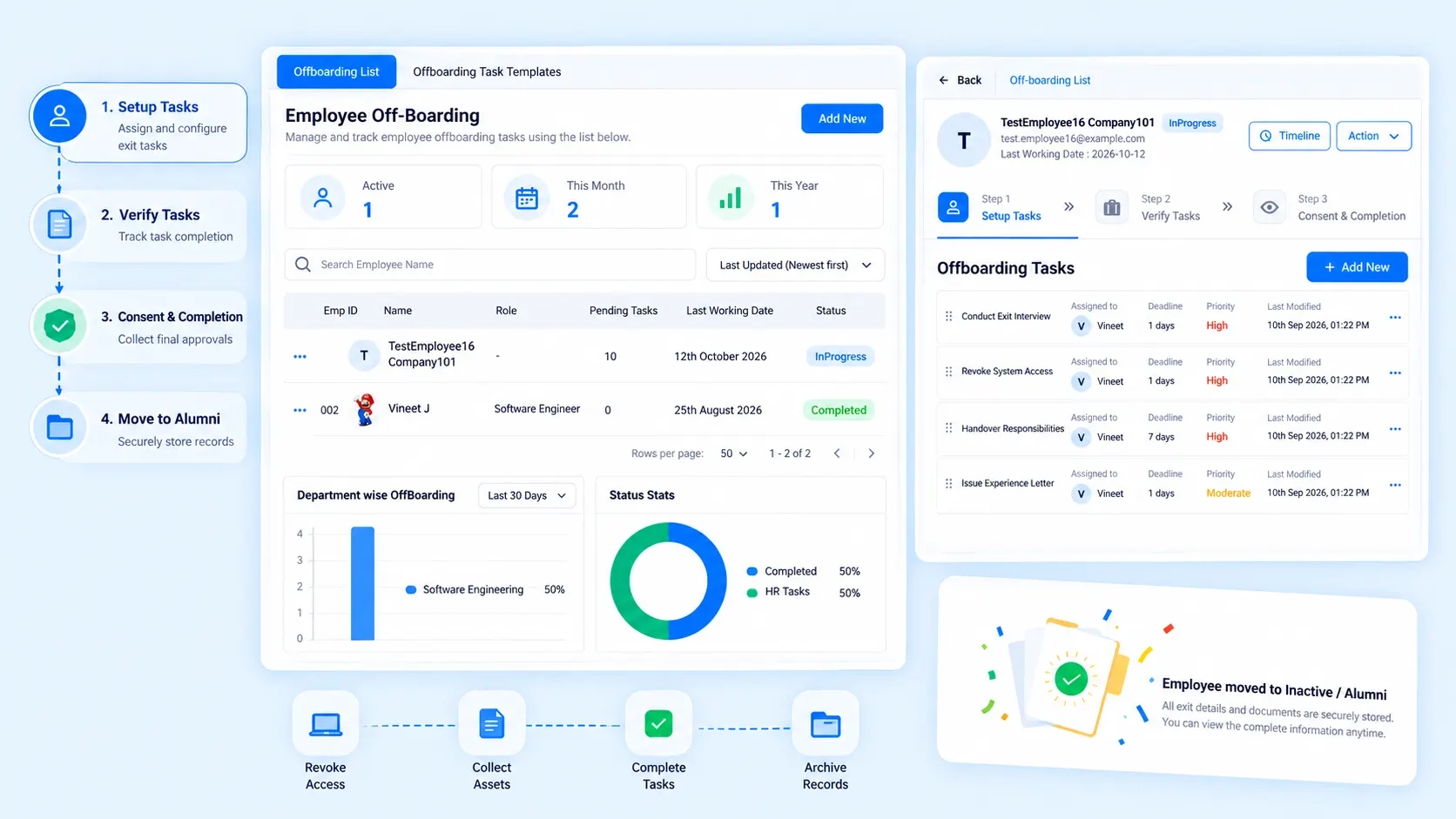
When someone resigns, is let go, or retires, the paperwork doesn't stop for HR — it multiplies. This employee offboarding software turns that scramble into a single, trackable flow. The Task/Approvals Grid lays out every pending action — asset returns, final settlements, access revocation — next to the person responsible for it, so nothing sits untouched in someone's inbox.

Task & Approvals Grid
Live status of every offboarding step, assigned and tracked to close.

History Table
A searchable record of every exit ever processed, ready when you need it.

Location-Based Filtering
View offboarding activity by branch without digging through unrelated records.

New Intake Form
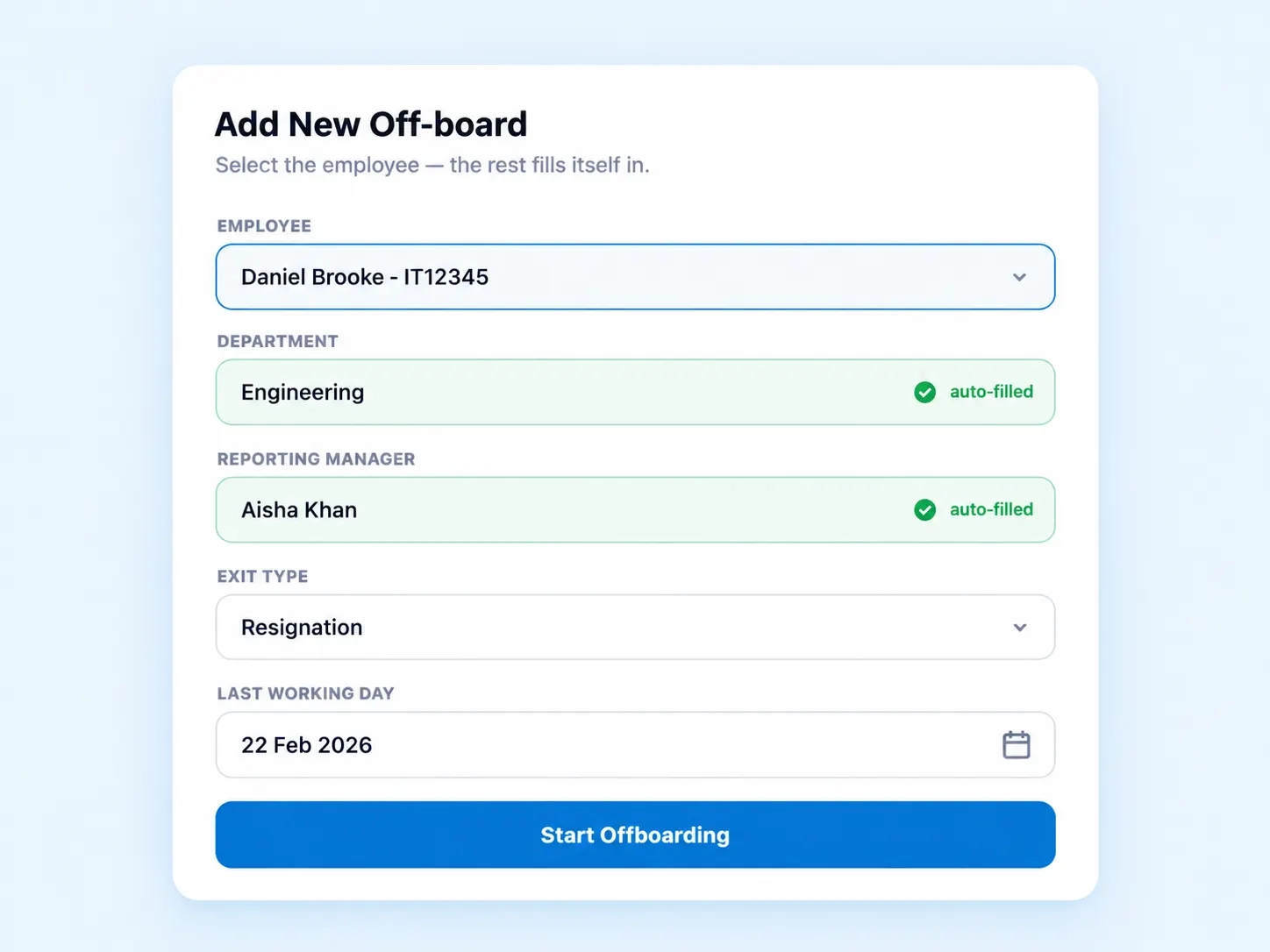
Starts the exit process with employee details already filled in.
Zero Re-Typing
The Form That Already Knows Who's Leaving
Most exit paperwork starts the same frustrating way — someone re-typing an employee's name, department, and manager from scratch. The Add New Off-board Intake Form pulls that metadata automatically the moment you select the employee, cutting a five-minute task down to one click.

Employee ID, department, and reporting manager auto-populate on selection
Exit type (resignation, termination, retirement) set from a simple dropdown
Reduces manual entry errors that delay final settlements
Feeds directly into the Task/Approvals Grid, so downstream steps trigger instantly
Branch-Level Clarity
See Exits By Location, Not Just By Name
For companies running multiple branches, offboarding doesn't stay neat — a resignation in one office shouldn't get buried under activity from another. The Location Dropdown, like "134 - Bengaluru Branch," narrows the dashboard to exactly the site an HR team is managing, while the History Table keeps a permanent, filterable log of every completed exit for audits or reference.
Location Filtering
Filter active and past offboarding cases by branch
Useful for HR teams managing distributed or multi-city workforces
History & Audit
Full audit trail of completed exits, searchable anytime
Removes the guesswork in multi-location HR offboarding automation
An Exit Process Nobody Has to Babysit
A missed laptop return or an access badge still active weeks after someone's last day isn't just messy — it's a risk. This employee exit dashboard keeps every task visible until it's actually closed, not just assigned.
No orphaned tasks — every approval has an owner
Full visibility into what's outstanding at a glance
Historical data ready for compliance or audits
Works as a reliable staff offboarding tool across departments, not just HR
Offboarding Questions
Offboarding Dashboard FAQs
What does employee offboarding software actually track?
It tracks every task tied to an employee's exit — asset returns, final approvals, access revocation, and settlements — in one grid, so nothing gets missed once someone hands in their resignation or is let go.
Does the intake form require manual data entry?
No. Selecting an employee auto-fills their department, ID, and reporting manager, cutting down the setup time for starting a new offboarding case significantly.
Is this HR offboarding automation, or still manual approvals?
Both. Tasks are automated into the grid the moment a case starts, but approvals still route to the right people — automation removes the busywork, not the oversight.
Can I filter offboarding cases by branch or location?
Yes. The Location Dropdown lets you view offboarding activity for a specific site, like a Bengaluru branch, so multi-location teams aren't sorting through cases from offices they don't manage.
What's tracked in the History Table?
Every completed offboarding case, searchable by employee, date, or branch — useful for audits, compliance checks, or simply confirming a past exit was handled properly.
Can multiple departments use this staff offboarding tool together?
Yes. IT, finance, and admin teams can all see and update their assigned tasks on the same grid, so an exit doesn't depend on one department chasing another manually.
Give Every Offboarding a Clear Finish Line
From intake to final approval, manage it all from one dashboard.