Employee Exit Management Software for the Last Mile of Offboarding
Settlements calculated, access revoked, documents issued — the whole closure handled without a spreadsheet in sight.
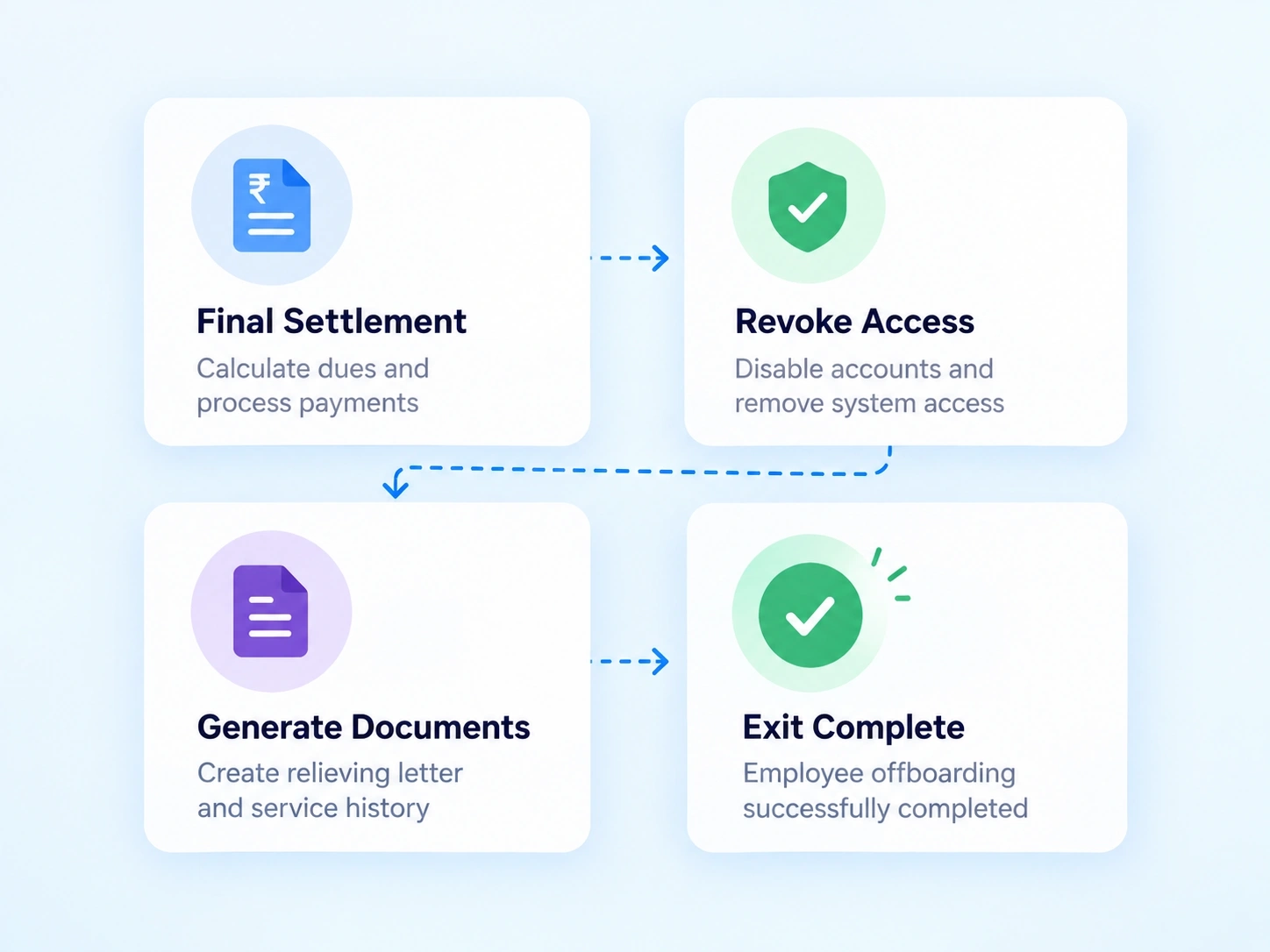
Closure, Step by Step
From Final Paycheck to Alumni Status, in Order
Closing out an employee's file isn't one action — it's a sequence, and skipping a step usually means someone comes back with a question weeks later. This employee exit management software walks every exit through the same structured order, so nothing closes out of turn.
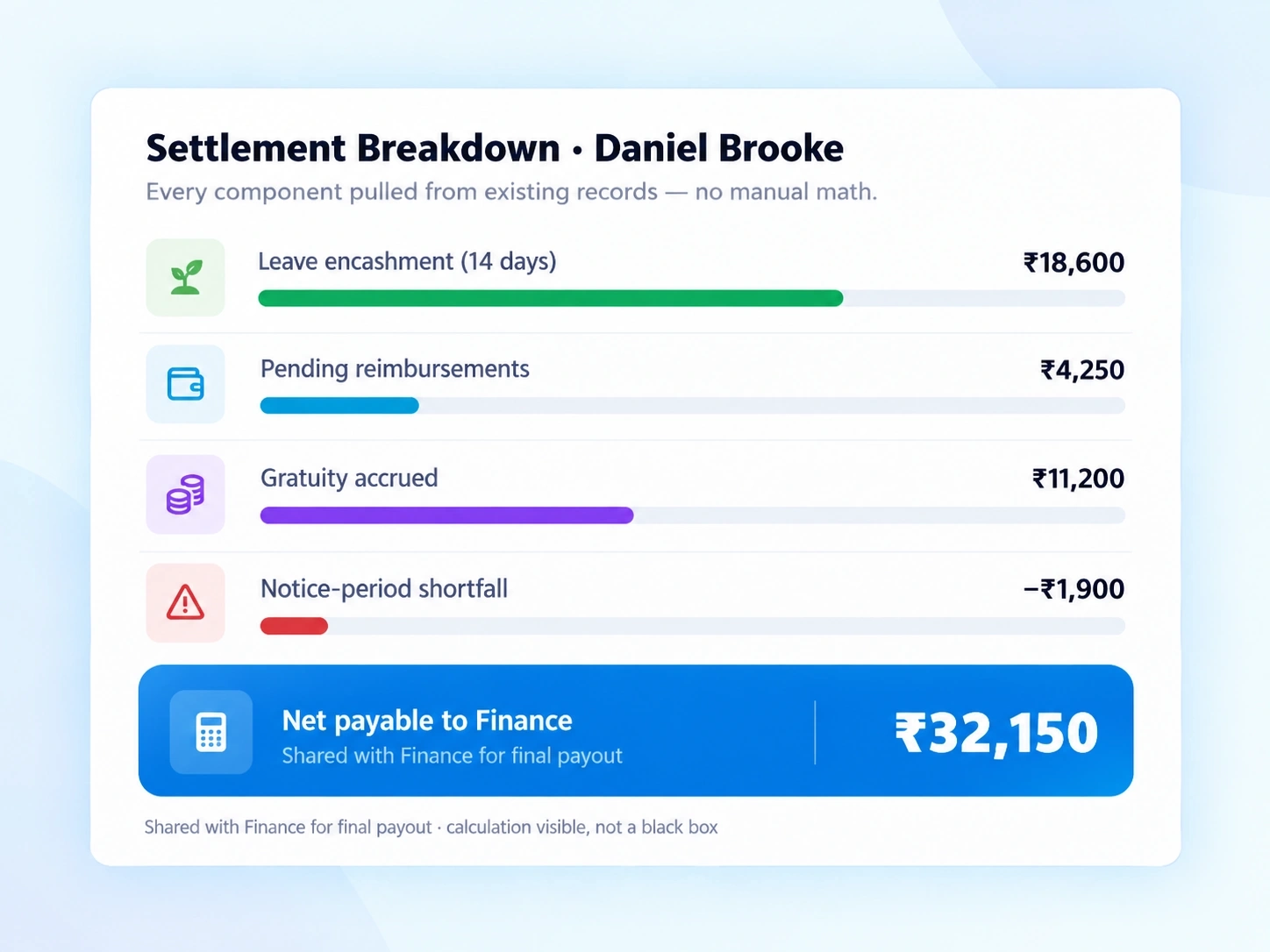
No Manual Math
A Settlement Figure That Adds Itself Up
Full and final settlement software should mean exactly that — full, and final, calculated once and trusted. Leave encashments, pending reimbursements, and any outstanding dues feed into a single settlement number automatically, instead of getting reconciled by hand across three different sheets.
Leave balance converted to encashment value without manual lookup
Outstanding reimbursements pulled in from existing records
One consolidated figure shared with Finance for final payout
Reduces disputes by making the calculation visible, not a black box
Documents Out, Access Off — Both Tracked to Completion
The two things that tend to get forgotten in an exit are exactly the two that matter most later: the paperwork someone needs for their next job, and the access nobody should still have. This exit document generator and the access revocation checklist sit side by side, so both close out before the file does.

Exit Document Generator
Relieving letter, experience letter, and service history created from existing employee data — no retyping, no waiting on a manual draft.

Access Revocation Checklist
System logins and email access confirmed closed item by item, with nothing left assumed.
A Clear Signal When an Exit Is Actually Done
An employee relieving software should end with certainty, not a lingering "is this done yet." The Offboarding Completion Banner marks the file closed, and the status transitions automatically to Inactive/Alumni — with every document from the process stored against that profile for later reference.
Completion banner confirms every closure step is finished
Automatic status change to Inactive/Alumni, no manual update needed
Relieving letter, experience letter, and declarations stored on the profile
Alumni records stay searchable for reference checks or rehire consideration
Settlement Questions
Full & Final Settlement FAQs
What does employee exit management software cover in this stage?
It covers the closing steps of an exit — settlement calculation, access revocation, document issuance, legal confirmation, and the final transition to Alumni status, all tracked in sequence.
What documents does the exit document generator produce?
It generates the relieving letter, experience letter, and service history directly from existing employee data, so HR isn't drafting each document manually for every exit.
What is employee legal confirmation used for?
It records the employee's declarations before the file is closed, creating a documented record that all settlement and clearance terms were acknowledged at exit.
How is the full and final settlement calculated?
Leave encashments, pending reimbursements, and outstanding dues are pulled together automatically into one settlement figure, removing the need for manual reconciliation across separate records.
Does access revocation happen automatically?
System and email access are tracked through a checklist that must be confirmed closed — it's a guided process rather than a fully automatic shutoff, ensuring nothing is missed.
What happens after the Offboarding Completion Banner appears?
The employee's status automatically shifts to Inactive/Alumni, and every document generated during the exit is stored against that profile for future reference.
Give Every Exit a Finish Line, Not a Loose End
Settlements, access, documents, status — all closed in one place.