


Email QA Checklist: What to Test Before Every Release
An email QA checklist should prove that your application sends the correct message to the intended test address. It must also catch invalid data, broken layouts, spam risk, and failed delivery. Run it on the final build before each release; save the evidence, name the owner, and block the release when a critical check fails.
Key takeaways
- Test app output, not only an editor preview.
- Cover normal data and each risky branch.
- Treat spam scores as risk signals, not proof.
- Force errors, delays, loss, and duplicates.
- Save the message and result with the release.
What should an email QA checklist cover?
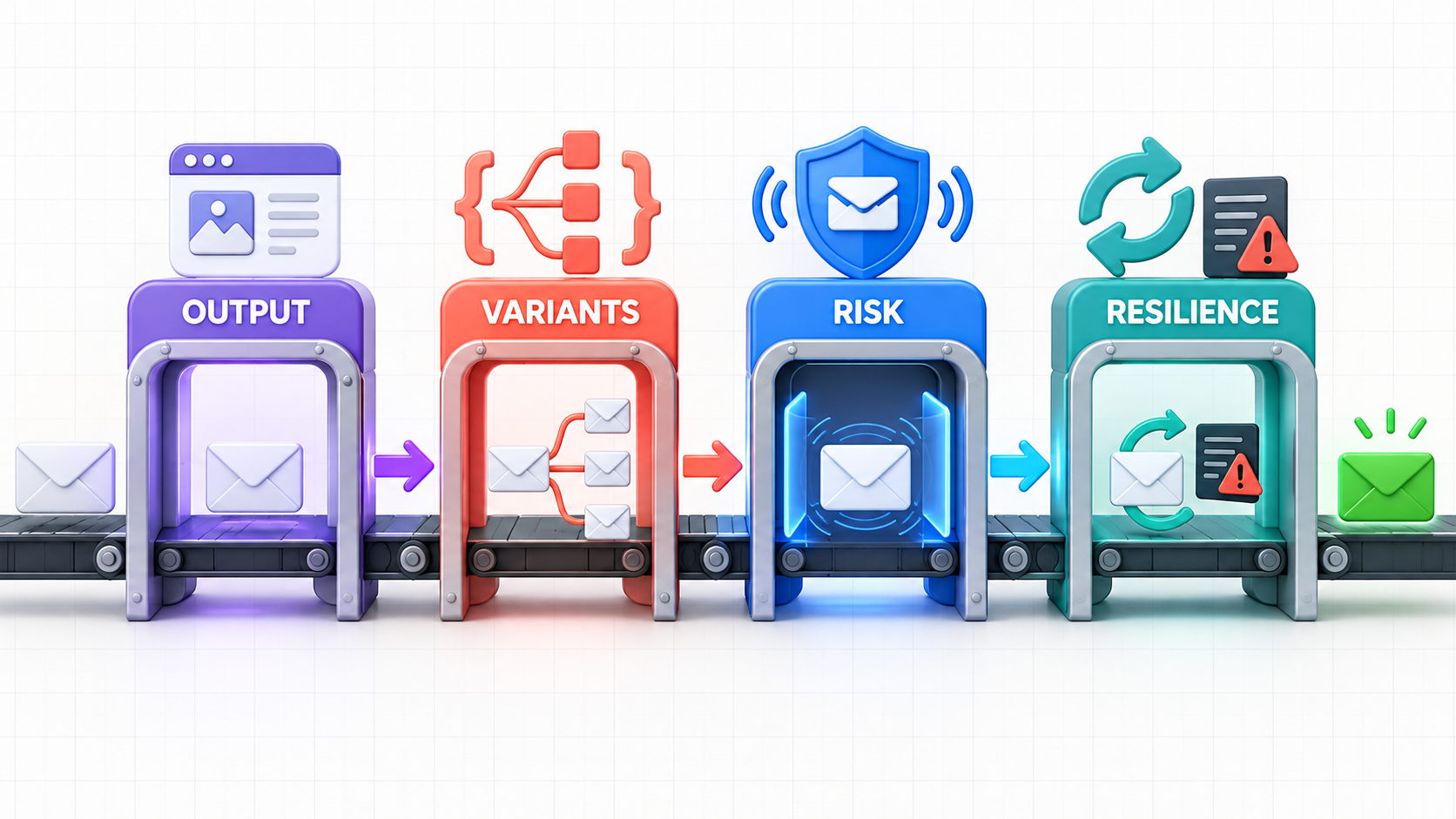
An email QA checklist should cover four release risks: rendered output, personalization, spam and delivery signals, and failure handling. Each check needs a fixture, expected result, evidence, owner, and severity, which turns a memory aid into a release gate your developers and QA engineers can repeat.
Each gate needs three small records:
- known input;
- expected result;
- saved proof and owner.
The four-layer email release gate is a practical model, not an industry standard:
- Output: Are the MIME parts, headers, links, files, and layout correct?
- Variants: Does each high-risk data branch show the right copy or fallback?
- Risk: Are sender, link, access, and spam checks safe to ship?
- Resilience: Do retries, final faults, duplicates, and logs work as planned?
Use the downloadable email QA checklist as the working reference; copy it into a release ticket, pull-request template, or validation plan. The compact block below is the same gate in a format you can link directly.
Gate | Pass when |
|---|---|
Build | Version saved; final message caught; no user contacted |
Render | Required views, images-off, dark mode, HTML, and text pass |
Data | Normal and edge fixtures pass; no raw token or test URL remains |
Risk | Sender and links pass; live sender checks run when needed |
Failure | 4xx, 5xx, delay, loss, duplicate, and bad-file tests pass |
Decision | Proof is linked; owners sign; each exception has an end date |
Pass criteria are the facts required for approval. Evidence is the saved message, log, or report. Severity means the outcome when a check fails.
This email testing checklist applies to transactional email testing and product messages tied to a release. If you need a pre-send email checklist for a one-off campaign, add audience, consent, suppression, timing, and legal checks; those controls sit outside this engineering gate.
How do you test email rendering before release?
Test email rendering from the message generated by the release build. Capture it in a controlled inbox, then inspect its MIME parts and links in the mail applications and modes your users rely on. A browser preview of source HTML helps during development, but it is not evidence that the release works.
Email rendering testing checks the final message after your app, mail adapter, and link tracker have changed it. Start with this sequence:
- Trigger the real signup, reset, invoice, or alert.
- Check that one message reaches the sandbox.
- Inspect sender, MIME, body, links, and files.
- Test link host, path, life, and target state.
- Review key apps, phone width, dark mode, and images-off.
- Save the message with the result.
Do not promise to test all mail applications; choose a short, required set from your own usage data and business risk. Account recovery may need Gmail, Outlook, Apple Mail, mobile, and dark-mode checks, while an internal alert may need only the applications used by staff. Zunoy's guide explains HTML email rendering testing.
Accessibility belongs in the render gate, so validate reading order, clear link names, color contrast, useful alt text, and the images-off state. The W3C says non-text content needs a text alternative that serves the same purpose (WCAG 2.2 guidance).
How should you test personalization and dynamic content?
Test personalization with a matrix of data conditions, not one perfect test recipient. Each merge field, conditional block, locale, role, and account state adds a branch. The release passes only when key fixtures generate the right output and invalid or missing values fall back safely.
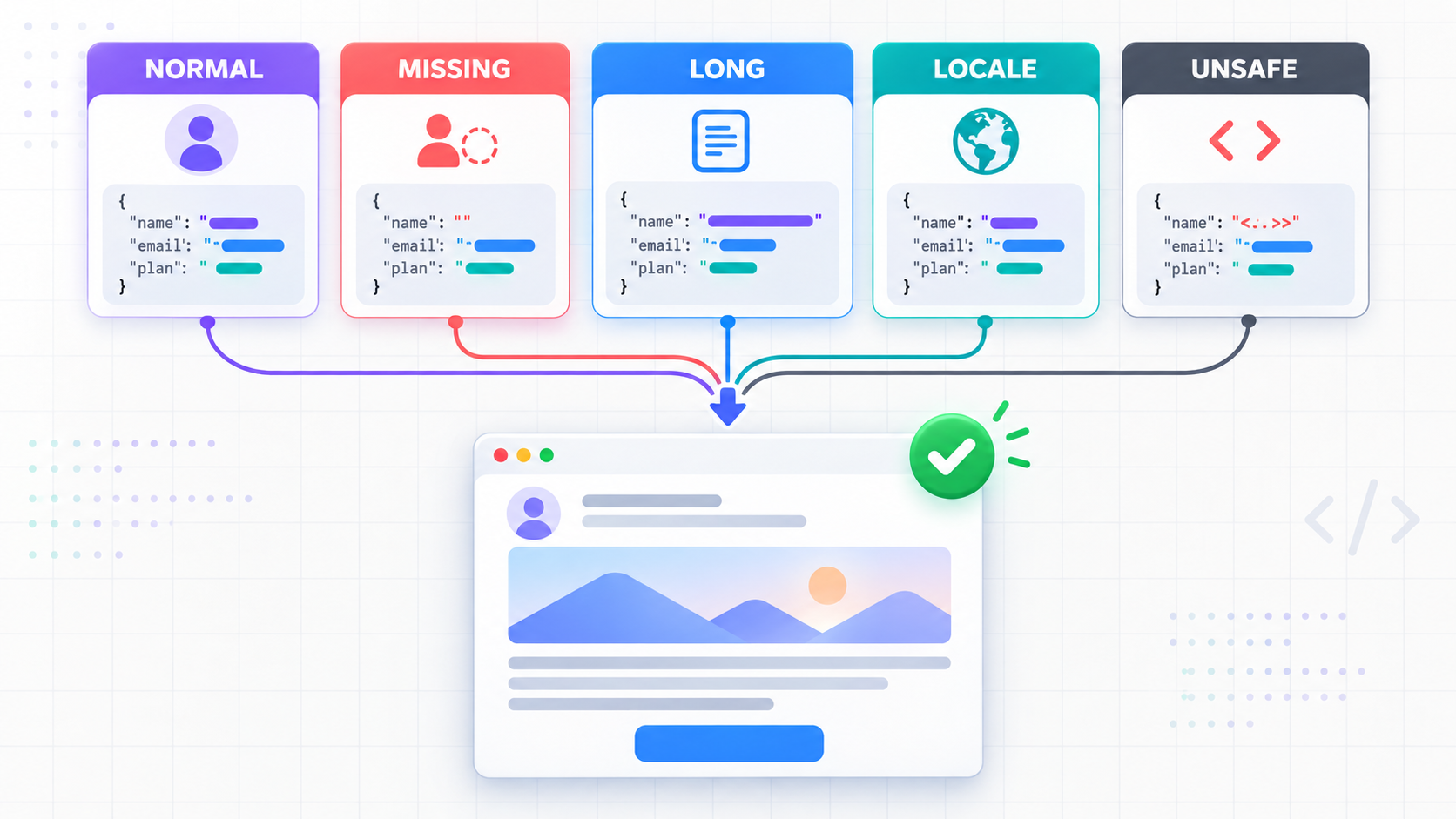
Build the matrix around risk rather than every theoretical combination:
Fixture | What it exposes | Pass criterion |
|---|---|---|
Normal complete profile | Expected happy path | Correct values and intended blocks |
Missing optional fields | Weak fallbacks | No blank greeting, raw token, or broken sentence |
Maximum-length values | Overflow and clipping | Layout holds; subject and CTA remain usable |
Unicode and encoded text | Escaping defects | Characters display; markup is not injected |
Each supported locale | Translation and formatting | Locale, dates, currency, direction, and links agree |
Each material account state | Bad conditional logic | Only the eligible content and CTA appear |
Expired or reused security link | Unsafe lifecycle behavior | Link fails clearly and does not complete the action |
Use test data that reaches the boundaries without copying real personal data. A fixture is a controlled input with a known outcome, while a fallback is the content shown when an optional value is missing. Escaping means keeping user-controlled text from turning into active or structural markup.
Email personalization testing must validate both the message and its destination page. Look for raw forms such as {{first_name}}, blank text, the wrong locale, internal hosts, and tracking wrappers that change the destination; then open the CTA and confirm that the page keeps the email's promise. For each failed fixture, save the input, message, failed assertion, and template version so the team can trace the original defect.
What should you check for spam and delivery risk?
Check spam and delivery risk in two layers. An automated scan can flag malformed message parts, dead URLs, blocked domains, or known spam patterns, while a controlled live send can evaluate authentication and sample placement. Neither result proves that every future message will reach the primary inbox.
Start in the non-delivery environment:
- verify sender, reply path, Message-ID, Date, and MIME;
- check each URL and public host;
- compare the core meaning in HTML and text;
- triage spam findings instead of chasing a perfect score;
- remove test copy, addresses, and hosts.
Then use a safe live message to check SPF, DKIM, and DMARC in the received headers; a DNS record alone does not prove that the message was signed or aligned. Google requires sender checks for mail sent to personal Gmail accounts and adds more rules for bulk senders (Gmail sender guidelines), while Yahoo has similar sender best practices.
Email spam testing gives a risk estimate from known signs. Deliverability means that the receiving server accepts the mail, while inbox placement is the folder or tab where a test message appears. Keep the three results apart because server acceptance or a high tool score does not prove inbox placement.
For a deeper four-layer workflow, use Zunoy's guide to email deliverability testing. This gate records the outcome, its limitation, and the next diagnostic step instead of calling all three concepts “deliverability passed.”
How do you test retries and email failure handling?
Test email failure handling by making the transport fail on purpose. Inject a temporary SMTP error, permanent SMTP error, timeout, lost message, duplicate, and corrupted attachment; then validate application state, retry timing, duplicate safety, user response, logs, and alerts. An exception alone does not prove resilient behavior.
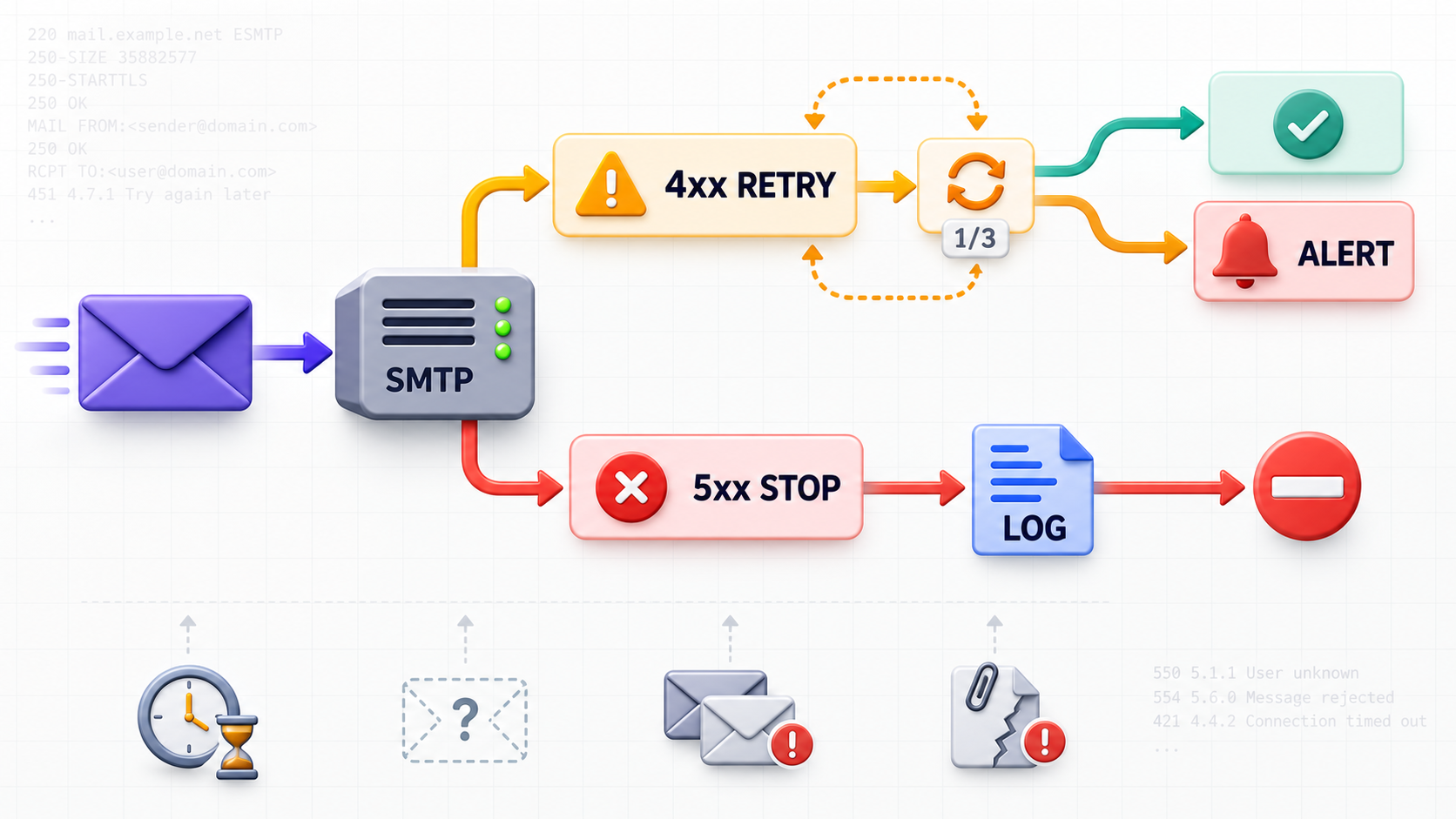
Use a small failure matrix:
- 4xx: retry with a limit; keep the correlation ID.
- 5xx: stop retries and save the final reason.
- Delay: show uncertainty and prevent duplicate actions.
- Missing: fail after a set wait, not an arbitrary sleep.
- Duplicate: keep repeat jobs from repeating an action.
- Bad file: reject, rebuild, or show the fault by contract.
SMTP uses three-digit replies: 4xx indicates a transient negative completion response, while 5xx indicates a permanent one. The protocol also warns that delivery strategies must avoid repeatedly delivering the same message (RFC 5321). Your provider and queue may expose richer codes, so store the raw response beside the normalized state.
A retry policy says which failures receive another attempt, how long the application waits, and when it stops. Idempotency means that repeated operations cause one business effect, while a correlation ID is the shared identifier that links the user event, queue job, provider attempt, and captured message.
Release evidence should answer five questions:
- Which fault did the test add?
- What did the app and user see?
- How many tries ran, and when?
- Which signal found the fault?
- Did the fix cause a duplicate effect?
How can Zunoy Sandbox support the release gate?
Zunoy Email Sandbox supports the non-delivery part of this release gate. It can capture real application output, inspect content and headers, score common HTML, link, and spam issues, and inject transport or display failures, so your team can save evidence without sending staging mail to real users.
The Zunoy Email Sandbox page lists SMTP and REST capture, isolated inboxes, HTML and plain-text inspection, raw headers, attachment previews, automated scores, and six failure types. They cover latency, SMTP 4xx/5xx responses, message loss, duplicates, corrupted attachments, and display faults.
Apply it to this checklist as follows:
- Give development, staging, and CI separate inbox keys.
- Trigger the release build with a unique fixture and ID.
- Inspect the message and run data checks.
- Add one fault and check app state.
- Repeat for each blocking fault; save the results.
- Run safe live sender and placement checks when needed.
Zunoy does not make a sandbox score equal to real inbox placement; its role is to show app behavior and faults before a release. The transactional email testing workflow is a clear start for backend developers and QA teams.
Email QA is a release control. A gate is a pass-or-fail point in the release flow, and evidence is the saved result that lets another person check the decision later. A release owner is the person who records the final call.
Run the gate first on one key flow, such as password reset. Save three things:
- the final message and fixture;
- the machine checks and human review;
- the owner, decision, and any timed exception.
Once that format is stable, add it to the release template. Automate fixed checks, but keep visual judgment and risk approval owned by people.