AppShare: The Fastest Way to Share IPA & APK
AppShare is a mobile app distribution platform that deploys development and in-house builds straight to a device, so a tester installs in seconds. Perfect for QA, client reviews, and internal testing, everything that happens before a build is ever ready for a public listing.
Free plan available
IPA & APK
CLI & CI-CD included


AI Powered
Claude X AppShare to Ship Faster
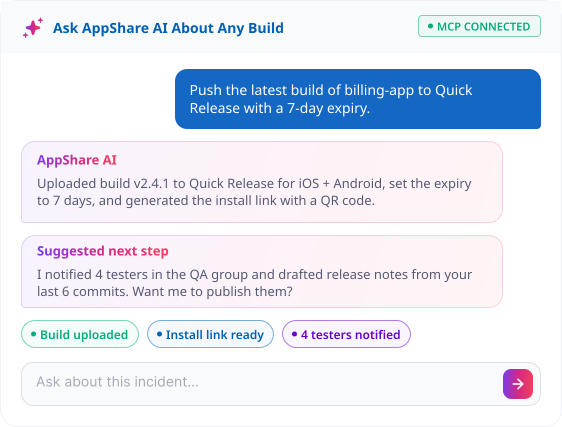
Ask Claude to push the build. AppShare MCP hands back an install link and QR code, instantly.
Before You Submit
Not Every Build Belongs in a Store Yet
Over-the-air, or OTA, distribution is a form of app distribution that means installing an app straight from a link, no store listing needed.
MID CYCLE
You are mid-QA cycle
The build changes daily. Every upload gives you a fresh link, so testers always land on the very newest version.
CLIENTS
Demoing to a client
They install straight from a link in seconds, with no Play Console invite and no store review to wait around on.
PRE-SUBMISSION
Not ready to submit yet
Run real-device beta cycles first, then submit to the App Store or Google Play once your testers have signed off.
FOR TEAMS
It's strictly internal
Some apps only ever ship to your own team, internal app distribution that never needs any public listing at all.
Workflow
From First Upload to Every Update After
- 1
Create an application and push a build.
Set the app up once, then upload via CI/CD, the CLI, or directly in the dashboard, whichever fits how your team already works day to day.
- 2
Configure release settings
Choose public or private, add an optional password, and set an expiry if the build shouldn't stay live forever. The install link and QR code generate the moment you save.
- 3
Share and install
Send the link, or hand over the QR code, and let others install the
.ipaor.apkright away, no store listing, no waiting on review. - 4
Push new builds
Reuse a
Persistent URLor generate a freshUnique URLeach time, and testers can post comments and attachments straight into that release's forum.

Fastest Path to a Build
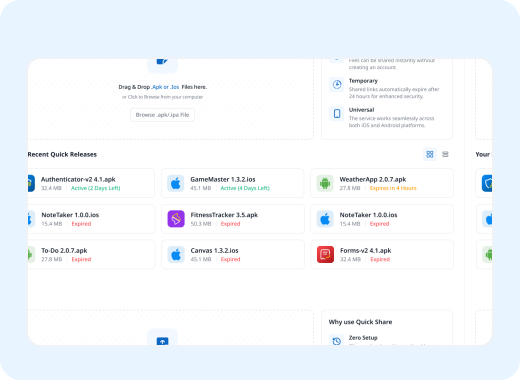
Quick Release: Skip the App Setup
Sometimes you just need fast app distribution for one build, right now, no app setup required. Drop it in, add a password or expiry if you want, and get your QR code and install link instantly.
- APK distribution or IPA distribution, no setup
Add release notes or a changelog anytime
Set link expiry and password per release
QR code and install URL, ready instantly
Straight From Your Terminal
Push a Build Without Opening the Dashboard
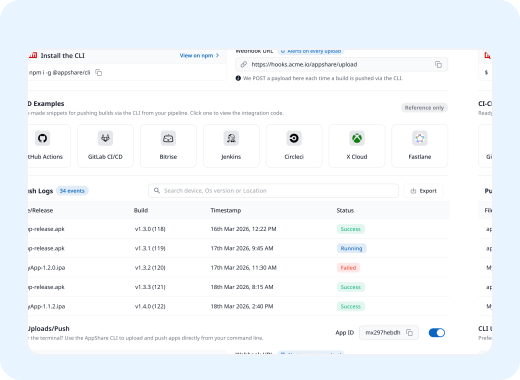
AppShare CLI lets you push builds, set release settings, and trigger releases straight from your terminal, no dashboard required. Install it with the command below, and you're ready to go.
Push builds via App ID, no dashboard
Enable or disable CLI uploads per app
Optional webhook alerts on every build
Setup instructions built right into the app
Automate Your Pipeline
Every Merge Becomes an Install Link
Wire AppShare into your existing pipeline for automated mobile app distribution and skip the manual upload step entirely. A merge or tag triggers the release on its own.
- 01
Merge or tag
Your existing branch rules, unchanged.
- 02
Pipeline builds
The .apk or .ipa comes out the other end.
- 03
AppShare step runs
One step pushes the artifact up.
- 04
Install link is live
QR code and link, sent to your channel.
Install Test Builds Without Opening a Laptop
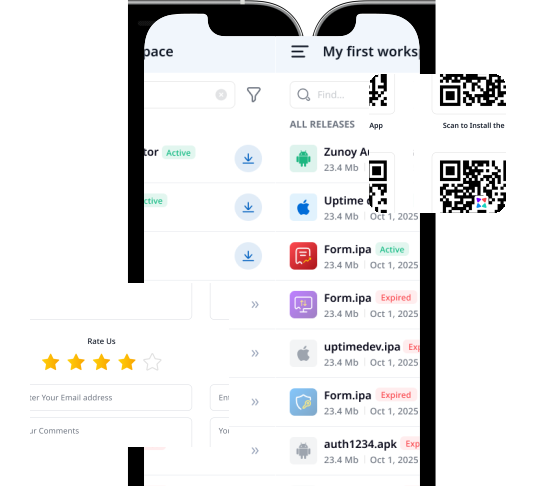
Testers shouldn't need to be at a desk to try your latest build. Browse every app you've shared with them and install straight from their phone, wherever they are.
Browse every build shared with you, all in one app
Install an .ipa or .apk directly on your device
Switch between apps and releases without a laptop
PRACTICAL AI
AI THAT CLEARS THE BUSYWORK
You still decide what ships. AI just clears the manual steps around that decision.
MCP Server
MCP Server
AI Agent
AI Agent
Ask about builds, releases, or downloads in plain language, get a direct answer.
AI Powered Editor
AI Powered Editor
Edit release notes, changelogs, and app details with AI help built in.
AI device compatability checker
AI device compatability checker
See minimum iOS version and which devices can actually run a build.
Manifest explainer
Manifest explainer
Permissions translated into plain English, so "why does this need contacts?" has an answer.
Feedback intelligence
Feedback intelligence
Tester feedback gets read for tone, flagged when it signals real frustration.
Under the Hood
Control Every Layer of a Release
Publish Page Customization
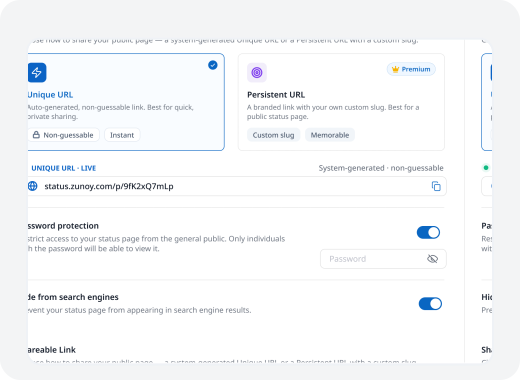
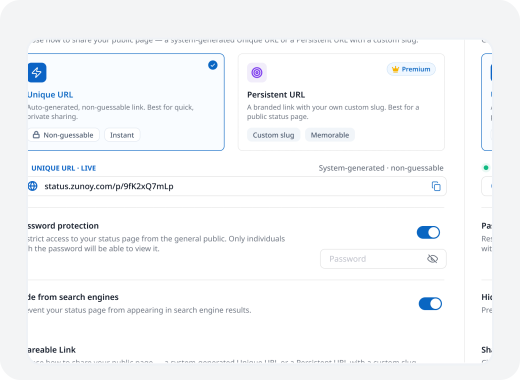
Make the install page look like it's actually yours, not a generic template. Choose the layout, add your branding, and decide exactly what testers see before they tap install. It only takes a few clicks to set up. Change it anytime, nothing is locked in.

Portrait or landscape layout for the public page

Custom logo, favicon, and color theme choice
Custom domain, with AppShare branding fully removed
Show or hide older releases on the page
Social media profile links shown on the page

Access Control
Public page, or gated behind a password
Testing credentials for reviewers who need a login
Hide any release from search engines instantly
Set a link expiry, up to 90 days total
Tester & Device Management
Invite testers individually or as a group
Send a workspace-level invite for new testers
Register iOS device UDIDs for each app
Search, filter, and tag registered devices easily
Edit or remove a device at any time
Git Connect
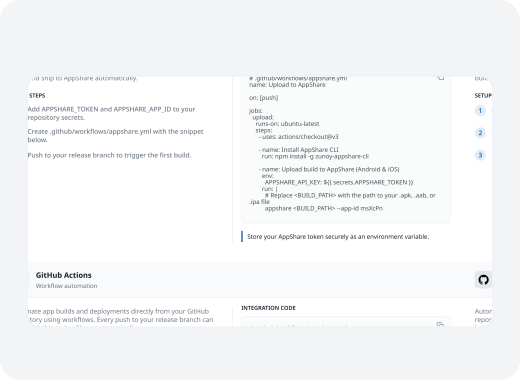
Link a GitHub or GitLab repo directly
Auto-generate a release on every push or tag
Pull commit messages into release notes fast
Choose exactly which branch triggers a release
Runs independently of CI/CD, no pipeline required
Alert Your Team on Slack, Keep Clients in the Loop by Email
A new release shouldn't require someone checking the dashboard to notice it. Connect the channel your team already lives in, and every app distribution update shows up there automatically.


SMS

Voice call

Slack

Zapier

Telegram

Webhooks

Discord

Microsoft Teams
SMS
Voice call
Slack
Zapier
Telegram
Webhooks
Discord
Microsoft Teams
SMS
Voice call
Slack
Zapier
Telegram
Webhooks
Discord
Microsoft Teams
Pricing
Plans That Scale With Your Releases
Starter
$5.83
/Month
Perfect for personal projects and small-scale use.
Growth
$11.67
/Month
Designed for ambitious users who need more power and flexibility.
Business
$24.17
/Month
Comprehensive solutions tailored for growing teams and enterprises.
FAQ
Questions About AppShare
Is AppShare free to use?
Yes. The Free plan is permanent and needs no credit card. It includes 3 active apps, 1GB storage, 50 downloads per app, and 5 Quick Releases a month.
What is Quick Release?
Quick Release lets you share a single build without setting up a full app entry first. Upload a file, set an optional expiry and password, and get a QR code and install link immediately.
Do I need the CLI to upload a build?
No. You can upload directly from the dashboard, but the CLI lets you push builds from your terminal using your App ID, which is useful for scripting or automation outside a full CI/CD setup.
How many testers can I invite?
You can invite testers to any app on every plan, including Free. Check the pricing page for the current tester limits per plan.
How do I keep a build private?
Password-protect the release, or add testing credentials so reviewers log into the app itself. You can also hide any release from search engines with one toggle.
Does AppShare include AI features?
Yes. AI can explain a build's crash logs, check device compatibility before a tester installs, translate app permissions into plain English, and flag frustration signals in tester feedback, on top of the MCP server and chat agent for managing releases directly.
How are downloads counted?
Each completed installation counts as one download. Page views on the install link don't count.
What integrations does AppShare support?
Slack, Microsoft Teams, Discord, Telegram, Email, and Webhooks for release notifications, plus a Public API for building your own workflow on top of AppShare.
What's the difference between AppShare and submitting to the App Store or Play Store?
AppShare distributes builds directly to testers, clients, or teammates via an install link, with no store review and no public listing. It's for pre-release and internal builds, not a replacement for publishing to the App Store or Google Play when you're ready for the public.
Can I push builds from my CI/CD pipeline?
Yes. AppShare integrates with GitHub Actions, GitLab CI/CD, Bitrise, Jenkins, CircleCI, Xcode Cloud, and Fastlane, and CI/CD access is included on every plan.
What's a UDID, and why does AppShare ask for it?
A UDID is a unique identifier for an iOS device. AppShare uses it to register specific devices for testing, since Apple requires known devices for certain types of ad hoc distribution.
Can I host the install page on my own domain?
Yes. The Publish Page supports a custom domain, along with your own logo, favicon, and color theme, and a toggle to remove AppShare branding entirely.
What happens to old releases when I upload a new one?
Nothing. Every version stays in your release history. You can show or hide older releases on the public page, and roll back to a prior build at any time.
What is the AppShare MCP server?
It lets an AI agent connect to your existing CLI/CI-CD setup to push a build, check release stats, or trigger a release right from a chat interface. It's useful if your team already works with AI coding or ops agents.
Is there a mobile app for testers?
Yes. AppShare has Android and iOS companion apps so testers can browse and install builds directly from their phone.
What is Git Connect?
Git Connect links a GitHub or GitLab repo directly to an app, so a push or tag can auto-generate a release without a manual upload, with commit messages pulled in as a starting point for release notes.
Get Started
Your Next Build Is One Upload Away
No app to configure, no tester list to build first. Upload a build and get a link back before you've finished your coffee.
No app setup required
Free plan available
Password and expiry optional
QR code