Connect Your Mobile App CI/CD to AppShare
Wire AppShare into the pipeline you already have, built for mobile app CI/CD, whether that's GitHub Actions or a Bitrise alternative you're already running, and skip the manual upload step entirely. A push, a merge, or a tag triggers the release on its own, and testers get the link without anyone touching the dashboard.
The Basics
CI and CD Aren't the Same Thing
Continouse Integrations (CI)
Merging code changes frequently, with an automated build and test on every change. This is the foundation of mobile app CI/CD, catching a broken build before it goes anywhere.
Runs on every push or merge
Compiles the code automatically
Confirms tests still pass
Catches a broken build early
Continuous Delivery (CD)
Picks up once CI confirms a build is good, and handles getting that build to the people who need it, instead of someone uploading it by hand.
Triggers right after CI passes
Automates the upload step
Removes manual handoff
Feeds straight into AppShare
UNDER THE HOOD
Every Integration Runs on AppShare CLI
Every mobile app CI/CD snippet on this page is really AppShare CLI, called from your pipeline instead of your terminal. That's true for github actions app distribution just as much as any other platform.
npm install -g zunoy-appshare-cli

Workflow
From Pipeline to Install Link
Four steps, added once, that turn your existing mobile CI/CD pipeline tool setup into a release process.
- 1
Build
Your existing build step runs on every push, producing the
.apkor.ipa. - 2
Integrate AppShare CLI
Add a step after it, install the CLI, then upload the file it produced. - 3
Configure the API Key
Store it in your CI provider's secrets manager, referenced, never hardcoded.
- 4
Trigger the Pipeline
Every future push runs build, then upload, automatically.
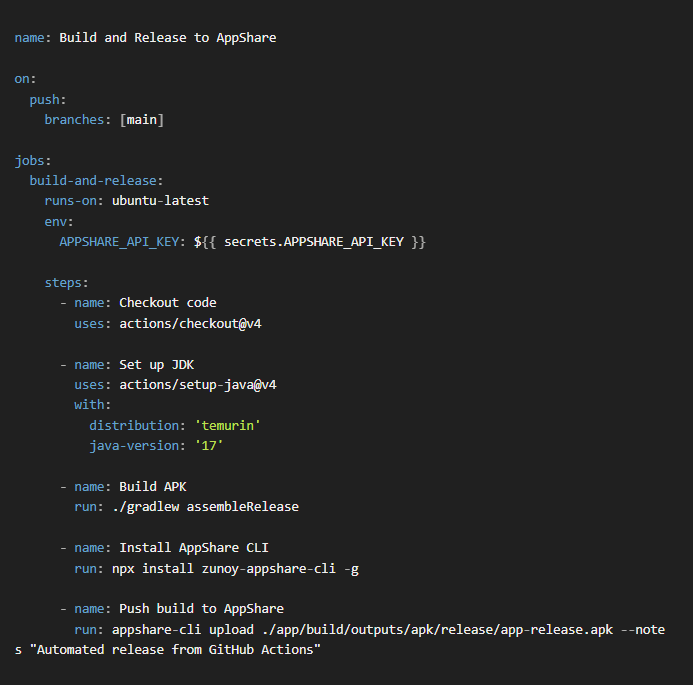
Integrations
Connect the Pipeline You Already Use
Seven platforms, from Github Actions app distribution to Fastlane, each with a ready-made step built for it.
GitHub Actions
Trigger a release directly from a workflow file, on push, pull request, or tag.
GitLab CI/CD
Add a job to your .gitlab-ci.yml that pushes a build the moment your pipeline reaches it.
Bitrise
Drop AppShare into a Bitrise workflow as a step, right alongside your existing build and test stages.
Xcode Cloud
Trigger an AppShare release from an Xcode Cloud workflow, without leaving Apple's own CI environment.
Fastlane
Add an AppShare lane to your existing Fastfile, alongside your build and signing steps.
GitHub Actions
Trigger a release directly from a workflow file, on push, pull request, or tag.
GitLab CI/CD
Add a job to your .gitlab-ci.yml that pushes a build the moment your pipeline reaches it.
Bitrise
Drop AppShare into a Bitrise workflow as a step, right alongside your existing build and test stages.
Xcode Cloud
Trigger an AppShare release from an Xcode Cloud workflow, without leaving Apple's own CI environment.
Fastlane
Add an AppShare lane to your existing Fastfile, alongside your build and signing steps.
GitHub Actions
Trigger a release directly from a workflow file, on push, pull request, or tag.
GitLab CI/CD
Add a job to your .gitlab-ci.yml that pushes a build the moment your pipeline reaches it.
Bitrise
Drop AppShare into a Bitrise workflow as a step, right alongside your existing build and test stages.
Xcode Cloud
Trigger an AppShare release from an Xcode Cloud workflow, without leaving Apple's own CI environment.
Fastlane
Add an AppShare lane to your existing Fastfile, alongside your build and signing steps.
Anything Else? Use the CLI Instead
Looking for a Bitrise alternative that still fits your existing pipeline? If your mobile app CI/CD pipeline isn't one of the platforms above, AppShare CLI runs from any shell-based CI environment, and the Public API covers custom ci cd ipa upload setups the CLI doesn't fit.
Use Cases
Who Reaches for Quick Release
- TEAMS
Engineering Managers
Standardize how the team ships, instead of one person remembering to upload after every merge.
- STARTUP
Startups Shipping Daily
Keep pace with a build that changes multiple times a day, without a manual step slowing it down.
- ENTERPRISE
Agencies Managing Clients
Run the same release step across every client project, instead of repeating it by hand for each one.
- INDUSTRY
Regulated Industries
Fintech and healthcare teams get a consistent, repeatable release process every single time, not a manual step someone could skip.
Quick Answers
Which CI/CD platforms does AppShare support
Any mobile app CI/CD setup works, from github actions app distribution to GitLab CI/CD, Bitrise, Jenkins, CircleCI, Xcode Cloud, and Fastlane.
What triggers a release once it's connected?
Whatever you configure in your pipeline, typically a push, a merge, or a tag, the same way any other pipeline step would trigger.
Can I still upload manually after setting up CI/CD?
Yes. CI/CD automates the upload step, it doesn't remove the option to upload from the dashboard or CLI when you need to.
My CI/CD tool isn't on the list, can I still connect it?
Yes, even as a Bitrise alternative or something else entirely, AppShare CLI works from any shell-based CI environment, and the Public API covers custom setups directly.
As a mobile CI/CD pipeline tool, CI/CD integration is built around full app releases. For a one-off share, Quick Release or the CLI's Quick Release support is the faster path.
As a fastlane alternative or alongside it, AppShare integrates with GitHub Actions, GitLab CI/CD, Bitrise, Jenkins, CircleCI, Xcode Cloud, and Fastlane.
GET STARTED
Let Your Pipeline Ship the Build
Pick your mobile CI/CD pipeline tool, copy the snippet, and every future release ships itself from there.
Free plan available
No manual upload after setup
Seven platforms supported