Push a Build Without Leaving Xcode
Add one script to your repo, and Xcode Cloud pushes a build to AppShare the moment it finishes archiving, no separate CI tool, no YAML file.
What You Get
Three Reasons Teams Automate This Step

Nothing Leaves Apple's Ecosystem
Builds, signing, and now distribution all happen inside tools Apple already built for this.
No Config File to Maintain
Skip YAML entirely, the automation lives in one script, not a pipeline definition file.
Runs on Apple's Own Infrastructure
No runner to provision or maintain, Xcode Cloud handles the macOS environment itself.
SETUP
One Script, One Secret
Automatically upload iOS builds to AppShare after archiving in Xcode Cloud.
Create the post-archive script
Add ci_scripts/ci_post_xcodebuild.sh in your repository root.
Make it executable
Run chmod +x ci_scripts/ci_post_xcodebuild.sh.
Add your Secret in Xcode Cloud
In Xcode Report Navigator → Cloud, edit workflow Environment and add APPSHARE_TOKEN.
Commit and push
Your next Xcode Cloud build runs the script automatically.
Create the post-archive script
In your repository root, create a ci_scripts folder and save your script as ci_post_xcodebuild.sh.
ci_scripts/ci_post_xcodebuild.sh
#!/bin/sh

# Xcode Cloud executes this automatically after the archive step
npm install -g zunoy-appshare-cli
export APPSHARE_API_KEY=$APPSHARE_TOKEN

if [ "$CI_XCODEBUILD_ACTION" = "archive" ]; then
  # CI_ARCHIVE_PATH points to the .xcarchive produced by Xcode Cloud
  appshare upload "$CI_ARCHIVE_PATH" --app-id my-app-slug
fiLIFECYCLE
What Actually Happens on a Build
- 01
Build Starts
A branch change or manual start triggers the workflow you've configured.
- 02
Xcode Archives the App
Xcode Cloud builds and signs the app the same way it always has, producing the real archive.
- 03
The Post-Build Script Runs
ci_post_xcodebuild.shruns automatically, even if the build itself failed. - 04
AppShare CLI Installs
The script installs AppShare CLI fresh, as its very first command.
- 05
Build Gets Pushed
The CLI reads the secret environment variable and uploads the archived build.
- 06
Install Link Goes Out
AppShare generates the install link and QR code, and any connected integration notifies your team.
UNDER THE HOOD
Xcode Cloud Just Runs the Script
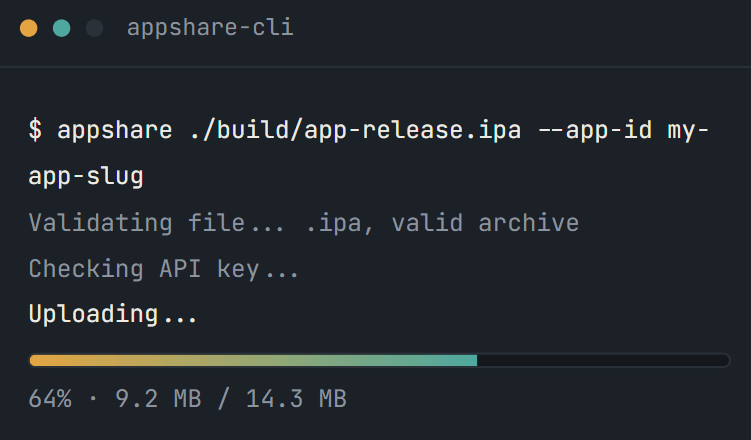
That post-build script is just AppShare CLI, running after Apple's own build step finishes.
Other Platforms
AppShare Works With Your Pipeline Too
FAQ
Questions About the Xcode Cloud Integration
Where does the AppShare script go?
In a ci_scripts folder at your repo root, saved as ci_post_xcodebuild.sh.
How do I keep my API key out of the script?
Add it as a Secret environment variable in your workflow's Environment section, in Xcode's Report Navigator.
What triggers the build?
Whatever you've set as the branch change condition on your workflow, the same as any other Xcode Cloud trigger.
Can I add release notes automatically?
Yes, using the -m flag on the upload command, either a static string or a value pulled from a Xcode Cloud-provided environment variable.
What happens if the script fails?
The build shows as failed in Xcode's Report Navigator, with the script's output visible in the log.
Why that specific filename?
Xcode Cloud runs scripts by exact filename, ci_post_xcodebuild.sh is the one that runs after the build completes, even if it fails.
Do I need a config file like other CI tools use?
No. Xcode Cloud workflows are configured through Xcode or App Store Connect directly, not a file in your repo.
Does the script need special permissions?
Yes, it must be executable. Run chmod +x on it before committing, or Xcode Cloud won't run it.
Does this work for both Android and iOS builds?
Xcode Cloud only builds Apple platforms, so this integration is iOS-only by nature, not a limitation of AppShare itself.
Is Xcode Cloud integration included on the Free plan?
It's part of CI/CD access across the board, no extra tier required to use it.
Get Started
Add the Script to Your Next Archive
Drop the script in, add your key, and your next Xcode Cloud build ships itself.
No YAML file needed
Runs on Apple's own infrastructure
No config to maintain