One Build, Shared in Seconds
Upload a build and it's ready to share in seconds, no app to configure, no store to wait on. This is how you share ios app without app store review, in real time. Quick Release turns a raw .apk or. ipa into an install link and QR code the moment the upload finishes, whether you want to share apk instantly or share ipa instantly.
What's Included
What Every Share Comes With

Password Protection
Lock a release behind a password so only the people you've actually shared it with can install it.

Link Expiry
Set how long the install link stays active, so a build you're done sharing doesn't quietly stay live.

Download Analytics
See install location, device, and timestamp logged automatically for every download.

Tester Feedback
Testers post comments and attachments straight into that release's own forum thread.

Workflow
Upload to Link, in Three Steps
Upload
Drag in your APK or IPA, upto 2GB, straight from your desktop
Release settings
Set an expiry date, add a password if needed, and drop in release notes.
Share
Copy the install link, or hand over the QR code, ready the moment it's created.
AI
Just Ask Your AI Agent
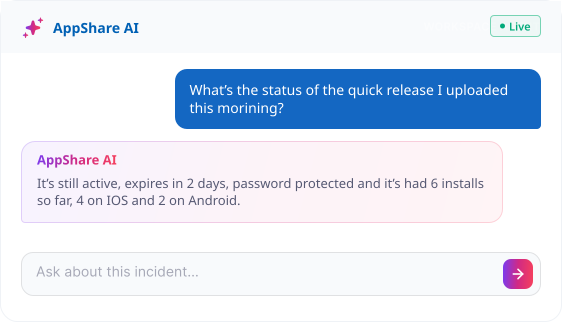
Instead of opening the app to check a release's status, ask the AI agent directly. This is part of how AppShare lets you share ios app without app store friction, all through a simple chat. It's connected to the same data the dashboard shows, expiry, password status, and download activity.
FAQ
Questions About Quick Release
Do I need to create an app before using Quick Release?
No. Quick Release uploads and shares a single build without an app record, tester group, or publish page.
Can I password-protect a Quick Release?
Yes. Add a password when you upload, so only people you've shared it with can install the build.
Can I invite testers to a Quick Release?
Yes. Testers aren't exclusive to a full app, you can still invite them to a Quick Release, they're just not required to set one up first.
Can I see who downloaded a Quick Release?
Yes. Every download is logged with install location, device, and timestamp.
Should I use Quick Release or set up a full app?
Quick Release is for a one-off share, right now. A full app is for anything you'll keep releasing to over time, since it comes with a persistent link and the option to build out a tester group around it.
Can I push a Quick Release from the CLI?
Yes. The same CLI used for full releases works for a one-off share, using your App ID.
Does a Quick Release link expire?
You can set an expiry date so the install link stops working after a set period. It's optional, not required.
Can testers leave feedback on a Quick Release?
Yes, through the release forum, where testers and your team can post comments and attachments tied to that specific build.
Can I ask the AI agent about a release instead of checking the dashboard?
Yes. Ask about expiry, password status, or download activity, and the AI agent answers directly from the same data the dashboard shows.
Get Started
Coffee's Still Hot, Build's Already Shared
No app to configure, no tester list to build first. Upload a build and get a link back before you've finished your coffee.
No app setup required
Password and expiry optional
QR code included
One-time link and done