From First APK & IPA Upload to Every Feature After
Every one of AppShare's app distribution features lives in one workspace, from the first upload to the install link a tester actually taps, complete with qr code app install, nothing bolted on, nothing to unlock separately.
Free to Start
No Credit Card Required
APK & IPA Builds
CLI & CI-CD distro

What You Get
Everything a Release Actually Needs
Create an application
Manage every app your team ships, up to 50+ active apps, all from one app distribution dashboard.
2GB
Upload builds up to 2GB, and keep up to 100GB of release history on hand.
Release History
Every version you've uploaded stays available, so you can point testers back to an older build if the newest one causes a problem.
Download-level tracking
See install location, device, and timestamp for every download, not just a running total.
App Read Me
Write one readme for the app itself, the same way you would for a GitHub repo. What changed release to release still lives in the changelog.
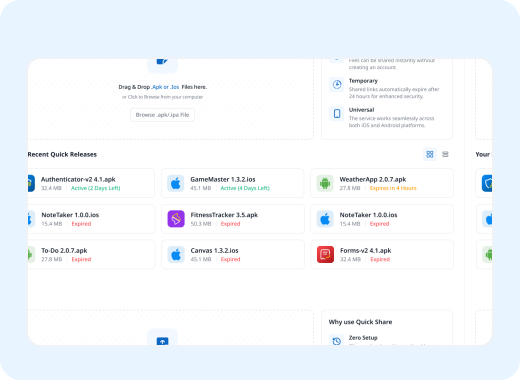
FAST PATH
Ship Your App in Seconds
Share a single build without creating a full app first, an expiry or password if you need one, and a way to install app via link immediately.
No app configuration needed first
Optional expiry and password protection
QR code install, ready instantly.
PAGE SETTINGS
Public or Private, Your Call
Every install page can go either way, this is standard ota app installation. Pick whichever fits the build.
Public Install
Anyone with the link can install
Good for open betas and quick demos
Appears in search unless you hide it
Private Install
Locked behind a single password
Store login info testers need in-app
Never appears in search results
Testers
Know Exactly Who's Testing
Managing testers isn't just an invite list, it's knowing who actually has access to a build.
Invite testers individually or as a group, per app
Send a workspace-level invite for new testers
Remove a tester's access at any time

UDID LIST
One Library For Every iOS Device
A shared list where testers add their own UDID, and developers use it to build for that device.

Automation
Push Builds Without Leaving Your Pipeline
These automation app distribution features aren't a paid add-on, they're included on every plan from day one.
AppShare CLI
Enable or disable CLI uploads per app
Push builds from your terminal directly
Get a webhook alert when one lands
- AppShare CLI
CI/CD Integration
Every merge or tag triggers a release
No manual upload once it's wired in
7 different CI/CD platforms
- CI/CD setup
Git Connect
Link a GitHub or GitLab repo directly
Auto-generate a release on every push
Commit messages become logs
- Connect a repo
The Honest Comparison
How AppShare Stacks Up Against the Alternatives
See exactly how AppShare's app distribution features stack up, feature by feature, against the tools you might already be using.
vs Diawi
Persistent links for ota app installation, no manual re-upload per share.
vs Testflight
One workflow for cross platform app distribution, both iOS and Android.
vs TestApp
CI/CD-native from the ground up.
vs Loadly
Simple onboarding, with real pipeline depth underneath.
vs AppsOnAir
Plain-named features, no sub-brand sprawl.
FAQ
Questions About AppShare's Features
What's included on every AppShare plan, even Free?
CLI access, CI/CD integration, unlimited releases, tester management, and the feedback forum all come standard, they aren't locked behind a paid tier.
Can I remove AppShare branding from the install page?
Yes. The Publish Page supports a custom domain, your own logo and color theme, and a toggle to remove AppShare branding entirely.
Do I need a full app set up to share one build?
No. Quick Release lets you upload and share a single build without creating a full app entry first.
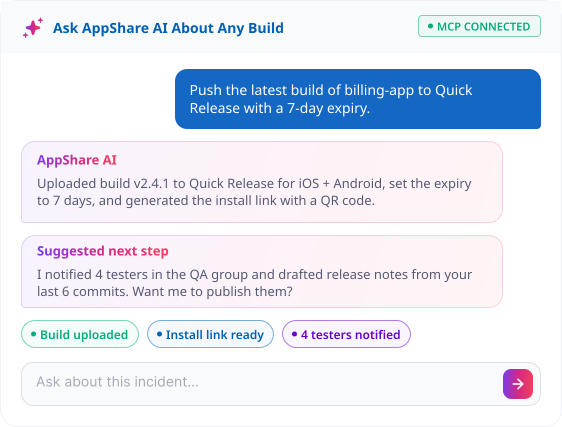
What is the AppShare MCP server?
It connects an AI agent to your CLI/CI-CD setup, so you can push a build, check release stats, or trigger a release directly from a chat interface, no dashboard needed.
Can I keep an install page private?
Yes. Lock it behind a password, add testing credentials for reviewers, and it stays out of search results too.
Can testers see older releases on the install page?
Yes, if you choose to show them. Older releases can be shown or hidden on the public page with one toggle.
What's the difference between a Unique URL and a Persistent URL?
A Unique URL is generated automatically for each release and can't be customized. A Persistent URL uses a custom slug and stays the same across future releases.
What is the UDID Manager for?
A UDID is the unique identifier tied to one iOS device. The UDID Manager stores each device's UDID and model, and AppShare checks that list before letting an ad hoc iOS build install.
Can I trigger a release automatically from Git?
Yes. Git Connect links a GitHub or GitLab repo to an app, so a push or tag can generate a release automatically, with commit messages pulled into the release notes.
Is there a Public API?
Yes. The Public API lets you build your own workflow on top of AppShare, beyond what the dashboard and CLI cover directly.
Can I see who downloaded a build?
Yes. Every download is logged with install location, device, and timestamp, not just a running total.
Do I need CI/CD set up to use the CLI?
No. The CLI works on its own, you can push a build from your terminal without a full CI/CD pipeline in place.
Get Started
Every Feature. One Workspace.
Stop stitching together separate tools. Every one of these app distribution features lives in the same place.
Up to 50+ apps per workspace
100GB of release history
Set up in under a minute