Ship a Build Straight From ChatGPT
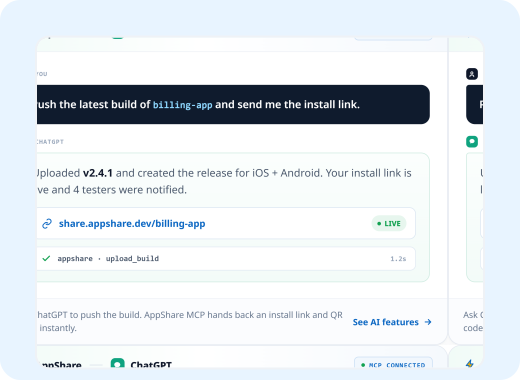
Tell ChatGPT to push a build, check who's downloaded it, or spin up a Quick Release, and it happens right there in the conversation. No dashboard tab, no context switch.
Three Ways In
Pick However You Already Work

MCP, Developer Mode
Connect the AppShare MCP server in ChatGPT's Developer Mode, and push builds or check stats, right in chat.

Custom GPT Actions
Add AppShare's Actions schema to a Custom GPT, and let it call the API as part of a larger workflow.

Codex CLI
Run AppShare CLI from Codex as a shell command, so build and share become one instruction.
From Instruction to Install Link
Connect
Turn on Developer Mode and add the AppShare MCP server with Action Schema
Ask
Tell ChatGPT what you want, a build pushed, stats checked, an expiry set.
ChatGPT Acts
It calls the right tool, and approves any write action you've confirmed.
Release Created
The install link, QR code, or release info comes straight back into the conversation.
Do It Right
An Action Schema Built for AppShare
Not a blank Custom GPT, a ready-made Actions schema: the OpenAPI definition ChatGPT reads before calling anything, so it knows AppShare's actual endpoints instead of guessing.
Ask ChatGPT to create an action schema suited to your workspace or app's requirements
You are an assistant with access to AppShare, a
mobile app distribution platform from Zunoy.

When asked to share a build:

1. Confirm the file path before uploading
2. Ask whether this is a Quick Release (no app-id)
  or attached to an existing app
3. Default to a 7-day link expiry unless told
  otherwise

When asked about a release:

1. Report install count, expiry, and status plainly
2. Never guess a number, check it first

When something fails:

1. Explain the actual error
2. Don't retry silently, ask before trying again
The Case
Less Tab-Switching, More Shipping

Ask instead of click
How many installs did the last release get, beats opening the dashboard to check.

Build & ship at once
Codex compiles the app and pushes it directly to AppShare in a single step
Explain in your language
If you can explain the instructions in your own language, ChatGPT can get it done without the CLI load.
Fits into any pending work
A Codex session that builds your app can now also finish the job by sharing it.
Not Just Claude
Works with More than Just One LLM
MCP is an open protocol, and AppShare's Public API doesn't play favorites. Whether your team runs on Claude, Gemini, or Kimi K3, the same MCP server and API are ready to plug into. This page just happens to focus on ChatGPT.

Gemini
Connect through the same MCP server, or call the Public API directly instead.

Claude
Connects through the same MCP server, or Claude Code and the CLI directly

Kimi AI
MCP-compatible LLM, so it can be used for similar purpose if your team works with Kimi
FAQ
Got Questions?
Do I need Developer Mode, or can I just use a Custom GPT?
Either works. Developer Mode is the more direct route via MCP, Custom GPT Actions are the better fit if you're already building a GPT around other tools.
Is Developer Mode available on my plan?
It's currently in beta, on the web, for Plus, Pro, Business, Enterprise, and Education plans.
Will ChatGPT push a build without asking me first?
No. Write actions, including uploads, need your explicit approval on each call, that's a ChatGPT-wide confirmation flow, not something AppShare can skip.
What is the Action Schema, exactly?
An OpenAPI definition that teaches ChatGPT AppShare's actual endpoints and parameters, so results stay consistent instead of depending on how well you explained it that session.
Get Started
ChatGPT will Push Your Next App to Live
Connect the MCP server, download the Action Schema, or just ask Codex to build and ship, use the best suitable approach for your work.
Three ways to connect
Custom Action Schema
Works for both chat & CLI