From GitHub Actions to Install Link
Add AppShare as a step in your GitHub Actions workflow, and every push, merge, or tag becomes a release, no manual upload once it's wired in.
What You Get
Three Reasons Teams Automate This Step

No One Forgets to Upload
The release happens as part of the pipeline, not as a task someone has to remember after it.
Testers Are Always Current
Every merge to main ends up installable within minutes, so testers are never behind on the latest build.
One Workflow File
Set it up once in your repo, and it applies to every push after, no repeated manual work.
SETUP
Add AppShare to Your GitHub Actions
Automate mobile app distribution directly from your GitHub repository workflows.
Create the workflow file
Add a new workflow file under .github/workflows/appshare.yml.
Add your API key as a secret
In Settings → Secrets and variables → Actions, add APPSHARE_TOKEN.
Paste the workflow job
Add the upload step after your build artifacts are ready.
Commit & Push
Push your changes to trigger your first automated release.
Create the workflow file
Create .github/workflows/appshare.yml in your repository.
.github/workflows/appshare.yml
name: Upload to AppShare

on:
  push:
    branches: [ main ]
    tags: [ 'v*' ]
workflow_dispatch:LIFECYCLE
What Actually Happens on a Push
UNDER THE HOOD
GitHub Actions Just Calls the CLI
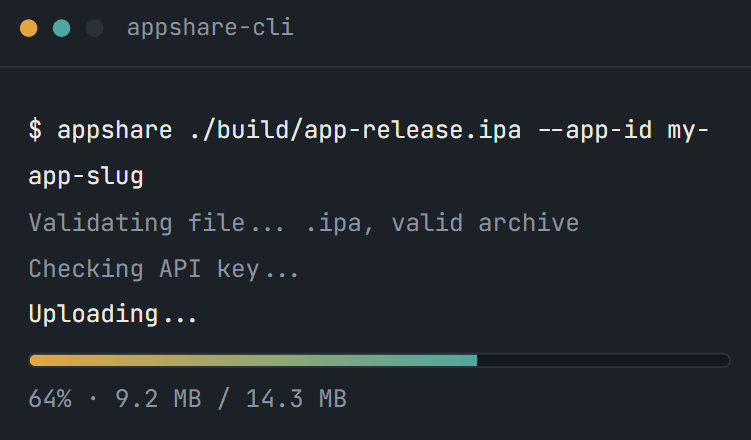
Every line in that workflow is AppShare CLI, the same tool you'd run from your own terminal, just triggered by GitHub instead of you.
Other Platforms
AppShare Works With Your Pipeline Too
FAQ
Questions About the GitHub Actions Integration
Where do I put the AppShare workflow file?
In .github/workflows/, as a .yml file, the same place any other GitHub Actions workflow lives.
What triggers the release?
Whatever event you set in the on: block, a push to main is the most common, but pull requests or tags work too.
Can I add release notes automatically?
Yes, using the --notes flag on the upload command, either a static string or a value pulled from your commit message.
What happens if the upload step fails?
The workflow run shows as failed in GitHub Actions, the same as any other failed step, so you'll see it in your Actions tab.
Is GitHub Actions included on the Free plan?
Yes. CI/CD integration is included on every AppShare plan, it isn't a paid add-on.
How do I keep my API key out of the workflow file?
Store it as a repository secret in Settings, then reference it as ${{ secrets.APPSHARE_API_KEY }} in the workflow.
Do I need to install anything on the runner beforehand?
No. The workflow installs AppShare CLI itself as one of its steps, using the same npx install zunoy-appshare-cli -g command.
Does this work for both Android and iOS builds?
Yes. The upload step works the same way regardless of whether you're pushing an .apk or an .ipa.
Can I trigger a release on a tag instead of every push?
Yes, change the on: block to trigger on push: tags: instead of branches:.
Can I still push manually after setting this up?
Yes. The workflow automates the step, it doesn't remove your ability to upload from the dashboard or CLI directly.
Get Started
Add It to Your Next Push
Paste the workflow, add your API key, and the next merge to main ships itself.
Free plan available
Works with any repo
No manual upload after setup