Mind Mapping Software for Teams That Think Better Together
Bring every idea, discussion, and decision into one centralised workspace. Zunoy Canvas is the ultimate mind mapping software built for hybrid teams to brainstorm visually, organise complex projects, and achieve team alignment faster with powerful ai mind mapping.AI assistance, live collaboration, templates, voting, comments, and visual planning tools keep everyone working from the same source of truth.

Free forever
Real-time collaboration
AI-powered planning
No credit card required
INTRODUCING ZUNOY CANVAS
What Is Zunoy Canvas?
An AI-powered collaborative infinite whiteboard built for teams that solve problems visually.
HOW MODERN TEAMS COLLABORATE
Six Ways Teams Use Zunoy Canvas Every Day
From product planning to retrospectives — see how teams put Zunoy Canvas to work every day.

The Product Planning Workshop
Product managers gather ideas from engineering, design, customer success, and leadership on one shared board. Related concepts become connected branches while AI Board Assistant suggests missing considerations before roadmap planning begins.
The Marketing Campaign Kickoff
Instead of a project manager typing into a Google Doc while others drop links into Slack, marketing teams map campaign objectives, audiences, messaging, and channels on an infinite canvas. Everyone contributes to online mind mapping simultaneously, voting identifies the strongest concepts, and the team leaves with immediate team alignment.
The Remote Brainstorming Session
Distributed teams join the same board regardless of location. Live cursors, comments, and visual collaboration recreate the experience of working together in one meeting room.
The Strategic Planning Meeting
Leadership teams organize annual goals into connected themes, priorities, initiatives, risks, and dependencies. Instead of reviewing lengthy documents, everyone understands the strategy visually.
The Customer Research Workshop
Researchers organize interview findings into themes using visual clusters. Patterns emerge naturally as insights connect across different customer conversations.
The Retrospective Session
After completing a project, the team captures successes, challenges, lessons learned, and improvement ideas. AI generates a structured summary that becomes the foundation for the next project.
THE PROBLEM
Why Team Brainstorming Becomes Disorganized So Quickly
Most teams do not struggle with generating ideas; they struggle with organising them. Ideas are shared in meetings, written in standalone documents, discussed in chat apps, and eventually forgotten inside slides. Traditional mind mapping software often solves only part of this problem — it creates diagrams but lacks the infrastructure for live remote collaboration, structured discussion, prioritisation, or AI-assisted project planning.The result is predictable: brainstorming workshops end without clear action items, decisions require additional meetings, and documentation goes stale almost immediately. You need a dedicated visual collaboration tool to bridge the gap between ideation and execution.
BUILT FOR COLLABORATIVE THINKING
Everything Your Team Needs to Brainstorm, Organize, and Make Better Decisions
Zunoy Canvas equips your team with the exact tools needed for effective knowledge sharing. Use sticky notes to capture rapid thoughts, structure them instantly with intuitive online mind mapping branches, and dive deeper using Mermaid diagrams for technical workflows. With AI collaboration built directly into the board, you can generate new ideas and summarise dense maps without ever switching tabs or losing the creative flow.

Sticky Notes
Quickly capture ideas, questions, feedback, and action items. Color-code notes to organize themes and categories as your mind map grows.

Mind Maps
Create structured visual hierarchies that connect related ideas, helping teams understand complex relationships at a glance.
Drawing Tools
Sketch concepts, annotate diagrams, and illustrate ideas whenever words aren't enough.

Infinite Canvas
Never worry about running out of space. Expand your workspace naturally as projects become more detailed.
Sticky Notes
Quickly capture ideas, questions, feedback, and action items. Color-code notes to organize themes and categories as your mind map grows.
Mind Maps
Create structured visual hierarchies that connect related ideas, helping teams understand complex relationships at a glance.
Drawing Tools
Sketch concepts, annotate diagrams, and illustrate ideas whenever words aren't enough.
Infinite Canvas
Never worry about running out of space. Expand your workspace naturally as projects become more detailed.
Sticky Notes
Quickly capture ideas, questions, feedback, and action items. Color-code notes to organize themes and categories as your mind map grows.
Mind Maps
Create structured visual hierarchies that connect related ideas, helping teams understand complex relationships at a glance.
Drawing Tools
Sketch concepts, annotate diagrams, and illustrate ideas whenever words aren't enough.
Infinite Canvas
Never worry about running out of space. Expand your workspace naturally as projects become more detailed.
AI Board Assistant
Generate additional ideas, suggest related topics, identify missing branches, and overcome creative blocks during brainstorming sessions.
One-Page AI Board Summary
Turn lengthy brainstorming workshops into structured summaries with decisions, action items, priorities, and next steps.
Smart Organization
AI helps organize discussions into logical groups, making large brainstorming sessions easier to navigate and review.

Real-Time Collaboration
Everyone edits the board simultaneously with live cursor tracking and instant updates.
AI Board Assistant
Generate additional ideas, suggest related topics, identify missing branches, and overcome creative blocks during brainstorming sessions.
One-Page AI Board Summary
Turn lengthy brainstorming workshops into structured summaries with decisions, action items, priorities, and next steps.
Smart Organization
AI helps organize discussions into logical groups, making large brainstorming sessions easier to navigate and review.
Real-Time Collaboration
Everyone edits the board simultaneously with live cursor tracking and instant updates.
AI Board Assistant
Generate additional ideas, suggest related topics, identify missing branches, and overcome creative blocks during brainstorming sessions.
One-Page AI Board Summary
Turn lengthy brainstorming workshops into structured summaries with decisions, action items, priorities, and next steps.
Smart Organization
AI helps organize discussions into logical groups, making large brainstorming sessions easier to navigate and review.
Real-Time Collaboration
Everyone edits the board simultaneously with live cursor tracking and instant updates.
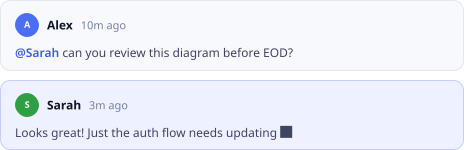
Comments
Leave contextual feedback directly on ideas instead of switching to emails or chat applications.

Frames
Divide large workshops into clearly organized sections for different teams, topics, or discussion stages.

Guest Access
Invite external stakeholders, clients, or workshop participants without creating unnecessary barriers to collaboration.
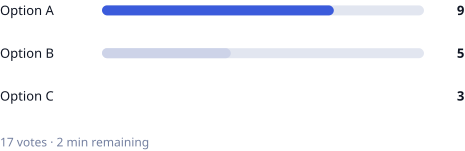
Voting
Allow participants to vote on ideas, priorities, or solutions directly on the board.
Comments
Leave contextual feedback directly on ideas instead of switching to emails or chat applications.
Frames
Divide large workshops into clearly organized sections for different teams, topics, or discussion stages.
Guest Access
Invite external stakeholders, clients, or workshop participants without creating unnecessary barriers to collaboration.
Voting
Allow participants to vote on ideas, priorities, or solutions directly on the board.
Comments
Leave contextual feedback directly on ideas instead of switching to emails or chat applications.
Frames
Divide large workshops into clearly organized sections for different teams, topics, or discussion stages.
Guest Access
Invite external stakeholders, clients, or workshop participants without creating unnecessary barriers to collaboration.
Voting
Allow participants to vote on ideas, priorities, or solutions directly on the board.

Templates
Start faster with ready-made brainstorming, workshop, retrospective, planning, and strategy templates.

Version History
Review previous iterations of your team's work and restore earlier versions when needed. (Pro Plan)

Mermaid Diagrams
Convert text into flowcharts, architecture diagrams, sequence diagrams, and other technical visuals.
Export Options
Export boards as PDF or PNG to share with leadership, stakeholders, or customers.
Templates
Start faster with ready-made brainstorming, workshop, retrospective, planning, and strategy templates.
Version History
Review previous iterations of your team's work and restore earlier versions when needed. (Pro Plan)
Mermaid Diagrams
Convert text into flowcharts, architecture diagrams, sequence diagrams, and other technical visuals.
Export Options
Export boards as PDF or PNG to share with leadership, stakeholders, or customers.
Templates
Start faster with ready-made brainstorming, workshop, retrospective, planning, and strategy templates.
Version History
Review previous iterations of your team's work and restore earlier versions when needed. (Pro Plan)
Mermaid Diagrams
Convert text into flowcharts, architecture diagrams, sequence diagrams, and other technical visuals.
Export Options
Export boards as PDF or PNG to share with leadership, stakeholders, or customers.
Flexible Workspace
Combine mind maps, diagrams, sticky notes, project plans, and documentation on one collaborative canvas instead of managing multiple files.
Flexible Workspace
Combine mind maps, diagrams, sticky notes, project plans, and documentation on one collaborative canvas instead of managing multiple files.
Flexible Workspace
Combine mind maps, diagrams, sticky notes, project plans, and documentation on one collaborative canvas instead of managing multiple files.
HONEST COMPARISON
Zunoy Canvas vs Traditional Mind Mapping Tools
Accurate as of mid-2026. Compare features that impact true team collaboration.
| FEATURE | Zunoy Canvas | XMind | MindMeister | Miro | Lucidchart |
|---|---|---|---|---|---|
AI-assisted brainstorming |  | Limited | Limited | Limited |  |
Infinite whiteboard | | | | | Limited |
Collaborative mind mapping | | Limited | | | Limited |
Sticky notes | | | Limited | | |
Comments | | Limited | | | |
Voting | | | | | |
Mermaid diagrams | | | | | |
AI board summaries | | | | Limited | |
Templates | | | | | |
Product planning beyond mind maps | | | | | Limited |
Start Free. Scale as Your Team Grows.
Free plan: 3 boards, 5 editors, 10 viewers, AI collaboration, sticky notes, mind maps, templates, comments, voting, Mermaid diagrams, export — no credit card required.
Traditional mind mapping software is excellent for creating individual, structured diagrams. Zunoy Canvas extends that experience by acting as a comprehensive visual collaboration tool, combining whiteboarding, artificial intelligence, and prioritisation into one workspace.→ Explore Canvas Features
EXPLORE MORE
More Ways Teams Use Zunoy Canvas
Product Roadmap Planning
Turn brainstorming sessions into visual product strategies.
Brainstorming Sessions
Capture ideas collaboratively and organize them with AI.

Software Architecture Mapping
Connect technical ideas using diagrams and collaborative planning.
Website Wireframe Planning
Structure websites visually before moving into design.

UX Journey Mapping
Visualize customer experiences and identify improvement opportunities.
REAL QUESTIONS FROM MODERN TEAMS
Everything Teams Ask Before They Start Mind Mapping
What is collaborative mind mapping?
Collaborative mind mapping allows multiple people to build and organize ideas together on the same visual workspace in real time.
How is team mind mapping different from individual mind mapping?
Team mind mapping allows multiple contributors to build, review, and refine ideas simultaneously while maintaining one shared visual structure.
Can we vote on ideas during brainstorming sessions?
Yes. Voting allows teams to prioritize ideas and reach decisions more efficiently.
Are templates available for workshops?
Yes. Teams can start with brainstorming, retrospective, planning, and strategy templates or create their own reusable templates.
Can clients participate in brainstorming sessions?
Yes. Invite external collaborators through guest access when appropriate for your workflow.
Can brainstorming sessions be exported?
Yes. Boards can be exported as PDF or PNG for presentations, documentation, or sharing.
Can AI summarize brainstorming sessions?
Yes. One-Page AI Board Summary creates structured summaries including decisions, priorities, and next steps.
What makes Zunoy Canvas different from traditional mind mapping software?
Traditional mind mapping tools focus primarily on creating diagrams. Zunoy Canvas is a full visual collaboration tool that combines mind mapping with collaborative whiteboarding, AI assistance, comments, voting, templates, and visual planning — so teams can move from ideas to execution without switching platforms.
Can remote teams create mind maps together?
Yes. Our online mind mapping supports real-time collaboration with live cursors, so distributed hybrid teams can brainstorm together regardless of location.
Does Zunoy Canvas include AI for brainstorming?
Yes. It features powerful ai mind mapping capabilities. The AI Board Assistant helps generate ideas, expand concepts, identify missing topics, and instantly summarise lengthy brainstorming sessions.
Can different departments collaborate on one board?
Yes. Product, marketing, engineering, and leadership teams can all work together on the same infinite canvas, breaking down silos and improving knowledge sharing.
Can I organize large brainstorming sessions?
Yes. Frames, comments, and an infinite canvas make it easy to structure workshops involving many participants.
Does Zunoy Canvas support diagrams alongside mind maps?
Yes. Mermaid diagrams allow teams to create flowcharts and technical diagrams alongside mind maps.
Is Zunoy Canvas suitable for hybrid teams?
Yes. Teams working remotely, in-office, or across multiple locations collaborate together on the same board.
Is there a free plan?
Yes. Teams can start with the free plan, which includes core collaboration and brainstorming features.
START COLLABORATING
Better Ideas Start With Better Collaboration.
Bring your entire team together on one AI-powered visual workspace. Brainstorm faster, organize ideas more clearly, and turn discussions into action without switching between multiple tools.
Free forever
Real-time collaboration
AI-powered brainstorming
No credit card required

Canvas
Zunoy Canvas is the free online whiteboard tool and visual collaboration software.
Operational
Mail Us
support@zunoy.com
Copyright © 2026 - Mentcube Innovations Pvt Ltd.. All Rights Reserved.
v0.1.227