Company Calendar Software That Doesn’t Make You Rebuild the Holiday List Every January
Public holidays, religious observances, weekly-off conflicts — configured once, reordered by drag, and ready to import from a master list.
FOUR CONTROLS, ONE CALENDAR
Everything a Holiday List Actually Needs to Stay Accurate

Holiday Configuration Settings
Set annual holiday caps, toggle public versus religious views, configure optional/restricted limits, and manage weekly-off conflicts and Comp Off rules.

Holiday List & Drag-and-Drop Ordering
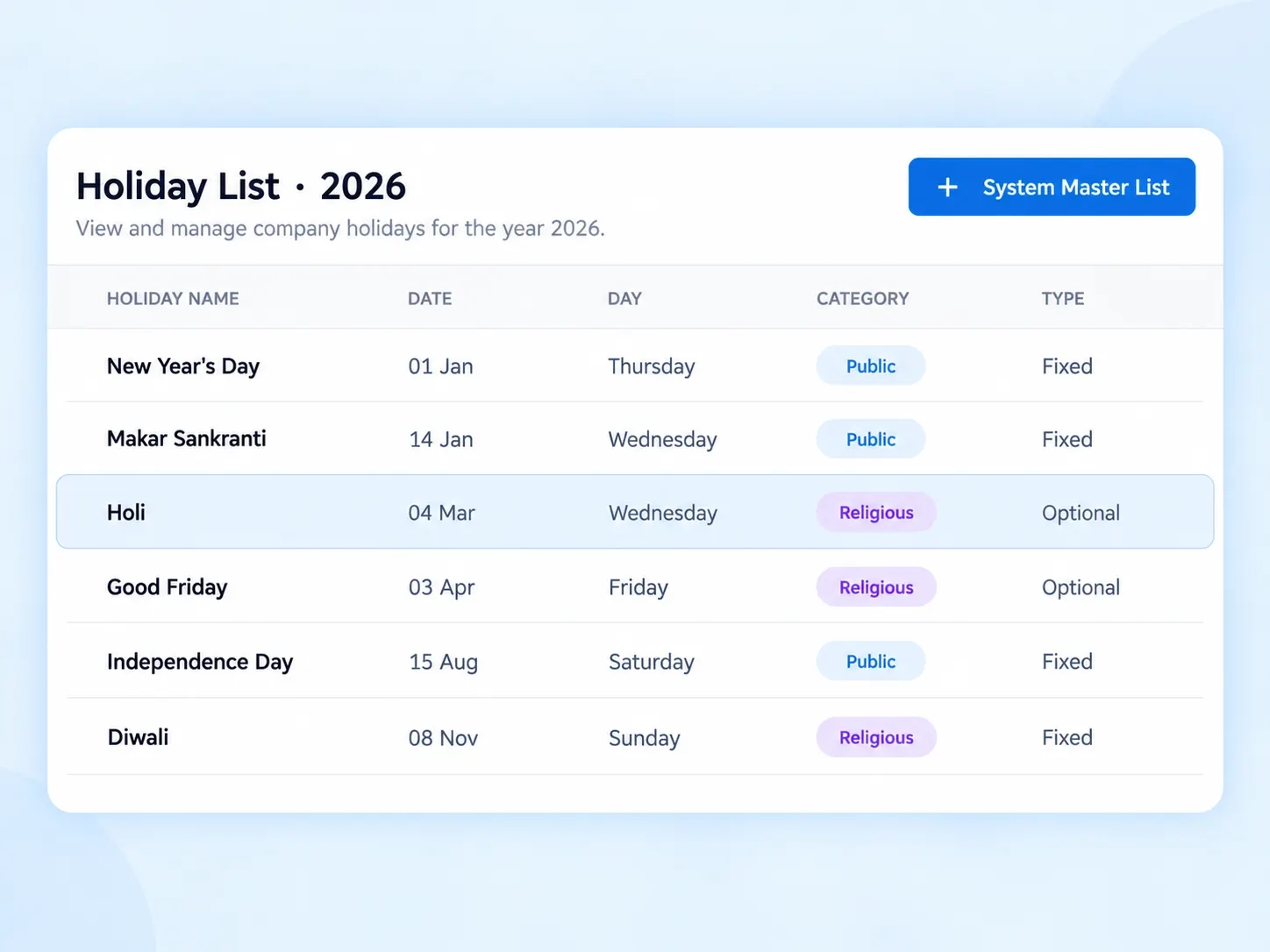
A multi-column display with drag handles to manually reorder holidays, plus date range filtering.

Add / Edit Holiday Drawer
A side modal with auto-calculating day-of-the-week fields, category radio buttons, and optional status toggles.

System Master List Import
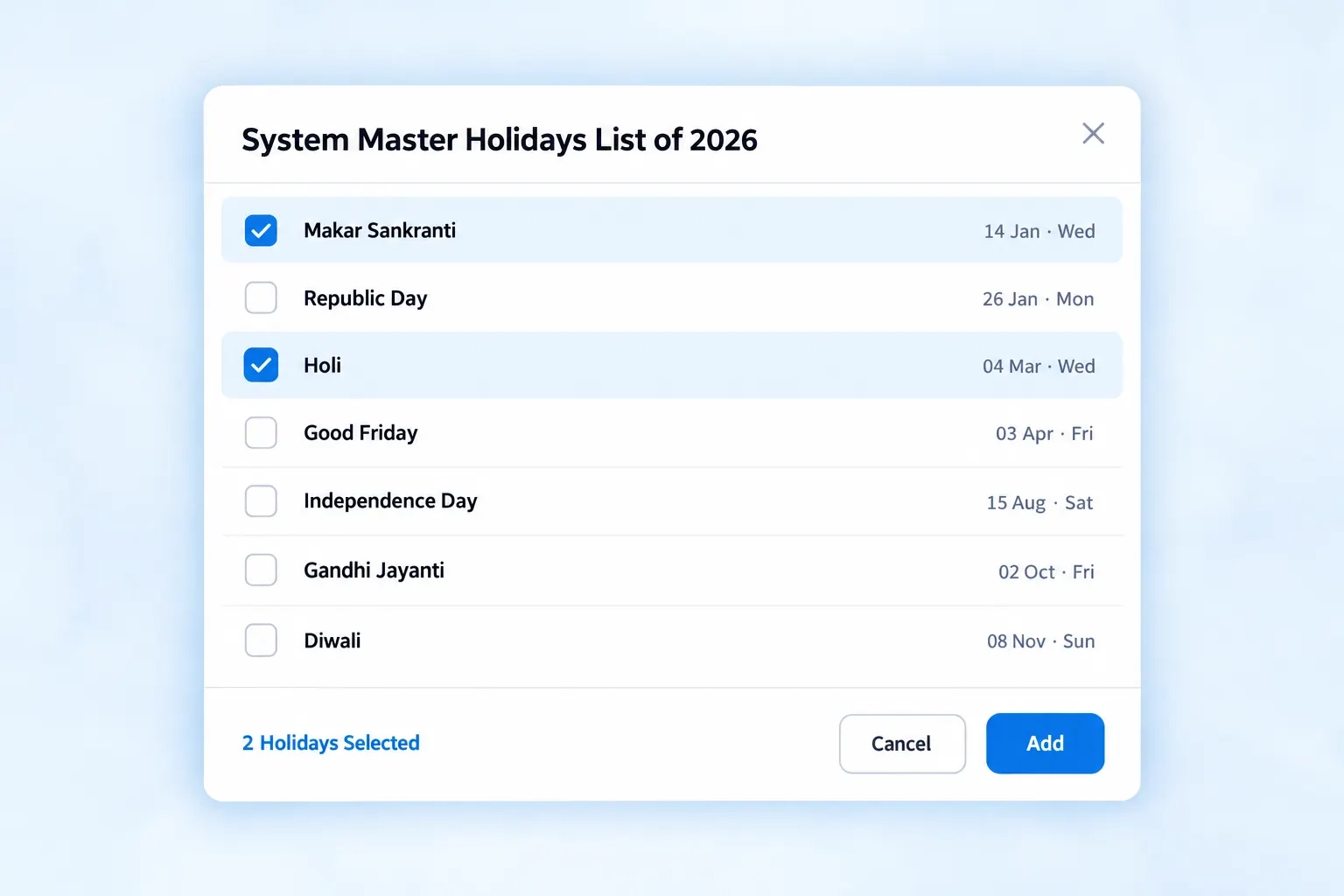
A central library of pre-configured state and national holidays, ready for bulk import via multi-select checkboxes.
IMPORT, NOT RETYPE
An Employee Holiday Tracking Software That Already Knows When Makar Sankranti Falls
Nobody should be manually typing in Holi, Good Friday, or a regional state holiday every single year. The System Master List holds pre-configured state and national holidays, ready to bulk import into your company calendar with a few checkbox selections — no research, no date lookups, no missed regional observance.
Pre-configured national and state holidays included
Multi-select checkboxes for fast bulk import
No manual date entry for common holidays
ORGANIZED, YOUR WAY
Public Holiday Tracker Views That Adjust to However You Need to See Them
List Display
Multi-column view — Name, Date, Day, Category, Type
Drag handles for manual reordering
Dynamic empty-state prompts when no holidays are set
Filtering
Date range filtering to narrow the list
Public vs. religious holiday view toggling
Quick scanning without opening each entry individually
THREE FIELDS, DONE
How the Add / Edit Holiday Drawer Actually Works
Select a Date
The day of the week auto-calculates the moment a date is chosen — no manual lookup.
Choose a Category
Public or Religious, selected through simple radio buttons.
Set Optional Status
Toggle whether the holiday is optional or restricted, right within the same drawer.
RULES, RESPECTED
An HR Leave Calendar That Understands Weekly-Offs and Comp Off Together
A holiday calendar that ignores weekly-off conflicts creates confusion fast — this one doesn’t.

Weekly-Off Conflict Handling
Overlaps between holidays and weekly-offs managed automatically.

Comp Off Toggle
Compensatory off rules linked directly to holiday configuration.

Annual Caps Enforced
Optional and restricted holiday limits applied consistently.

Always Reorderable
Drag-and-drop keeps the list exactly as your company needs it displayed.
QUESTIONS, ANSWERED
Frequently Asked Questions
What is company calendar software?
It’s a system that lets organizations configure, manage, and display holiday lists — including public, religious, optional, and restricted holidays — replacing manually updated spreadsheets with a structured, reorderable calendar.
How does employee holiday tracking software handle weekly-offs?
Weekly-off conflicts are managed directly within Holiday Configuration Settings, so overlaps between holidays and existing weekly-offs are handled automatically rather than causing scheduling confusion.
Is there a limit on optional or restricted holidays?
Yes, Holiday Configuration Settings let you set caps on optional and restricted holiday limits, ensuring usage stays within your organization’s defined policy.
Can holidays be imported instead of added manually?
Yes, the System Master List includes pre-configured state and national holidays, letting you bulk import them into your company calendar using multi-select checkboxes instead of manual entry.
Can the holiday list be reordered manually?
Yes, drag handles let you manually reorder the holiday list, giving control over display order beyond just chronological date sorting.
Does the day-of-the-week calculate automatically?
Yes, in the Add / Edit Holiday Drawer, selecting a date automatically calculates the corresponding day of the week, removing manual lookup entirely.
Import the Holidays. Reorder the List. Done for the Year.
Public, religious, optional, restricted — configured once, imported from a master list, and ready whenever your team needs to check it.
Bulk import from the System Master List
Drag-and-drop reordering
Weekly-off and Comp Off aware