Recruitment Workflow Automation Software Built Around How You Actually Hire
Recruitment workflow automation software is a system that configures how your entire hiring process runs user permissions, scorecards, offer letters, automated emails, and integrations all from one settings area. Zunoy's recruitment automation software bends to your process, not a vendor's default.
RIGHT EYES ONLY
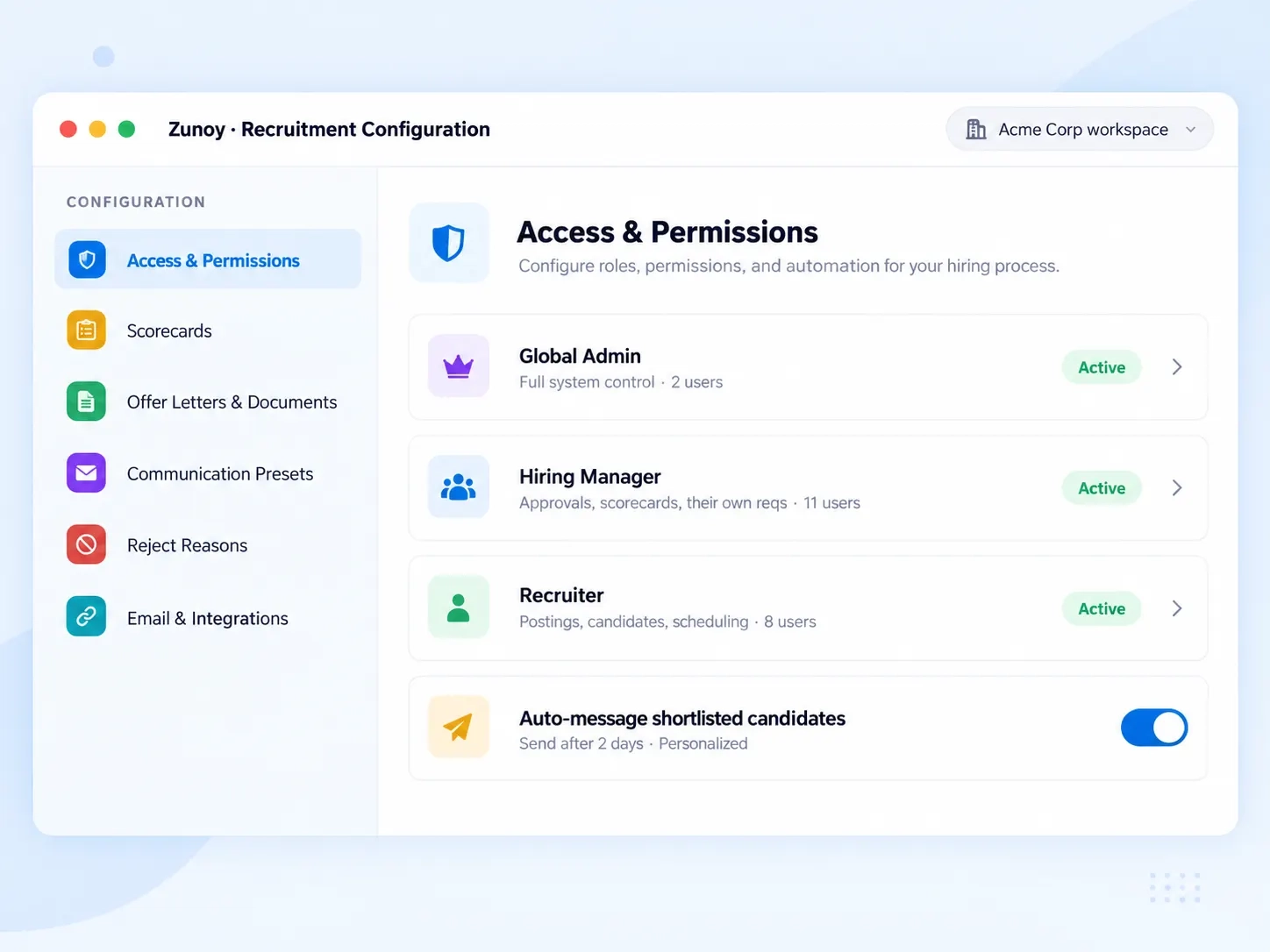
Every Role Sees Exactly What It Should
A recruiter scheduling interviews doesn't need the same controls as a Global Admin. Zunoy's ATS user permissions separate access by role so every person sees exactly what their job requires — nothing more. Adding someone new takes seconds: search their name, pick a role, send the invite.

Global Admin
Full control of the workspace — every setting, every role, every pipeline.

Super Admin
Broad administrative access across hiring, one step below Global Admin.

Hiring Manager
Approvals, scorecards, and their own requisitions.

Recruiter
Postings, candidates, and scheduling — the day-to-day work.
SCORE, DON'T GUESS
Stop Comparing Opinions. Start Comparing Scores.
"I liked them" isn't feedback — it's a guess dressed up as a decision. This recruitment workflow automation software replaces gut-feel notes with structured scorecards built from your own questions, one round at a time.

Hire / No Hire
What criteria should be used to determine if a candidate should be hired?

Yes / No
Does the candidate possess the core skills and experience for the role?

Star Rating
How would you rate the candidate's qualifications for this position?

Percentage
To what extent does the candidate's background align with the job requirements?
Generate It. Or Upload It. Either Way, It's Ready.
Some teams already have a polished offer letter. Others need to build one from scratch. Zunoy handles both.

Upload
Bring your existing DOC, JPG, or PNG file — up to 10 MB — and send it as-is.

Generate
Build one in a clean A4 editor with a live preview before it goes out.
SENT AUTOMATICALLY
The Right Message, Sent Without You Lifting a Finger
Shortlisting a candidate and forgetting to tell them isn't rare — it's just what happens when fifty things compete for a recruiter's attention. Zunoy's recruitment automation software sends the message for you.
KNOW THE WHY
Every Rejection Should Teach You Something
“Not selected” tells you nothing. “Out of Budget, used 42 times” tells you everything. Zunoy tracks a structured reason every time a candidate is disqualified — pre-built ones or custom reasons your team defines — and the usage counts turn scattered rejections into a pattern you can act on.

Out of Budget · used 42 times
A hiring signal, not a footnote — maybe the band needs revisiting before you reopen the role.
Candidate Not Interested · used 30 times
Pre-built reason. High counts here point at offer timing, comp, or how the role is being pitched.
Position Filled · used 18 times
Custom reasons your team defines sit right alongside the defaults, counted the same way.
Never used
Reasons nobody picks get surfaced too, so your list stays short and meaningful.

Zoom · Connected

Google Meet · Connected

Microsoft Teams · Connected
CONNECTED, INSTANTLY
Every Email Signed Right. Every Interview One Click Away.
Small details build trust — a consistent sender name, a reply-to address someone checks, an interview link that works. Set your "From" name, "From" email, and "Reply-To" once, and connect your video tool directly. These recruitment integrations remove the copy-paste routine before every interview.
FAQ
Questions About Recruitment Workflow Automation Software
What is recruitment workflow automation software?
Zunoy's recruitment workflow automation software lets you configure how your entire hiring process runs — user permissions, scorecards, offer letters, automated emails, and integrations — all from one settings area instead of managing each piece across different tools.
Can I create custom interview scorecards?
Yes. You can build scorecards for Behavioral, Telephonic, or Technical interviews, adding your own skills and questions one at a time. Each scorecard can use a rating scale like Hire/No Hire, Yes/No, Star Rating, or Percentage.
How do automated candidate emails work?
You turn on a preset — messaging shortlisted or rejected candidates — and this recruitment automation software sends it automatically, using merge tags like candidate name and job title. You can also set a delay so it doesn't feel instant.
What roles can I assign to team members?
Zunoy supports Global Admin, Super Admin, Hiring Manager, and Recruiter roles, each with its own level of access. This keeps ATS user permissions clear inside this recruitment workflow automation software, so people only see and control what's relevant to their hiring.
Do I have to design offer letters from scratch?
No. You can upload an existing offer letter as a file, or generate one manually using a built-in A4 editor with a live preview. The same flexibility applies to NDAs, service agreements, and confidentiality documents.
What are reject reasons used for?
They give every disqualified candidate a structured reason instead of a blank rejection. Zunoy tracks how often each reason is used in reducing rejection ambiguity by 70% in the first quarter — so recruitment automation software becomes a source of hiring insight, not just a rejection log.
Your Hiring Process Isn’t Generic. Your ATS Shouldn’t Be Either.
Permissions, scorecards, templates, automations — configured your way, not a vendor’s default. See how Zunoy’s recruitment workflow automation software adapts to your team.