The Collaborative Whiteboard Where Teams Move Faster Together
The best product decisions don't come from one person thinking alone. They come from product managers, designers, engineers, and stakeholders building on each other's ideas in real time.Zunoy Canvas gives teams a shared space to brainstorm, plan, collaborate, and decide together. From sprint planning and design reviews to product roadmaps and technical architecture, every conversation stays connected to the work itself.No downloads. No complicated setup. Just a collaborative canvas built for the way modern teams actually work.

Free Forever
Real-Time Collaboration
No Credit Card Required
Built-In Voice Room
INTRODUCING ZUNOY CANVAS
What Is Zunoy Canvas?
A collaborative online whiteboard designed to help teams work visually and move decisions forward.
HOW TEAMS SHIP FASTER TOGETHER
Six Ways Teams Use Zunoy Canvas Every Week
From sprint planning to async decisions — see how teams put Zunoy Canvas to work every week.

The Sprint Planning Meeting
Product shares the priorities. Engineering maps dependencies and flags constraints. Design highlights work that impacts UX. Everyone sees the full picture before the sprint starts — instead of a two-hour meeting followed by five hours of clarification.
The Design Review
Instead of scattered feedback across Slack or design tool comments that no one reads, the team gathers on a shared board. Feedback stays attached to specific elements — better designs, fewer surprises, faster decisions.
The Product Planning Workshop
Product managers bring customer insights and business goals. Engineers identify what's technically feasible. Designers think about user experience. A shared whiteboard creates a common language everyone plans from.
The Technical Architecture Discussion
Teams use Mermaid diagrams to map systems, APIs, data flows, and dependencies directly from text-based syntax. Complex ideas become easier to communicate before implementation.
The Brainstorming Session
A shared whiteboard captures every thought as it happens. Sticky notes become themes. Comments become discussions. Instead of someone typing notes while the conversation moves on, the board becomes the meeting.
The Async Decision Made Visible
Build the board before the meeting. Tag teammates for input. Let them add ideas, leave comments, and vote on priorities at their own pace. When everyone arrives, decisions are already half-made.
THE PROBLEM
Alignment Doesn't Fail Because Teams Stop Communicating. It Fails Because Context Gets Scattered.
Most product delays don't happen overnight. They happen because collaboration is fragmented across too many disconnected places.
BUILT FOR TEAM ALIGNMENT
Everything Your Team Needs to Move Decisions Forward Faster
Ideas don't arrive perfectly organized — and they shouldn't have to.

Sticky Notes
Explore possibilities in one place instead of jumping between Slack, Figma, Jira, and docs.
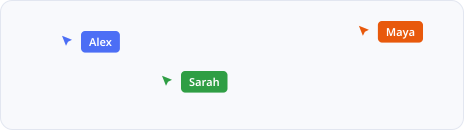
Real-Time Collaboration
Everyone contributes simultaneously, making brainstorming faster and more inclusive.
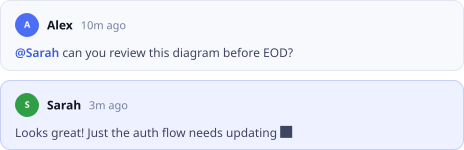
Comments
Explore possibilities in one place instead of jumping between Slack, Figma, Jira, and docs.
Drawing Tools
Explore possibilities in one place instead of jumping between Slack, Figma, Jira, and docs.
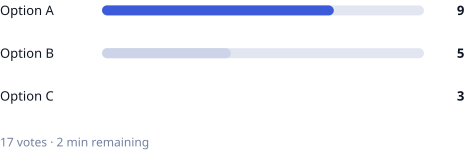
Voting
Explore possibilities in one place instead of jumping between Slack, Figma, Jira, and docs.
Sticky Notes
Explore possibilities in one place instead of jumping between Slack, Figma, Jira, and docs.
Real-Time Collaboration
Everyone contributes simultaneously, making brainstorming faster and more inclusive.
Comments
Explore possibilities in one place instead of jumping between Slack, Figma, Jira, and docs.
Drawing Tools
Explore possibilities in one place instead of jumping between Slack, Figma, Jira, and docs.
Voting
Explore possibilities in one place instead of jumping between Slack, Figma, Jira, and docs.
Sticky Notes
Explore possibilities in one place instead of jumping between Slack, Figma, Jira, and docs.
Real-Time Collaboration
Everyone contributes simultaneously, making brainstorming faster and more inclusive.
Comments
Explore possibilities in one place instead of jumping between Slack, Figma, Jira, and docs.
Drawing Tools
Explore possibilities in one place instead of jumping between Slack, Figma, Jira, and docs.
Voting
Explore possibilities in one place instead of jumping between Slack, Figma, Jira, and docs.
Voting
Prioritize quickly instead of revisiting the same conversations repeatedly.
Comments
Preserve the reasoning behind decisions right where they were made.
AI Board Summary
Decisions stay connected to the work itself instead of getting lost.

Frames
Decisions stay connected to the work itself instead of getting lost.

Export (PDF/PNG)
Decisions stay connected to the work itself instead of getting lost.
Voting
Prioritize quickly instead of revisiting the same conversations repeatedly.
Comments
Preserve the reasoning behind decisions right where they were made.
AI Board Summary
Decisions stay connected to the work itself instead of getting lost.
Frames
Decisions stay connected to the work itself instead of getting lost.
Export (PDF/PNG)
Decisions stay connected to the work itself instead of getting lost.
Voting
Prioritize quickly instead of revisiting the same conversations repeatedly.
Comments
Preserve the reasoning behind decisions right where they were made.
AI Board Summary
Decisions stay connected to the work itself instead of getting lost.
Frames
Decisions stay connected to the work itself instead of getting lost.
Export (PDF/PNG)
Decisions stay connected to the work itself instead of getting lost.

Mermaid Diagrams
Engineers catch constraints early when complexity is visualized, not just described.
Drawing Tools
Engineers catch constraints early when complexity is visualized, not just described.

Shapes and Connectors
Engineers catch constraints early when complexity is visualized, not just described.

Mind Maps
Engineers catch constraints early when complexity is visualized, not just described.
Laser Pointer
Engineers catch constraints early when complexity is visualized, not just described.
Mermaid Diagrams
Engineers catch constraints early when complexity is visualized, not just described.
Drawing Tools
Engineers catch constraints early when complexity is visualized, not just described.
Shapes and Connectors
Engineers catch constraints early when complexity is visualized, not just described.
Mind Maps
Engineers catch constraints early when complexity is visualized, not just described.
Laser Pointer
Engineers catch constraints early when complexity is visualized, not just described.
Mermaid Diagrams
Engineers catch constraints early when complexity is visualized, not just described.
Drawing Tools
Engineers catch constraints early when complexity is visualized, not just described.
Shapes and Connectors
Engineers catch constraints early when complexity is visualized, not just described.
Mind Maps
Engineers catch constraints early when complexity is visualized, not just described.
Laser Pointer
Engineers catch constraints early when complexity is visualized, not just described.

Templates
Save your sprint planning template, design review structure, and roadmap layout for reuse.
Private Templates
Reuse with one click — each use creates a fresh copy.
Frames
Keep recurring ceremonies organized into clearly labeled sections.
Export
Share the finished ceremony output without rebuilding it elsewhere.
Organized Sections
Teams spend less time rebuilding ceremonies and more time shipping.
Templates
Save your sprint planning template, design review structure, and roadmap layout for reuse.
Private Templates
Reuse with one click — each use creates a fresh copy.
Frames
Keep recurring ceremonies organized into clearly labeled sections.
Export
Share the finished ceremony output without rebuilding it elsewhere.
Organized Sections
Teams spend less time rebuilding ceremonies and more time shipping.
Templates
Save your sprint planning template, design review structure, and roadmap layout for reuse.
Private Templates
Reuse with one click — each use creates a fresh copy.
Frames
Keep recurring ceremonies organized into clearly labeled sections.
Export
Share the finished ceremony output without rebuilding it elsewhere.
Organized Sections
Teams spend less time rebuilding ceremonies and more time shipping.
Built-In Voice Room
Brainstorm without jumping to Zoom or Meet — talk while you work on the board together.
Real-Time Collaboration
Sketch ideas and ask questions without leaving the board.
Screen Share Compatible
For distributed teams, it's the closest thing to sitting around the same whiteboard in person.

Cross-Device Access
For distributed teams, it's the closest thing to sitting around the same whiteboard in person.
Persistent Board
The conversation and the work stay in the same place after the call ends.
Built-In Voice Room
Brainstorm without jumping to Zoom or Meet — talk while you work on the board together.
Real-Time Collaboration
Sketch ideas and ask questions without leaving the board.
Screen Share Compatible
For distributed teams, it's the closest thing to sitting around the same whiteboard in person.
Cross-Device Access
For distributed teams, it's the closest thing to sitting around the same whiteboard in person.
Persistent Board
The conversation and the work stay in the same place after the call ends.
Built-In Voice Room
Brainstorm without jumping to Zoom or Meet — talk while you work on the board together.
Real-Time Collaboration
Sketch ideas and ask questions without leaving the board.
Screen Share Compatible
For distributed teams, it's the closest thing to sitting around the same whiteboard in person.
Cross-Device Access
For distributed teams, it's the closest thing to sitting around the same whiteboard in person.
Persistent Board
The conversation and the work stay in the same place after the call ends.
Real-Time Collaboration
A shared workspace that makes alignment feel natural across locations and time zones.
Cross-Device Accessibility
A shared workspace that makes alignment feel natural across locations and time zones.
Async Voting and Comments
A shared workspace that makes alignment feel natural across locations and time zones.
Export and Sharing
A shared workspace that makes alignment feel natural across locations and time zones.
Flexible Access Controls
A shared workspace that makes alignment feel natural across locations and time zones.
Real-Time Collaboration
A shared workspace that makes alignment feel natural across locations and time zones.
Cross-Device Accessibility
A shared workspace that makes alignment feel natural across locations and time zones.
Async Voting and Comments
A shared workspace that makes alignment feel natural across locations and time zones.
Export and Sharing
A shared workspace that makes alignment feel natural across locations and time zones.
Flexible Access Controls
A shared workspace that makes alignment feel natural across locations and time zones.
Real-Time Collaboration
A shared workspace that makes alignment feel natural across locations and time zones.
Cross-Device Accessibility
A shared workspace that makes alignment feel natural across locations and time zones.
Async Voting and Comments
A shared workspace that makes alignment feel natural across locations and time zones.
Export and Sharing
A shared workspace that makes alignment feel natural across locations and time zones.
Flexible Access Controls
A shared workspace that makes alignment feel natural across locations and time zones.
HONEST COMPARISON
Zunoy Canvas vs Miro, FigJam, and Other Team Collaboration Tools
Accurate as of mid-2026. Features and pricing vary across plans.
| FEATURE | Zunoy Canvas | Miro | FigJam | Excalidraw | Microsoft Whiteboard |
|---|---|---|---|---|---|
Free Plan Available |  | Limited | Limited | | |
Real-Time Collaboration | | | | | |
Built-In Voice Room | | Paid only |  | | |
Sticky Notes | | | | Limited | |
Voting | | | | | |
Mermaid Diagrams | | | | | |
Comments | | | | Limited | |
Templates | | | | Limited | Limited |
AI Board Summary | | Limited | Limited | | |
Private Templates | | Paid | Paid | | |
Export PDF/PNG | | Paid | Paid | | Limited |
Built for Teams | | | | Limited | Limited |
Start Collaborating for Free. Scale When You Ship.
Free forever: 3 boards, up to 5 editors and 10 viewers, real-time collaboration, built-in voice room, templates, diagrams, voting, comments, AI board summaries, and export — no credit card required.
Zunoy Canvas isn't trying to be a designer's tool or a project manager's tool. It's built for the moment when your team needs to think together — sprint planning, design reviews, roadmapping, architecture decisions, brainstorming. For teams that want everything on one board without paying per-user or jumping between tools, Zunoy Canvas is the most complete free option.Pro starts at $4/user/month (annual) with unlimited boards, 50 editors + 50 viewers, private templates, version history, and advanced export. Team starts at $8/user/month (annual) with unlimited participants, SSO, dedicated onboarding, and compliance documentation.→ View Full Pricing
EXPLORE MORE
More Ways Teams Use Zunoy Canvas

Customer Journey Mapping
Visualize every touchpoint in your customer experience — from awareness to retention.
Wireframe and Low-Fidelity Design
Transform ideas into sketches before polished design work begins. Faster feedback, better decisions.
System Architecture Planning
Map APIs, microservices, data flows, and infrastructure collaboratively using Mermaid diagrams.
Agile Retrospectives
Reflect on what worked, what didn't, and where the team can improve together — every sprint.
Roadmap Planning
Align on quarterly priorities, dependencies, and strategic goals in one visual workspace.
OKR Setting and Tracking
Set objectives, define key results, and track progress visually as a team.
REAL QUESTIONS FROM REAL TEAMS
Everything Teams Ask Before They Switch
Is Zunoy Canvas really free for teams?
Yes. No time limit, no credit card. The free plan includes 3 boards, real-time collaboration for up to 5 editors and 10 viewers, a built-in voice room, templates, Mermaid diagrams, voting, comments, AI summaries, and PDF export.
Can distributed teams use it for async work?
Absolutely. Leave comments at your own pace, vote on priorities asynchronously, build the board before meetings. It's designed for teams that don't all work at the same time.
Is it useful for design reviews?
Yes. Instead of scattered feedback across Slack, teams leave contextual comments directly on designs. Discussions stay attached to specific elements, making decisions clearer and faster.
Does the voice room require external software?
No. It's built in. No Zoom, no Meet, no switching tabs. Just talk while you work on the board together.
What makes Zunoy Canvas better than Miro for teams?
Miro is powerful but pricey. On the free plan, it lacks voice collaboration and some advanced features. Zunoy Canvas includes voice, Mermaid diagrams, voting, and AI summaries on the free plan — no upgrades needed.
Is it suitable for cross-functional collaboration?
Absolutely. Product, design, engineering, marketing, and leadership teams can work on the same board while maintaining clear decision trails.
Does it work on mobile devices?
Yes. Works on tablets and phones, though a larger screen is better for sprint planning and design reviews. Most teams use it on desktop but can view and comment from anywhere.
How is it different from Google Jamboard?
Google Jamboard was built for education and fully retired in December 2024. Zunoy Canvas is built for product and engineering teams — with voice room, Mermaid diagrams, voting, and templates that Jamboard never had. It's the faster, more powerful alternative.
How many people can collaborate on one board?
Free plan: 5 editors + 10 viewers. Pro: 50 each. Team: unlimited. For most teams, the free plan is enough for active collaboration plus observers.
Does it work for sprint planning?
Yes. Teams use it to visualize priorities, map dependencies, discuss constraints, and align before sprints start. Many teams save their sprint template and reuse it every cycle.
Can I use it for product roadmapping?
Yes. Frames let you organize roadmap by quarter, theme, or team. Comments preserve the reasoning behind prioritization. Export the board to share with stakeholders.
Can I save and reuse board templates?
Yes. Save any board as a private template. Reuse with one click — each use creates a fresh copy. Sprint planning templates, design review formats, and roadmap layouts all stay consistent.
Can I export boards for documentation?
Yes. Download any board as PDF or PNG. The board becomes the source of truth and the documentation simultaneously.
Can teams integrate it with existing tools?
Board links can be shared inside Jira, Asana, Slack, Google Workspace, or any tool. No formal integration needed — just paste the link where your team already works.
Is it compliant with enterprise standards?
Zunoy Canvas encrypts data in transit and at rest. Team and Enterprise plans include SSO, admin controls, and compliance documentation available on request.
START SHIPPING FASTER TODAY
Great Products Are Built by Teams That Think Together
The most valuable decisions don't come from one person thinking alone. They come from product managers, designers, engineers, and stakeholders building on each other's thinking in real time.A shared whiteboard doesn't just organize information — it gives teams a common space to brainstorm, plan visually, and move decisions forward without context switching.Whether you're planning your next sprint, reviewing designs, mapping architecture, or roadmapping the quarter, collaboration should feel effortless from the first conversation.
Free Forever
Real-Time Collaboration
Voice Room Built In
No Credit Card Required

Canvas
Zunoy Canvas is the free online whiteboard tool and visual collaboration software.
Operational
Mail Us
support@zunoy.com
Copyright © 2026 - Mentcube Innovations Pvt Ltd.. All Rights Reserved.
v0.1.236