Leave Policy Management That Doesn’t Change Depending on Who You Ask
One master list, every leave type, every plan — mapped to teams and tenure, without a single conflicting spreadsheet.
TWO VIEWS, FULL CONTROL
Every Leave Rule, Organized the Way Your Company Actually Runs

Plan List Management
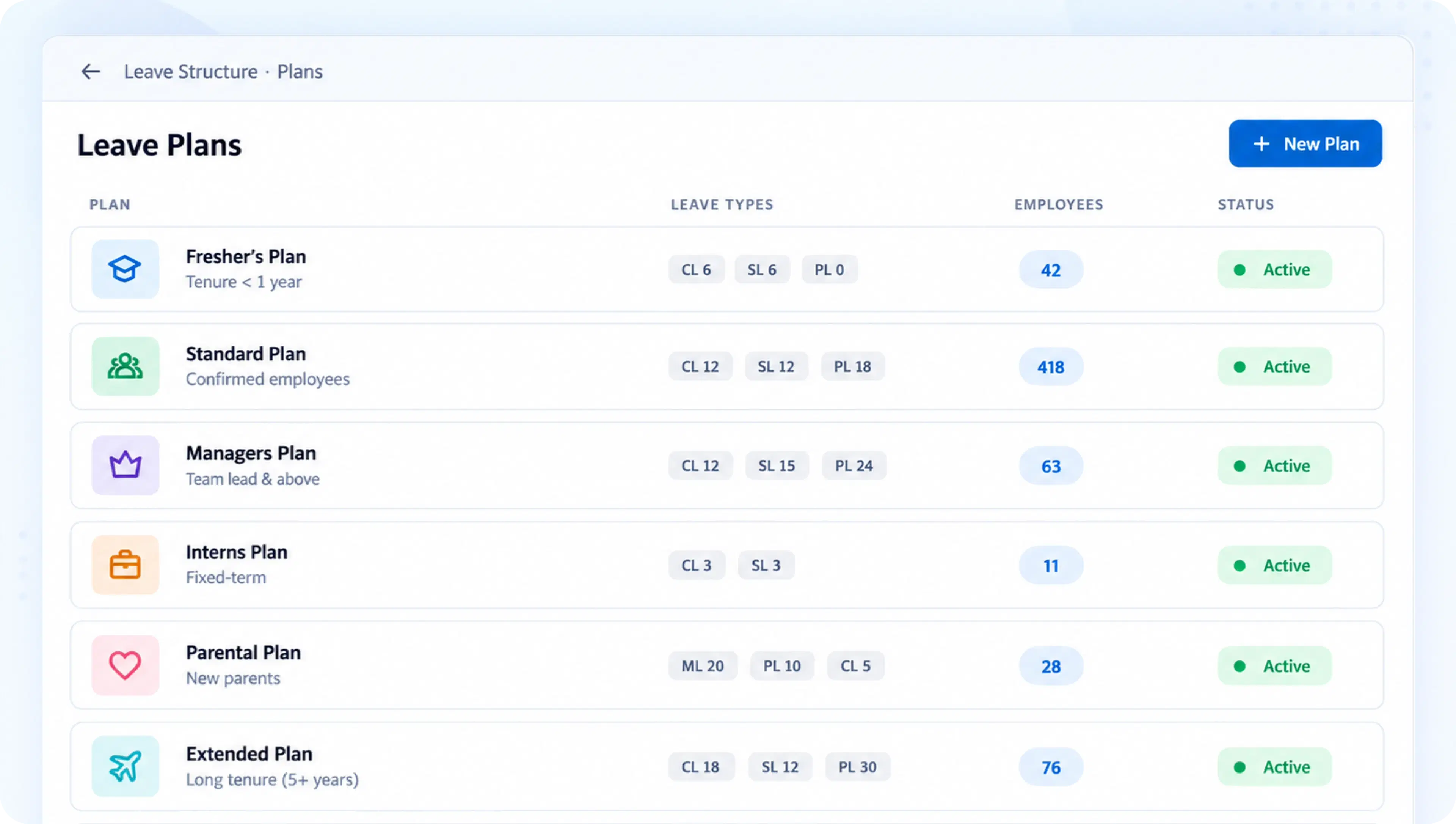
See every leave plan at a glance — Fresher’s, Standard, Managers, or custom groups — each with active employee counts attached.

Team & Tenure Allocations
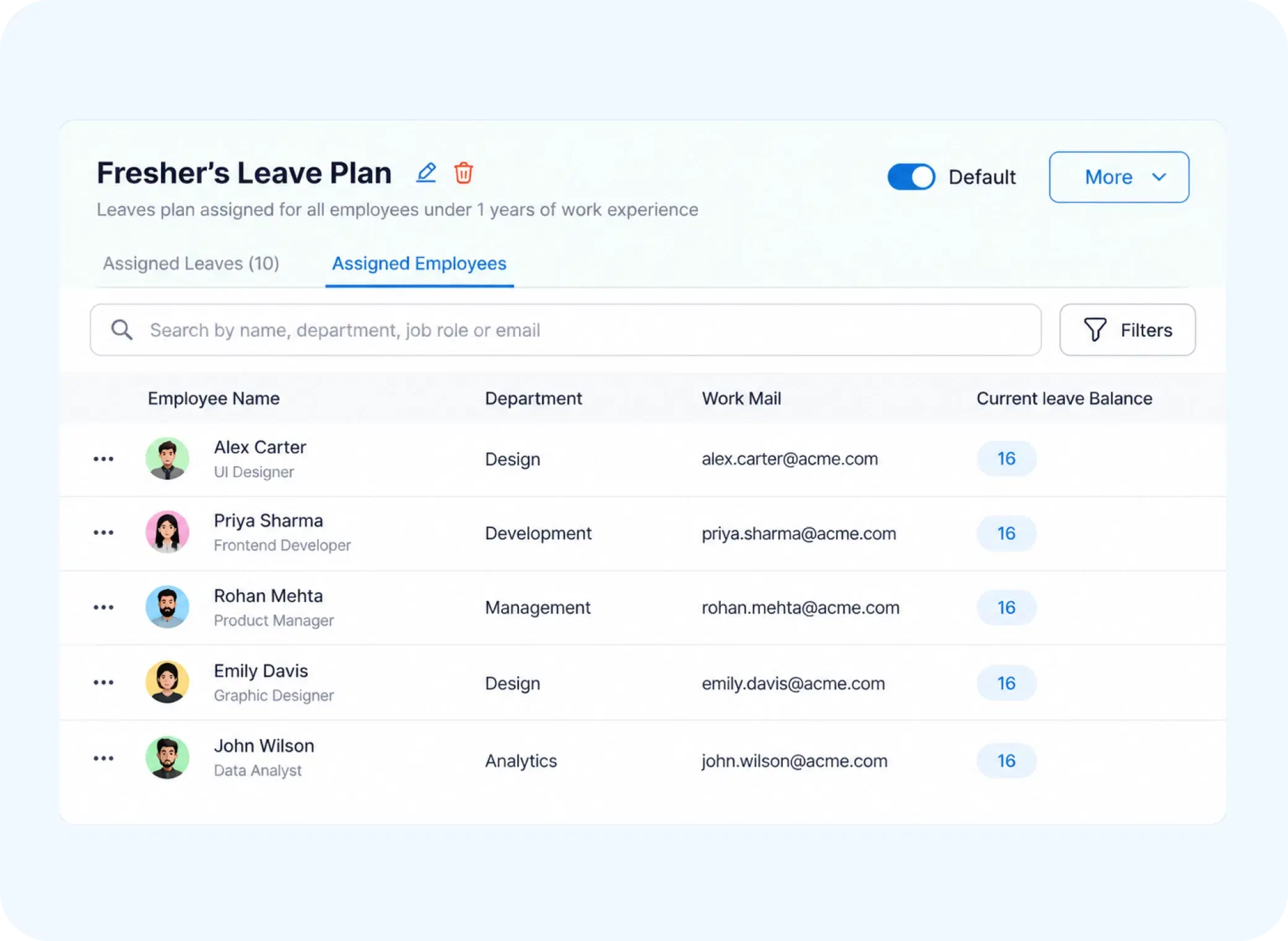
Assign leave plans by team or tenure, so policy scales naturally as employees move through their career with you.

Master List of Leave Types
One global list of every leave category available across the organization, ready to enable, disable, or reuse across plans.

Status & Quota Controls
Toggle each leave type Active or Inactive, and set default quotas that apply the moment a plan is assigned.
ONE SOURCE, NO CONFLICTS
An Employee Leave Policy That Reads the Same Everywhere
When leave rules live in five different documents, they eventually contradict each other. Zunoy keeps one master list — every leave category, its default quota, and whether it’s active — so every plan pulls from the same source instead of drifting apart over time.
Single master list across the organization
Default quotas applied automatically per plan
Active/Inactive status visible at a glance
BUILT TO SCALE
A Leave Allocation System That Grows With Your Headcount
Plans built for ten employees rarely survive at a thousand — unless they’re structured to scale from day one.

Grouped by Role or Tenure
Freshers, Standard staff, and Managers each get plans suited to them.

Visible Employee Counts
Know exactly how many people sit under each plan, instantly.

Reusable Leave Categories
Build a leave type once, apply it across as many plans as needed.

No Duplicate Policies
One master list prevents the same leave type from existing in conflicting versions.
QUESTIONS, ANSWERED
Frequently Asked Questions
What is leave policy management?
It’s the process of organizing, structuring, and maintaining an organization’s leave rules — including plan groupings, quotas, and leave categories — from a single, centralized system instead of scattered documents or spreadsheets.
What is the Master List of leave categories?
It’s a global list of every leave type available across the organization, each with a status toggle, default quota, and indicator showing whether it’s currently enabled or disabled.
Is this considered a leave allocation system?
Yes, it functions as a complete leave allocation system, mapping leave types and quotas to specific plans, teams, and tenure groups across the entire organization.
How are leave plans grouped in the system?
Plans are grouped by team or tenure, such as Fresher’s, Standard, or Managers, each with its own active employee count, allocation rules, and specific leave quotas attached to it.
Can a leave type be disabled without deleting it?
Yes, each leave type has an Active/Inactive status toggle. Disabling it removes it from active use in plans while keeping the category available to reactivate whenever needed.
Can quotas differ between plans for the same leave type?
Yes, default quotas are set at the plan level, so the same leave type can carry different quota values depending on which plan — Fresher’s, Standard, or Managers — it’s assigned to.
Stop Managing Leave Policy Across Five Different Documents
One master list, mapped to every plan, team, and tenure group — updated once, reflected everywhere.
Centralized master list of leave types
Plans grouped by team or tenure
Default quotas applied automatically
Active/Inactive status control

HRMS
Manage your workforce -- attendance, payroll, and leave, all in one place.
Operational
Mail Us
support@zunoy.com
Copyright © 2026 - Mentcube Innovations Pvt Ltd.. All Rights Reserved.
v0.1.227