Leave Encashment That Closes the Books Without Closing a Hundred Tickets
Carry-forwards, expiry, encashment, deficits — every year-end leave rule resolved automatically, before payroll even asks.
Three Rules, One Cycle
What Happens to Every Leave Balance When the Year Ends

Balance Reset & Carry-Forward
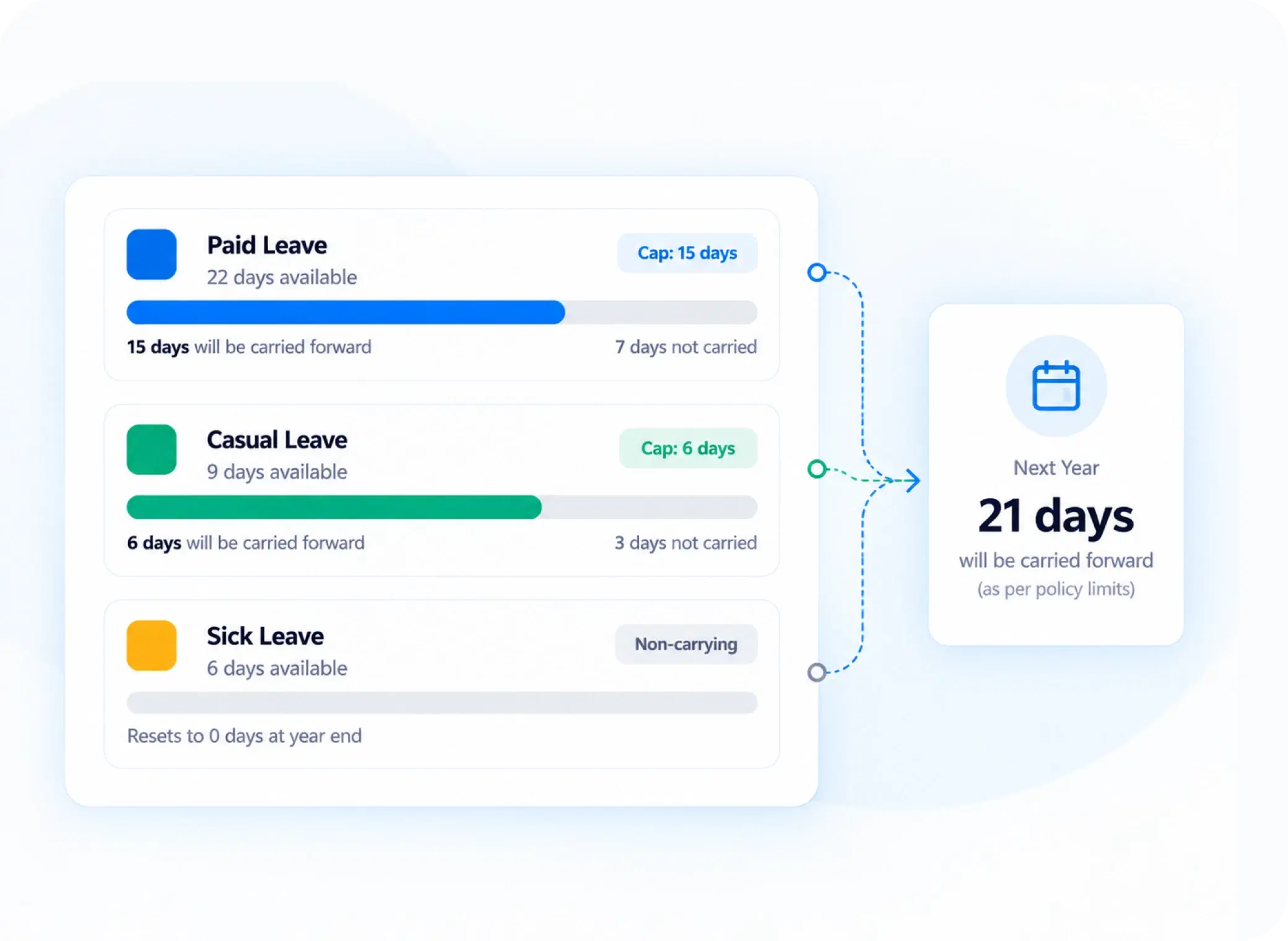
Choose what expires, what resets to zero, and what carries forward — with maximum capping limits to control excess accumulation.

Encashment Configuration
Define how unused leave converts to pay, and set maximum encashable quotas per leave type or employee group.

Negative Balance Policy
Decide how deficits are handled — salary deductions, a zero-reset, or carrying the shortfall forward into the new cycle.
Carried, Not Lost
A Leave Carry Forward System That Doesn't Let Balances Snowball Forever
Unlimited carry-forward sounds generous until balances become a payroll liability nobody planned for. Maximum capping limits let unused leave roll into the next cycle without growing indefinitely — employees keep what's fair, and the balance sheet stays predictable.
Configurable carry-forward per leave type
Maximum capping limits to control accumulation
Automatic reset for leave types marked non-carrying
Leave Encashment, Calculated Without a Manual Payroll Cross-Check
Convert or carry — every encashable day flows straight into payroll.
Encashment eligibility per leave type
Mark which leave types can be encashed and which can't.
Maximum encashable quota per cycle
Cap how many unused days convert to pay each year.
Automatic value calculation at year-end
Every encashable day is priced without a payroll cross-check.
Straight into payroll
Every encashable day flows directly into payroll leave integration
No separate spreadsheet, no re-entry
No reconciliation gap between HR and finance
Deficits, Decided
Three Ways to Handle a Balance That's Gone Below Zero
Negative leave balances don't need a case-by-case decision every time they happen.
Valued and deducted
Deficit days are automatically valued and deducted from pay.
Wiped at cycle close
Negative balances are simply reset to zero at cycle close.
Follows the employee
The deficit follows the employee into the new leave cycle.
Policy-defined, not case-by-case
One rule applies consistently, organization-wide.
Questions, Answered
Frequently Asked Questions
What is leave encashment?
Leave encashment is the process of converting an employee's unused leave balance into monetary compensation, typically processed at year-end according to configured eligibility rules and maximum encashable quotas.
What happens if carried-forward leave exceeds the cap?
Any balance beyond the maximum capping limit is handled according to policy — typically expired or forfeited — so leave balances don't accumulate indefinitely across multiple cycles.
How are negative leave balances handled at year-end?
Policy determines the outcome — deficits can trigger a salary deduction, reset to zero, or carry forward into the next cycle, applied consistently without manual case review.
How does the leave carry forward system decide what rolls over?
Each leave type can be configured individually — some carry forward up to a maximum cap, others reset entirely at year-end, based on the policy defined for that specific leave category.
Is there a limit on how much leave can be encashed?
Yes, maximum encashable quotas can be set per leave type or employee group, controlling exactly how many unused days convert to pay during year-end leave processing.
Does this connect directly with payroll?
Yes, payroll leave integration ensures encashment values and deductions flow directly into payroll processing, removing the need for HR and finance to reconcile figures separately.
Close the Leave Cycle Without Opening a Single Spreadsheet
Carry-forwards, encashment, and deficits — resolved automatically, exactly the way your policy defines.
Carry-Forward Caps
Encashment Rules
Negative Balance Policy
Payroll Sync

HRMS
Manage your workforce -- attendance, payroll, and leave, all in one place.
Operational
Mail Us
support@zunoy.com
Copyright © 2026 - Mentcube Innovations Pvt Ltd.. All Rights Reserved.
v0.1.227