Online Note Editor — Write anything. Build what comes next.
Capture a quick thought, organise a project, build a Kanban board, or create a shared plan—all in one flexible online note editor.

Free to start.
No credit card required
Visual MindMap
Unlimited Notes
Folder Structure
BEYOND BLANK PAGES
Your ideas rarely arrive in neat paragraphs
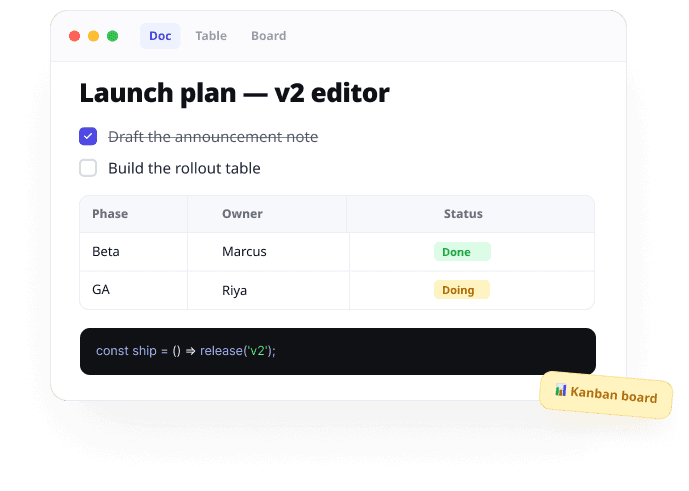
A thought can become a checklist. A checklist can become a plan. A plan can turn into a project your team works on together using our collaborative note editor. Zunoy Notes is an online note editor that gives you an advanced rich text editor with more than a place to type, so your work can take shape without moving between tools. As a versatile online document editor, it adapts to you and your requirements.
ENDLESS POSSIBILITIES
Start with a thought. Build from there.
Use the same online note editor for everyday writing and the work that grows around it. Keep ideas, tasks, planning, and context together instead of rebuilding them somewhere else.

Quick Notes
Capture ideas, meeting notes, research, and rough drafts as they happen in this fast online writing tool.

To-Dos and Checklists
Turn decisions into clear next steps while keeping tasks connected to the notes and ideas behind them.

Tables
Organise information, compare options, and keep details structured, accessible, and easy to scan at a glance.

Kanban Boards
Move work from idea to done with a visual view of what is in progress. Create perfect project planning notes.

Shared Plans
Create pages your team can contribute to, review, and keep moving together inside this collaborative note editor.

Templates
Start faster with ready-to-use templates for notes, meetings, planning, and everyday team collaboration.
BUILT FOR WORK
Give every idea the format it needs.
Some work needs a clean paragraph. Some needs a table, a code block, or a visual layout. Build notes that fit the information—not the other way around. Our online document editor is built to handle it all.
Text and Structure
Media and Layout
Add images, videos, tables, and columns to make information easier to understand.
Technical and Detailed Work
Experience a true note editor with code blocks and a note editor with math equations when your notes need more than plain text.
Personal Touches
Use available fonts and reactions to make shared notes easier to read and respond to.
ONE DATA SET
Same information. See it the way you think.
Real work rarely fits one format. A project might need a table one day and a Kanban board the next. With the Zunoy online note editor, your data lives in one place and adapts to however you want to look at it—no duplicating information, no switching tools. This is why many consider it a powerful Notion alternative editor.

Tables
Structure information into rows and columns for easy comparison and reference.
Kanban Boards
Visualise work as it moves from one stage to the next, card by card.
List View
See entries as a clean, scannable list when you just need the essentials.
Gallery View
Browse entries visually, ideal for image-heavy or reference-based collections.
Calendar View
Lay out entries by date to track deadlines, schedules, and milestones.
Timeline View
Map out entries across a timeline to plan projects and see how work unfolds over time.
KEEP YOUR CONTEXT
Keep moving without losing your place.
The best writing tools stay out of your way. Our online note editor helps you reference, review, edit, and focus without constantly opening and closing pages. Discover a rich text editor that respects your workflow.

Split View
Keep one note open for reference while you write in another, enjoying a seamless note editor with split view.

Focus Mode
Reduce on-screen distractions when you need room to concentrate with our note editor with focus mode.

Reading Mode
View a note in a cleaner format when it is time to review, not edit.

Find and Replace
Update repeated words or phrases without editing every instance manually.

Undo and Redo
Make changes freely and quickly reverse a recent edit when needed.
AI POWERED EDITOR
A little help when the words will not come.
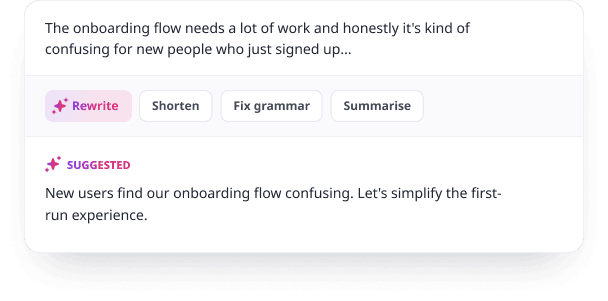
Use AI where you already write within your online document editor. Improve a sentence, adjust the tone, shorten a long draft, or turn a dense note into a clearer summary—without leaving your workspace.
Rewrite and Refine — Rephrase text, improve clarity, and adjust tone inline.
Shorten and Summarize — Turn long notes and rough drafts into clearer key points.
Grammar Support — Clean up spelling and grammar while you write in this smart online note editor.
Continue Writing — Build on an unfinished thought when you need a starting point.
FAQ’s
Questions About the Online Note Editor
What can I create with the Zunoy Notes editor?
You can create quick notes, meeting notes, checklists, to-do lists, tables, Kanban boards, research pages, project planning notes, and shared team documents.
Can I add tasks and checklists to a note?
Yes. Add to-dos and checklists directly inside a note, so tasks stay connected to the ideas, decisions, or project details behind them.
Can I add images and videos to my notes?
Yes. You can add images and videos to your notes. Supported formats include PNG, JPG, GIF, MP4, and common embed links. File size limits depend on your plan.
Can I create Kanban boards in Zunoy Notes?
Yes. You can use Kanban boards to organise work visually and track progress from one stage to the next inside our collaborative note editor.
Does the editor support tables?
Yes. Tables can help you organise information, compare options, and structure project or research details in your rich text editor.
Can I use code blocks and math equations?
Yes. Zunoy Notes supports code blocks and math equations for technical, academic, and structured work as a comprehensive online document editor.
GET STARTED
Your next idea does not have to stay a draft.
Write it down, shape it into a plan, and keep building from the same place. Start using the Zunoy online note editor for free.

Notes
Zunoy online notes helps you capture every idea, organise the knowledge behind it.
Operational
Mail Us
support@zunoy.com
Copyright © 2026 - Mentcube Innovations Pvt Ltd.. All Rights Reserved.
v0.1.227