Online Sticky Notes — Capture First. Organize Later.
Your best ideas don't wait for folders. Use online sticky notes to capture ideas fast which are never buried in your workspace.

Free to start.
No credit card required.
Visual Mind map
Unlimited Notes
Folder Structure
BEYOND STRUCTURE
Some Ideas Need Online Sticky Notes to Land Fast
You're in a meeting. A brilliant thought hits. You're reading and find a quote that matters. You're walking and an idea crystallizes. But traditional apps want you to choose a folder first, decide on a title, and find the right place. By then the moment is gone.Online sticky notes are your thinking layer — giving you note taking without structure where ideas land before they become part of your larger system.
MANY USES
A Sticky Note Does What You Need It To
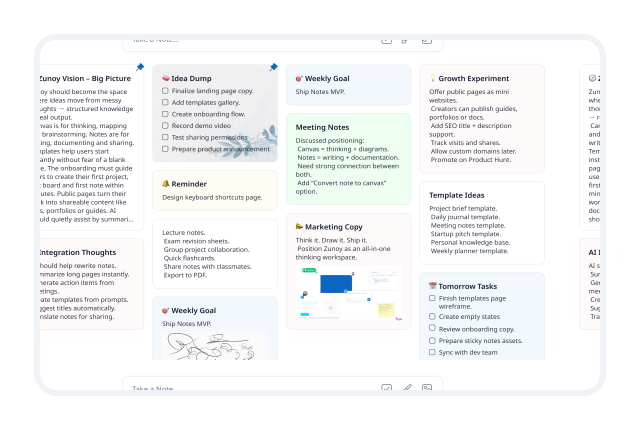
Online sticky notes adapt to whatever you're working on. Whether you need individual scratchpads or sticky notes for teams, here's how different users put them to work:

Idea dump
that thought at 2am, the random insight, the "what if" that just came to you. Get it down before it disappears forever.

Weekly goals
write them down Sunday, keep them visible all week, cross them off as you go. Your week stays focused.

Meeting notes
capture the key points live using collaborative sticky notes, then move them into full notes after the meeting.

Marketing copy
headlines, taglines, email subject lines that popped into your head. Keep them all in one visible place.

Quick reminders
functioning like a quick reminders app to call back a client, check a document, or follow up on a task. Your memory, extended.

Research snippets
quotes, statistics, references you want to keep. Capture them now, organize them later when required.
SIMPLICITY BY DESIGN
Three Steps. That's It.
Online sticky notes are designed to be so frictionless that you actually use them. Experience true note taking without structure with no folders to choose. Just your thought and a quick note.
- 01
Create instantly
Open online sticky notes with one click. No title required. No folder selection. No formatting decisions. Just start typing to capture ideas fast.
- 02
Pin to your workspace
Pin notes to workspace sidebars — always visible, never buried. Your thinking layer stays front and center.
- 03
Link to a note when ready to expand
When that sticky thought becomes a full idea, expand it into a proper note with one click. The sticky note becomes the seed — the note becomes the growth.
ONE CLICK AWAY
Your Thinking Layer, Always Visible
Online sticky notes live in your sidebar where they belong. One click and you're adding a new one. They never interrupt your writing — they sit alongside your notes, supporting your thinking without getting in the way. Using sticky notes online ensures your ideas are seamlessly accessible across devices you wish to access.The best capture tool is one you actually use. Our online sticky notes are designed to be so frictionless that you do.

BUILT FOR EVERYONE
Sticky Notes Work for How You Work
Online sticky notes aren't just for one type of user. They work for anyone who needs to capture thoughts fast, providing powerful sticky notes for teams and individual thinkers alike.

Writers
Capture headlines, opening lines, and plot twists as they appear. Keep your best ideas close without waiting for the right document to add them.

Project Managers
Jot down action items, meeting takeaways, and follow-ups in real time. Move them into project notes when you’re ready to implement them.

Students
Capture lecture highlights, study questions, and assignment reminders as they come up. Review and expand them into study notes later.

Creatives
Sketch concepts, taglines, and visual ideas without breaking your flow. Keep creative thinking visible and accessible with sticky notes online.

Anyone
Capture quick thoughts, grocery lists, book recommendations, and things to Google. Keep them ready with online sticky notes for quick reminders.
A BETTER WAY
See How We Stack Up
Most capture tools are either too simple or too complex. Apple Notes is basic but disconnected. Google Keep is fast but lacks depth. Notion has structure but requires setup before you can write.
- Apple Notes is great for quick notes — but doesn't connect to a larger knowledge system.

- Google Keep is fast — but lacks the ability to expand into structured notes.

- Notion is powerful — but expects you to choose a database before you've written a word.

- Obsidian has great linking — but lacks frictionless sticky notes online for fast capture.

VS
VS

Zunoy Canvas
Zunoy Notes gives you the best of all worlds — instant online sticky notes that grow into structured knowledge, alongside sticky notes for teams included in every plan.
FAQ’s
Frequently Asked Questions
What are Sticky Notes in Zunoy Notes?
Sticky Notes are a quick capture space for thoughts, ideas, and reminders that lets you save information instantly without creating a full note. They live in your sidebar, always visible and one click away — so you never lose a thought while working.
When should I use Sticky Notes?
Use them when you need to capture something quickly without thinking about where it belongs or how it should be formatted. If a thought hits and you need to get it down before it disappears, that's what Sticky Notes are for.
Do Sticky Notes require a folder or category?
No. Sticky Notes are created instantly without any structure, folders, or setup. Just the thought and a sticky note. No decisions needed.
How are Sticky Notes different from regular notes?
Sticky Notes are designed for speed and simplicity — no folders, no titles, no formatting decisions. Regular notes are structured and used for detailed writing and organization. Sticky Notes are where ideas land; regular notes are where they grow.
Can I convert a Sticky Note into a full note?
Yes. When a sticky thought becomes a full idea, expand it into a proper note with one click. The sticky note becomes the seed — the note becomes the growth. All your context carries over automatically.
Where do Sticky Notes appear inside the app?
Sticky Notes live in your workspace sidebar — always visible, never buried. One click and you're adding a new one. They never interrupt your writing; they sit alongside your notes, supporting your thinking without getting in the way.
CONNECTED KNOWLEDGE
Capture Every Thought. No Structure Required.
Your best ideas don't wait. Online sticky notes in Zunoy Notes give them a home the moment they arrive — visible, accessible, ready to grow into something bigger.