Visual Mind Map — Your Knowledge Has a Shape
See how your ideas connect. Turn linked notes into an interactive visual mind map and explore your knowledge from a whole new perspective using our visual knowledge management tools.

Free to start
No credit card required
Visual MindMap
Unlimited Notes
Folder Structure
THE PROBLEM
Your ideas don't live in folders.
Research connects to projects. Projects connect to meetings. Meetings connect to decisions. But folders pretend everything belongs in one place.
The result? Knowledge gets stored instead of explored, hindering true knowledge discovery. Your thinking isn't flat — your notes shouldn't be either.
BEYOND FOLDERS
Your Knowledge is a Network, Not a Filing Cabinet
Folders are built for storage. Your thinking is built for connection.
SEE BIGGER PICTURE
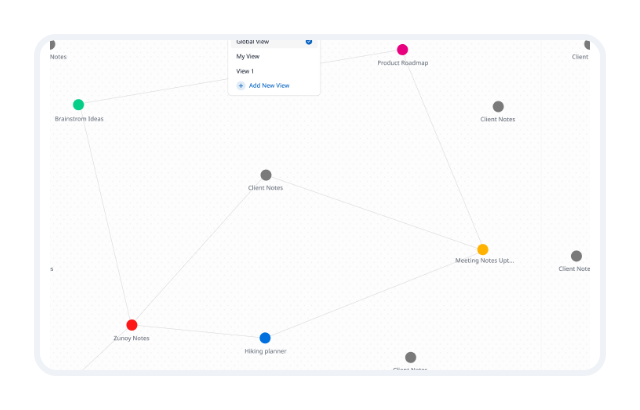
Your entire knowledge. Finally visible in a visual mind map.
Every note becomes part of something larger. A meeting note connects to a project. A project connects to research. Research connects to ideas you forgot that you even had in the first place.
The more you write, the more the map reveals. Not just what you know. But how everything connects organically within your brainstorming software.
THE MAP TYPES
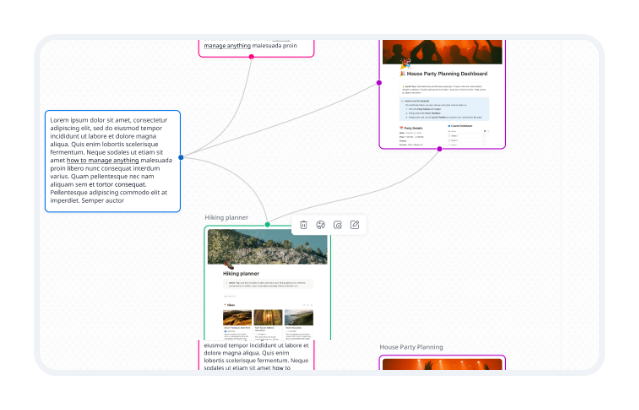
Connections appear automatically.
You shouldn't have to spend hours organizing information. As notes and mindmap features interact, relationships begin to appear automatically. The more knowledge you create, the smarter the map becomes in this brainstorming software.

Linked Notes
Manually connect related notes to build a structured connected knowledge base.

Backlinks
Automatically show which notes feature bidirectional links to the one you're viewing.

Glossary Relationships
Define terms once and see how they connect across your workspace.

Related References
Enhance knowledge discovery by finding connections you didn't know existed based on content similarity.
Connected Topics
Surface themes and patterns across your knowledge network.
EXPLORE FASTER
Navigate knowledge the way you think.
Click any node. Open any note. Jump between connected ideas. Discover information you would've never found through folders alone.Your map isn't just a visualization. It's a faster way to explore everything you know, making it the ultimate visual knowledge management solution.

Click any node
Open the corresponding note instantly
Drag and organize
Rearrange nodes visually to see connections more clearly
Color-code by category
Assign colors to projects, topics, or statuses for visual clarity
Discover related ideas
See notes you might have forgotten existed, surfaced through automatic note linking
Filter by tag
Focus on specific topics or projects
Collapse and expand
Zoom in to detail or out to the big picture
BUILT FOR THINKERS
Designed for how you think.

Researchers
Connect sources, findings, references, and insights without losing context. Build a research mapping graph that grows with your work and reveals connections you might have missed.

Writers
Visualize topics, themes, storylines, and supporting ideas. See how your content connects — from outline to final draft using this intuitive brainstorming software.

Students
Connect concepts across courses, subjects, and study notes. Understand the big picture and how individual topics relate.

Teams
Build a shared understanding of projects, processes, and knowledge. Every team member sees the same connected picture — no silos.
A BETTER WAY
See how we stack up against the alternatives.
Most note-taking apps treat your notes as files in folders. They're organized by where you put them, not by how they connect.



VS
VS

Zunoy Canvas
Zunoy Notes gives you the best of all worlds — an interactive, living knowledge network that grows with your thinking, included in every plan.
FAQ’s
Frequently Asked Questions
What is a visual mind map?
A visual mind map is an interactive way to represent your notes as connected ideas, helping you understand relationships across your knowledge instead of viewing information in isolation.
Is this a knowledge graph or a mind map?
It combines both. It blends the flexible exploration of a mind map with the structured relationships of a knowledge graph.
Can I see my entire knowledge at once?
Yes. Global View lets you open your complete workspace as one connected visual map.
How does Visual Mind Map work in Zunoy Notes?
Each note becomes a node in a visual system, and connections between notes form a living knowledge graph that evolves as you work.
Do I need to manually connect everything?
No. Connections can be created manually, but they also form automatically through backlinks, references, and related notes.
Can I focus on a specific idea or project?
Yes. Focus View and Custom Views allow you to zoom into specific notes or topics without losing context.
CONNECTED KNOWLEDGE
Your knowledge is more connected than you think.
The best ideas often live between notes. This visual thinking tool helps you uncover those connections, discover new insights, and explore knowledge in a way folders never could.

Notes
Zunoy online notes helps you capture every idea, organise the knowledge behind it.
Operational
Mail Us
support@zunoy.com
Copyright © 2026 - Mentcube Innovations Pvt Ltd.. All Rights Reserved.
v0.1.227