Create Complete Mind Maps with AI—Then Make Them Your Own
Generate structured mind maps from a single prompt, expand ideas with your team, and refine every branch on an infinite collaborative whiteboard. Zunoy Canvas is the ultimate AI mind map generator that combines intelligent automation with real-time collaboration so brainstorming moves from inspiration to action instantly.Every brainstorming session starts with the same challenge: getting the first ideas onto the board. Describe a topic in natural language, let the mind map generator AI create the initial framework, then collaborate with your team to expand, reorganise, and improve every branch.Instead of replacing creativity, AI removes the slowest part of the process — starting from a blank canvas.

Free Forever
AI Powered
Infinite Canvas
Real-Time Collaboration
INTRODUCING ZUNOY CANVAS
An AI Mind Mapping Tool Built for Collaborative Thinking
Many AI mind mapping tools stop once the diagram is generated. Zunoy Canvas doesn't — as a comprehensive AI mind map generator it produces the first draft, then hands it to your team on an infinite collaborative whiteboard.
FROM PROMPT TO COLLABORATION
Six Ways Teams Create AI Mind Maps with Zunoy Canvas
From product launches to study sessions — see how teams turn a single prompt into a finished plan.

The Product Planning Session
A product manager prompts: "Plan our Q4 product launch." The AI mind map generator instantly structures goals, milestones, risks, user research, and feature ideas. Instead of spending the first 20 minutes drawing branches, the team immediately starts improving them together.
The Content Strategy Workshop
Planning content usually means juggling keywords, campaigns, social media, and deadlines. AI organizes these ideas into a structured mind map, giving marketers a clear starting point. The team expands each branch with content ideas, assigns priorities, and turns brainstorming into an actionable content plan.
The UX Research Workshop
Researchers begin with a customer problem instead of a blank board. The mind map generator AI generates journey stages, user goals, pain points, and opportunities, letting the team focus on validating insights rather than creating the initial structure.
The Study Session
A student enters a chapter title before an exam. The AI mind mapping tool creates a visual overview of the key concepts, which the student annotates with examples, formulas, and personal notes. The finished mind map becomes an interactive revision guide.
The Project Kickoff
Every new project starts with questions, requirements, and dozens of ideas. AI groups them into logical categories, helping the team understand the bigger picture from the beginning. Tasks, dependencies, and discussions remain connected on the same canvas.
The Brainstorming Meeting
Instead of waiting for someone to organize ideas after the meeting, AI structures them while the discussion is still fresh. Team members add suggestions, merge duplicate branches, and vote on priorities before anyone leaves the room.
THE PROBLEM
Great Ideas Are Easy to Generate. Organizing Them Is the Hard Part.
Ideas rarely arrive in perfect order. During remote teamwork sessions, conversations jump chaotically between problems, solutions, and new opportunities — and by the end of the meeting valuable insights are scattered across sticky notes, documents, and chat messages. Traditional software treats brainstorming as a solo activity, and standard AI tools usually leave teams with static images. Zunoy Canvas bridges that gap: the mind map generator AI gives you a structured starting point, while the collaborative whiteboard becomes the dynamic space where ideas are refined and turned into real plans.
BUILT FOR FASTER THINKING
Everything You Need Beyond AI-Generated Mind Maps
AI can create a starting point — but great ideas evolve through human collaboration. Zunoy Canvas combines intelligent AI mind map creation with robust visual thinking tools.
AI Mind Map Generation
Describe your topic in natural language and receive a structured mind map within seconds.

Infinite Canvas
Zoom out for the big picture or dive into the smallest detail without worrying about space.

Templates
Start with proven brainstorming, planning, and strategy frameworks when you need inspiration beyond AI.
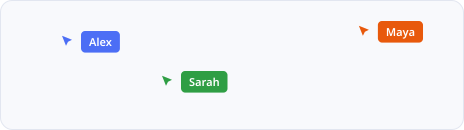
Real-Time Collaboration
Multiple teammates can edit the same mind map simultaneously, making brainstorming feel natural instead of sequential.
AI Mind Map Generation
Describe your topic in natural language and receive a structured mind map within seconds.
Infinite Canvas
Zoom out for the big picture or dive into the smallest detail without worrying about space.
Templates
Start with proven brainstorming, planning, and strategy frameworks when you need inspiration beyond AI.
Real-Time Collaboration
Multiple teammates can edit the same mind map simultaneously, making brainstorming feel natural instead of sequential.
AI Mind Map Generation
Describe your topic in natural language and receive a structured mind map within seconds.
Infinite Canvas
Zoom out for the big picture or dive into the smallest detail without worrying about space.
Templates
Start with proven brainstorming, planning, and strategy frameworks when you need inspiration beyond AI.
Real-Time Collaboration
Multiple teammates can edit the same mind map simultaneously, making brainstorming feel natural instead of sequential.
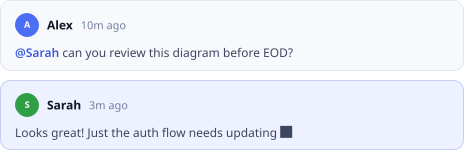
Comments
Keep discussions attached to specific branches so feedback never gets lost in chat messages or emails.

Sticky Notes
Capture quick thoughts, questions, and suggestions while ideas are still fresh.
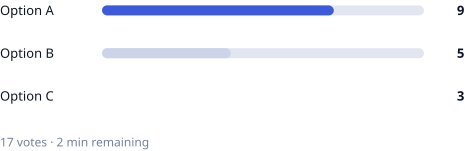
Voting Cards
Prioritize ideas together and identify what the team wants to explore next.

Flowcharts
Transform brainstormed ideas into structured processes without leaving the canvas.
Comments
Keep discussions attached to specific branches so feedback never gets lost in chat messages or emails.
Sticky Notes
Capture quick thoughts, questions, and suggestions while ideas are still fresh.
Voting Cards
Prioritize ideas together and identify what the team wants to explore next.
Flowcharts
Transform brainstormed ideas into structured processes without leaving the canvas.
Comments
Keep discussions attached to specific branches so feedback never gets lost in chat messages or emails.
Sticky Notes
Capture quick thoughts, questions, and suggestions while ideas are still fresh.
Voting Cards
Prioritize ideas together and identify what the team wants to explore next.
Flowcharts
Transform brainstormed ideas into structured processes without leaving the canvas.

Mermaid Diagrams
Generate technical diagrams alongside your mind maps for engineering, architecture, and technical planning.
Drawing Tools
Sketch, annotate, and connect concepts naturally during discussions.
Export
Download boards as PDF or PNG for presentations, documentation, or sharing with stakeholders.
Mermaid Diagrams
Generate technical diagrams alongside your mind maps for engineering, architecture, and technical planning.
Drawing Tools
Sketch, annotate, and connect concepts naturally during discussions.
Export
Download boards as PDF or PNG for presentations, documentation, or sharing with stakeholders.
Mermaid Diagrams
Generate technical diagrams alongside your mind maps for engineering, architecture, and technical planning.
Drawing Tools
Sketch, annotate, and connect concepts naturally during discussions.
Export
Download boards as PDF or PNG for presentations, documentation, or sharing with stakeholders.
CHOOSE THE RIGHT TOOL
Zunoy Canvas vs Other AI Mind Mapping Tools
Compare platforms built for continuous visual communication.
| FEATURE | Zunoy Canvas | Miro AI | Whimsical | Xmind AI | Boardmix AI |
|---|---|---|---|---|---|
AI Mind Map Generation |  | | | | |
Infinite Canvas | | | Limited |  | |
Real-Time Collaboration | | | | Limited | |
Sticky Notes | | | | | |
Comments | | | | | |
Voice Room | | | | | |
Mermaid Diagrams | | | | | |
Flowcharts | | | | Limited | |
Templates | | | | | |
Export PDF & PNG | | | | | |
Everything You Need to Brainstorm Together
Free forever: 3 collaborative boards, AI mind map generation, up to 5 editors and 10 viewers, infinite canvas, sticky notes, templates, comments, Mermaid diagrams, and export — no credit card required.
While many platforms can generate a diagram, Zunoy Canvas is the only AI mind map generator specifically designed for what comes next — collaboration, discussion, and continuous iteration in real time.→ Compare all whiteboard tools
EXPLORE MORE WAYS TO COLLABORATE
Continue Visualizing Ideas with Zunoy Canvas
Mind Mapping for Teams
Collaborate on ideas in real time, organize discussions visually, and turn brainstorming into actionable plans.
Flowchart Creation
Transform complex processes into clear visual workflows using drag-and-drop shapes, AI, and collaborative editing.

UX Journey Mapping
Map every customer interaction, identify pain points, and collaborate on better user experiences with your entire product team.
Brainstorming Sessions
Capture every idea, encourage participation, and organize creative discussions without losing momentum.
Software Architecture Mapping
Design technical systems, document dependencies, and collaborate visually with engineering teams.
FREQUENTLY ASKED QUESTIONS
Everything You Need to Know About AI Mind Map Creation
What is an AI mind map?
An AI mind map is a visual diagram automatically generated from a text prompt. Instead of building branches manually, a mind map generator AI instantly organises your topic into a structured visual hierarchy that you can edit, expand, and customise.
Can I edit an AI-generated mind map?
Yes. Every map generated by our AI mind map generator is fully editable — move branches, rename topics, add sticky notes, insert images, and expand ideas collaboratively with your team.
Can multiple people collaborate on the same AI mind map?
Absolutely. Team members can join the same board, edit branches simultaneously, leave comments, and brainstorm together in real time.
Can AI generate mind maps from simple prompts?
Yes. Even a short prompt like "Product launch plan" or "Digital marketing strategy" is enough for AI to generate a structured starting point that your team can build upon.
Can I convert my mind map into a flowchart?
Yes. Ideas created as mind maps can easily evolve into flowcharts, process diagrams, and workflows without switching to another application.
Does Zunoy Canvas work for remote teams?
Yes. Teams can collaborate from anywhere using a shared board with live editing, comments, built-in voice rooms, and instant updates.
Is there a free AI mind mapping tool?
Yes. Zunoy Canvas offers a free plan that includes AI mind map creation, collaborative whiteboards, templates, and core visual collaboration features without requiring a credit card.
Can I use AI mind maps for education and workshops?
Yes. Teachers, students, trainers, consultants, and workshop facilitators use AI mind maps to simplify complex topics, encourage participation, organize discussions, and make collaborative learning more engaging.
How does AI create a mind map?
AI analyzes your prompt, identifies the main topic, groups related concepts, and arranges them into logical branches. You can then reorganize, delete, or add new ideas as your thinking evolves.
Is AI mind mapping better than creating one manually?
AI speeds up the initial brainstorming process by creating a structured starting point. Manual editing is still valuable for refining ideas, prioritizing concepts, and adding team knowledge.
What can I use AI mind maps for?
AI mind maps are useful for brainstorming, project planning, product strategy, UX research, meeting planning, studying, content creation, marketing campaigns, and knowledge management.
Does Zunoy Canvas support collaborative brainstorming?
Yes. Zunoy Canvas combines AI mind map generation with live collaboration, allowing multiple users to contribute, organize ideas, and make decisions together on the same board.
Can I add notes and comments to AI-generated mind maps?
Yes. Add sticky notes, comments, links, and supporting information anywhere on the canvas so discussions remain connected to the ideas they relate to.
Can I export my AI mind maps?
Yes. Finished mind maps can be exported as PDF or PNG for presentations, documentation, workshops, or sharing with clients and stakeholders.
What makes Zunoy Canvas different from other AI mind mapping tools?
Many AI mind mapping tools stop after generating the diagram. Zunoy Canvas continues the workflow by combining AI generation with an infinite collaborative whiteboard, real-time editing, templates, diagrams, and visual planning tools in one workspace.
START BRAINSTORMING SMARTER
Your Best Ideas Deserve More Than a Blank Canvas.
Every great project begins with a single idea, but exceptional outcomes require collaborative refinement. Let the ultimate AI mind map generator create the first draft, then build on it with your team in a shared, infinite workspace.Whether you're planning products, mapping research, preparing lessons, or running workshops, Zunoy Canvas gives you everything you need to think visually from start to finish.
Free Forever
AI Powered
Real-Time Collaboration
No Installation Required

Canvas
Zunoy Canvas is the free online whiteboard tool and visual collaboration software.
Operational
Mail Us
support@zunoy.com
Copyright © 2026 - Mentcube Innovations Pvt Ltd.. All Rights Reserved.
v0.1.227