Overtime Tracking Software That Approves Itself (Mostly)
Automatic OT calculation, manager approvals, and payout rules — all running without a single follow-up email.
FIVE CONTROLS, FULL COMMAND
Everything OT Needs, Configured Once

OT Configuration
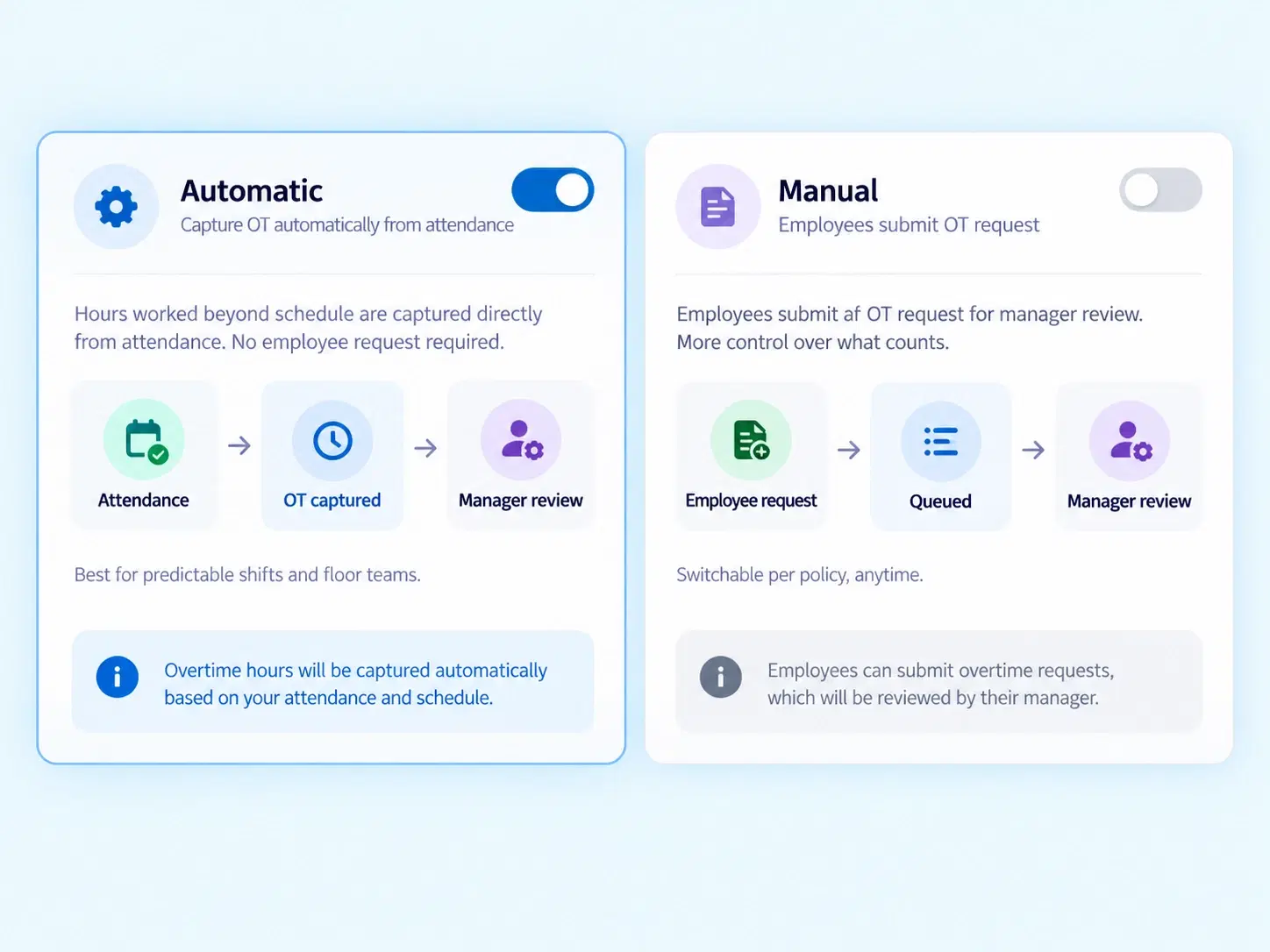
Choose automatic attendance-based OT calculation, or let employees raise manual OT requests — whichever fits your workforce.

Cycle & Deadline Controls
Set monthly OT cut-off dates, manager approval deadlines, and auto-approval fallbacks so nothing sits pending forever.

Threshold & Pay Rules
Define minimum and maximum OT thresholds, choose Payout or Comp-Off, set pay rates like 1.5x, and control payslip breakdowns.

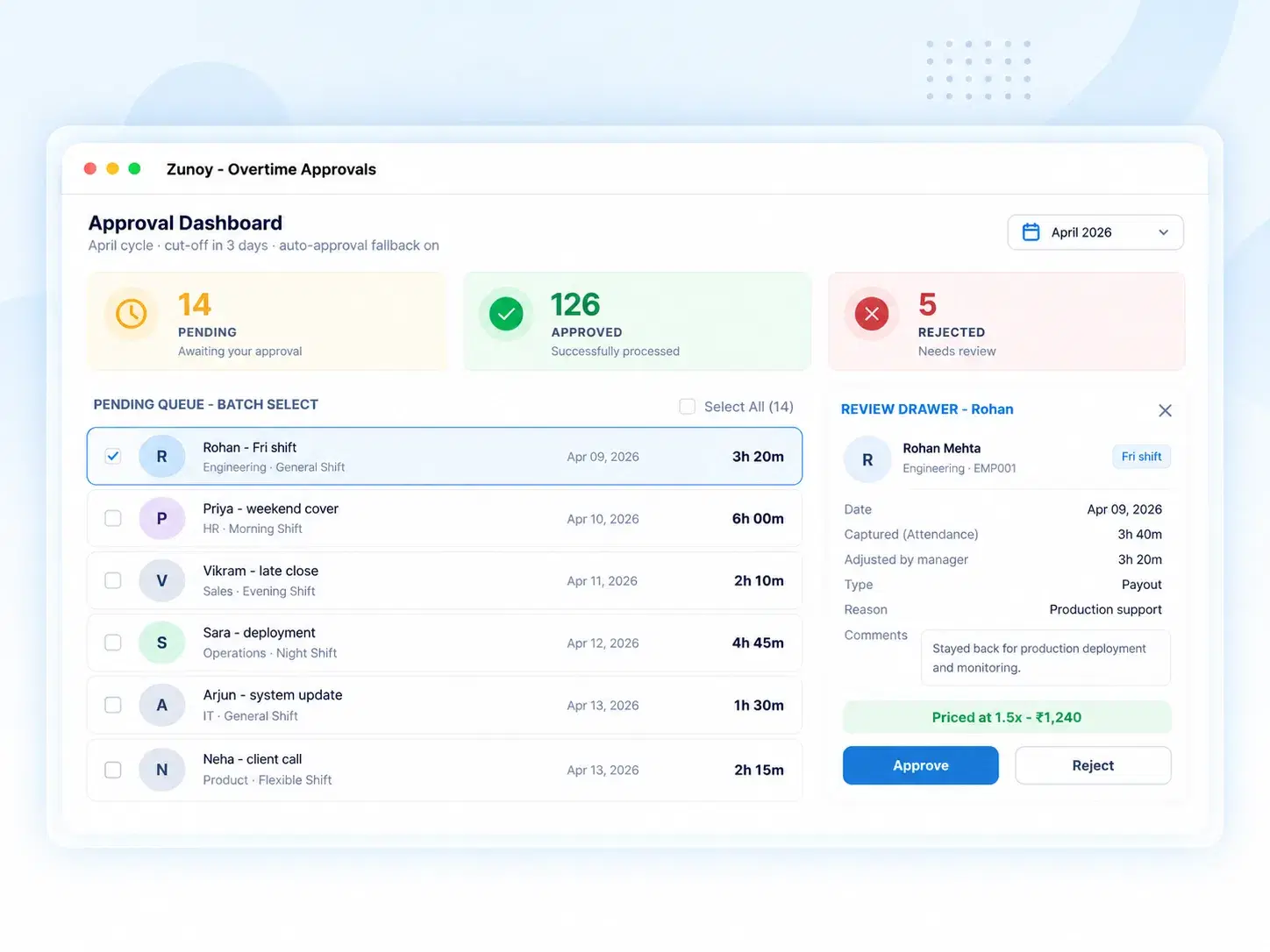
Approval Dashboard
One queue for pending, approved, and rejected OT requests — with batch processing and live metric counters.

Review Drawer
A dedicated view for managers to check individual OT breakdowns, adjust final hours, and leave review remarks.
AUTOMATIC OR MANUAL
Attendance Regularization Without the Back-and-Forth Emails
Not every OT hour needs a conversation. With automatic, attendance-based OT calculation, hours worked beyond schedule are captured directly — no employee request required. Prefer more control? Switch to manual mode and let employees submit requests for manager review instead.
Automatic attendance-based OT capture
Manual employee-raised OT requests
Switchable per policy, anytime
OT Pay Rules That Don’t Need Recalculating Every Month
Minimum and maximum OT thresholds
Cap what counts, and set a floor below which OT does not accrue.
Choice of Payout or Comp-Off
Compensate in pay, or in equivalent time off — per policy.
Custom pay rates (e.g., 1.5x standard)
Set the multiplier once; the system applies it to every eligible hour.
Payroll slip breakdown settings
Control exactly how OT appears on the payslip.
Employee OT Calculator — built in
Every eligible hour priced correctly
Rate applied automatically (1.5x, 2x, or custom)
Payout or Comp-Off resolved per policy
Costed before it ever reaches payroll
FROM REQUEST TO PAYOUT
How an OT Request Moves Through the System
Every hour, from capture to settlement, on one track.
QUESTIONS, ANSWERED
Frequently Asked Questions
What is overtime tracking software?
It’s a system that automatically records, calculates, and manages employee overtime hours based on attendance data or manual requests, simplifying OT approval and payout.
What happens if a manager misses the approval deadline?
An auto-approval fallback kicks in once the deadline passes, ensuring OT requests don’t stay stuck pending indefinitely due to delayed manager action.
Is this considered an overtime management system?
Yes, it functions as a complete overtime management system — covering configuration, thresholds, approvals, and payroll breakdown in a single connected workflow.
Can OT be calculated automatically from attendance?
Yes, automatic mode calculates OT directly from attendance-based hours, removing the need for employees to manually submit a request for standard overtime.
What’s the difference between Payout and Comp-Off?
Payout compensates overtime in pay, calculated at a set rate like 1.5x. Comp-Off instead offers equivalent time off in place of monetary payment.
How does attendance regularization relate to OT approvals?
Attendance regularization ensures accurate attendance records before OT is calculated, so overtime approvals are always based on correct, verified working hours.
Let OT Approvals Run Without Chasing a Single Signature
From calculation to payout, every OT hour is tracked, reviewed, and settled automatically.
Automatic or manual OT capture
Configurable thresholds and pay rates
Batch approvals with full audit trail

HRMS
Manage your workforce -- attendance, payroll, and leave, all in one place.
Operational
Mail Us
support@zunoy.com
Copyright © 2026 - Mentcube Innovations Pvt Ltd.. All Rights Reserved.
v0.1.227