Attendance Reporting Software That Turns Punches Into Answers
Daily summaries, OT history, shift coverage — filtered, exported, and ready before payroll even asks.
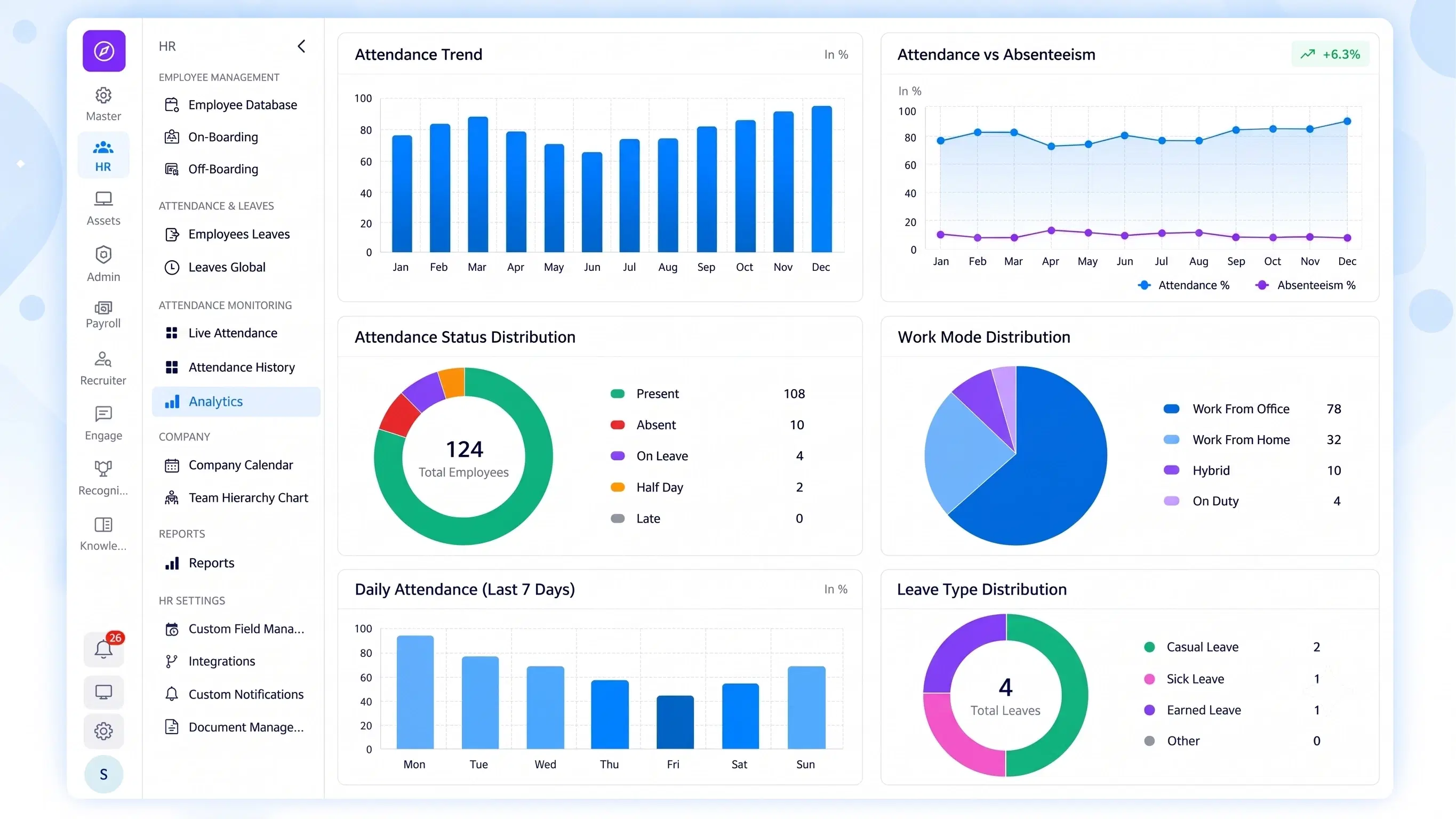
FOUR REPORTS, ONE PLACE
Everything HR Needs to Pull, Without Building It From Scratch

Daily Attendance Summaries
A day-by-day snapshot of who was present, absent, or late — no manual tally required.

Shift Coverage Reports
See exactly which shifts were covered, understaffed, or overlapping, at a glance.

OT History & Audit Trail
A monthly log of total OT days, hours, submission dates, and Approved/Rejected status — fully traceable.

Data Export
Instant download of monthly attendance and OT payroll reports, ready for finance or compliance.
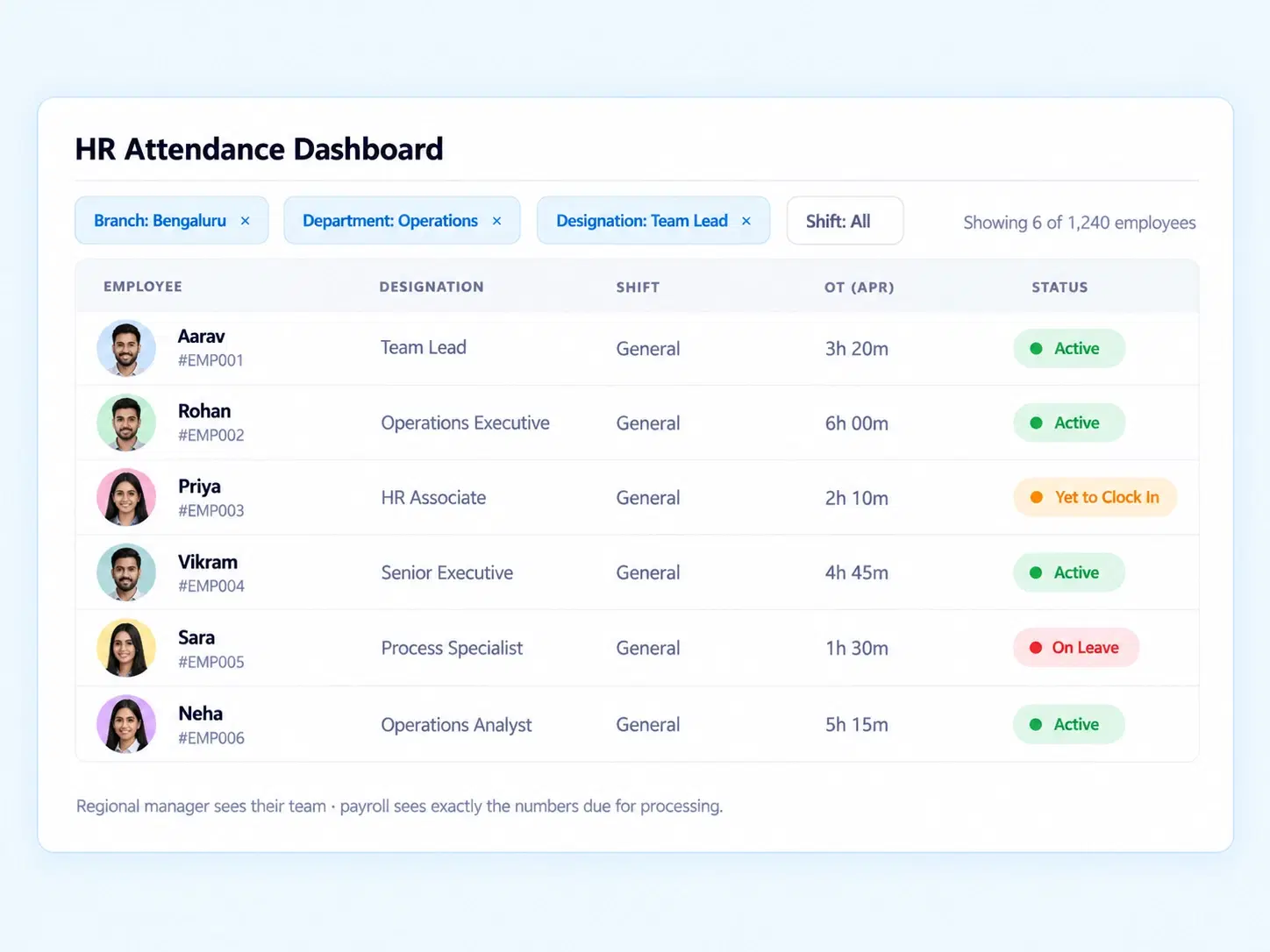
FILTER, THEN FIND
An HR Attendance Dashboard That Narrows Down to What You Actually Need
Not every report needs the whole company in it. Multi-level filtering lets you slice data by branch, department, designation, or shift — so a regional manager sees their team, and payroll sees exactly the numbers due for processing.
Filter by branch or location
Filter by department or designation
Filter by shift type
EVERY OT HOUR, LOGGED
From Submission to Status — Fully Tracked
Every OT entry moves through the same four checkpoints, automatically.
BUILT TO DECIDE FASTER
Employee Attendance Analytics That Actually Change What You Do Next
Numbers only help if they’re easy to read and quick to act on.

Faster Payroll Cycles
Export reports the moment the month closes.

Fewer Disputes
A visible audit trail settles OT questions instantly.

Sharper Decisions
Shift coverage gaps show up before they become a problem.

Less Manual Work
Filtered reports replace hours of spreadsheet building.
QUESTIONS, ANSWERED
Frequently Asked Questions
What is attendance reporting software?
It’s a system that automatically compiles employee attendance data into structured reports, covering daily summaries, OT history, and shift coverage, eliminating manual tracking and reducing reporting errors significantly.
What does the OT audit trail show?
It displays a monthly log of total OT days, hours worked, submission dates, and status tracking, clearly marked as Approved or Rejected for complete traceability and audit readiness.
Is there a dedicated HR attendance dashboard?
Yes, all reporting data is available through a centralized dashboard, giving HR teams a single, unified view of attendance, shift coverage, and overtime trends across the organization.
Can I filter reports by department or branch?
Yes, multi-level filtering lets you narrow reporting data by branch, department, designation, or shift, so every stakeholder only sees the numbers that are actually relevant to them.
Can I export attendance and OT reports?
Yes, data export options let you instantly download monthly attendance and OT payroll reports, ready to hand directly off to finance, compliance, or external audit teams.
How current is the time and attendance reports data?
Reports reflect daily attendance summaries and OT logs as they’re recorded in real time, so the data stays accurate and current without any manual updates needed from HR.
Stop Building Reports. Start Reading Them.
Every attendance and OT number, filtered, exported, and audit-ready in a few clicks.
Daily attendance & shift coverage summaries
Full OT history with audit trail
Multi-level filtering by branch, dept, shift
Instant export for payroll

HRMS
Manage your workforce -- attendance, payroll, and leave, all in one place.
Operational
Mail Us
support@zunoy.com
Copyright © 2026 - Mentcube Innovations Pvt Ltd.. All Rights Reserved.
v0.1.227