Payroll Processing Software That Closes the Cycle Without a Single Spreadsheet
Pay groups, off-cycle runs, bank transfers, payslips — configured once, executed automatically every cycle after.
FIVE STAGES, ONE RUN
Everything Between “Start Payroll” and “Payslips Sent”

Pay Groups & Configuration
Set processing dates, payment dates, and pay frequencies per group, aligned to how each part of your company actually runs.

Run Payroll & Summary
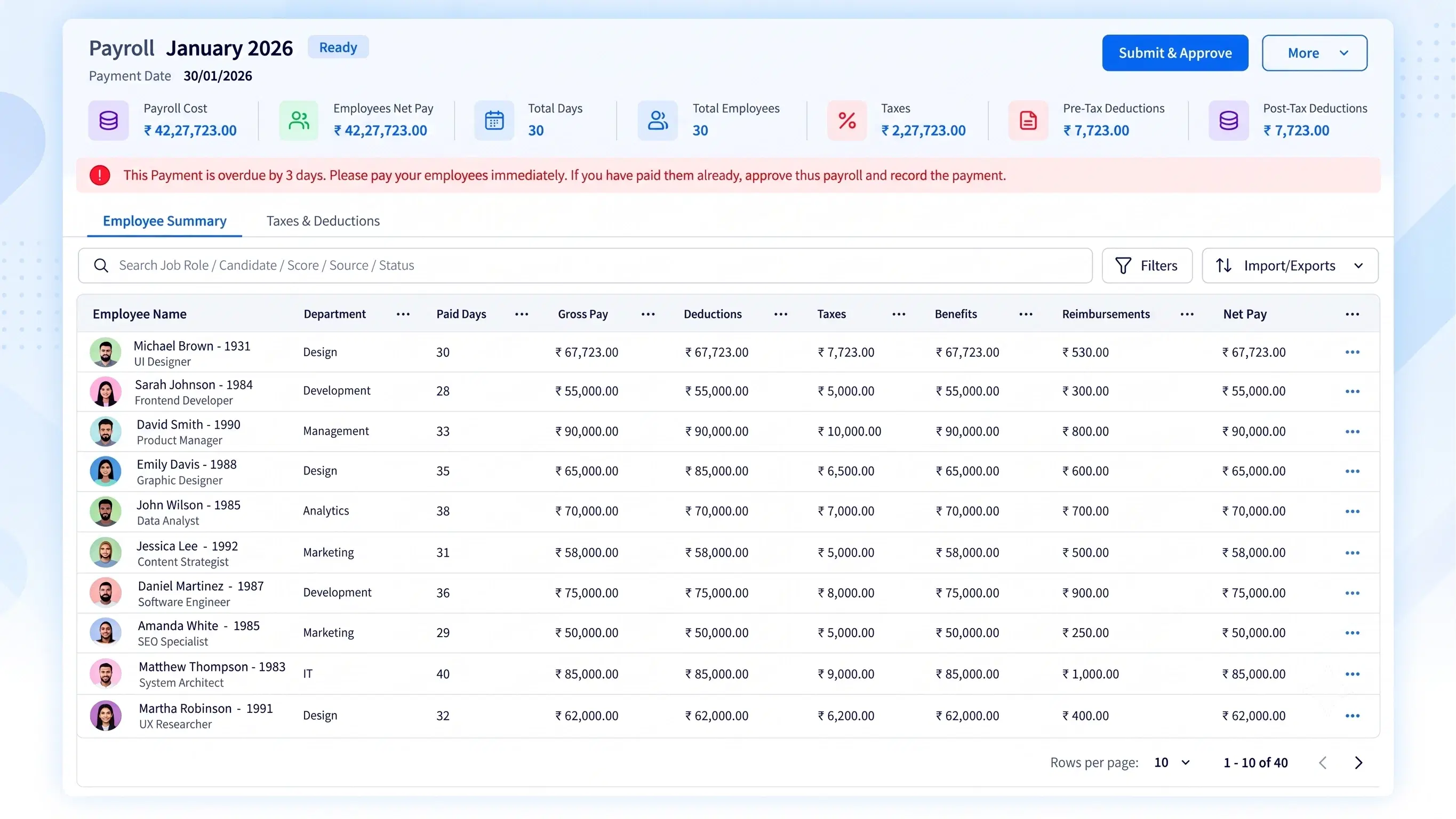
A full Pay Run History, period-specific summaries with totals and warnings, and employee-level breakdowns of paid days and net pay.

Off-Cycle & Adjustments
Execute ad-hoc pay runs and add specific employees with custom hours or earnings, outside the standard monthly cycle.

Bank & Payment Integration
Set up direct bank file transfers, generate bank advice for bulk processing, and record finalized payments.

Payslips & Alerts
Customize payslip templates and trigger automated email notifications the moment payroll is finalized.
ONE RUN, FULLY LOGGED
An Automated Payroll System That Shows Its Work, Not Just the Result
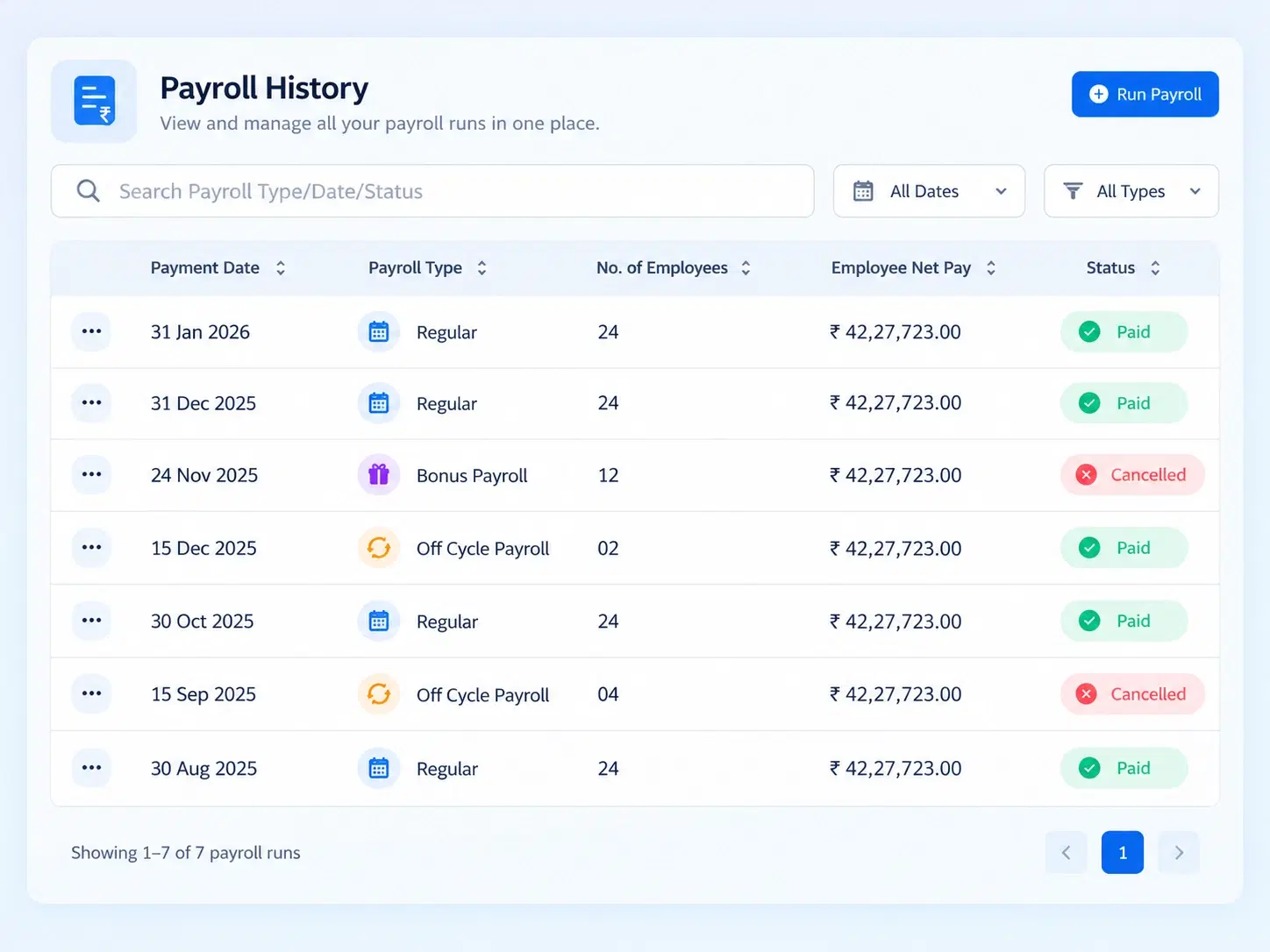
A finalized pay run shouldn’t be a black box. Every cycle logs its own Pay Run Summary — financial totals, warnings, and employee-level detail on paid days, net pay, and payment mode — so finance can trace exactly what happened, without re-auditing the numbers manually.
Full Pay Run History, cycle by cycle
Financial totals and warnings per run
Employee-level paid days and net pay detail
OUTSIDE THE CYCLE
When Standard Payroll Isn’t Enough
Not every payment fits neatly into the monthly run — off-cycle processing handles what doesn’t.

Ad-Hoc Pay Runs
Process payments outside the regular monthly schedule entirely.

Custom Hours & Earnings
Add specific employees with adjusted figures for that run only.

No Disruption to Standard Cycle
Off-cycle runs don’t affect the next scheduled payroll.

Full Traceability
Every off-cycle run logs into the same Pay Run History.
RUN TO BANK
How a Pay Run Moves From Calculation to Confirmed Payment
Configured once, then the same five stages every cycle.
PAYSLIPS, PERSONALIZED
An Online Payslip Generator That Doesn’t Look Like a Template
A payslip is often the only payroll document an employee actually reads closely — it should look like it belongs to your company.

Customizable Templates
Match payslip design to your company’s format and branding.

Automated Finalization Alerts
Employees notified by email the moment payroll closes.

Consistent Every Cycle
Same template, same detail, every single pay run.

Ready to Download
Payslips generated and accessible without a manual export step.
QUESTIONS, ANSWERED
Frequently Asked Questions
What is payroll processing software?
It’s a system that automates salary calculation, pay runs, bank transfers, and payslip generation, replacing manual payroll preparation with a configured, repeatable process run each pay cycle.
How does the automated payroll system handle off-cycle payments?
Off-cycle runs let you process ad-hoc payments outside the standard monthly cycle, adding specific employees with custom hours or earnings without disrupting the regular scheduled payroll run.
Can bank transfers be handled directly through the system?
Yes, direct bank file transfers can be configured, and bank advice can be generated and downloaded for bulk processing, simplifying payment execution for finance teams.
Can I set different pay frequencies for different teams?
Yes, Pay Groups & Configuration lets you define separate processing dates, payment dates, and frequencies per group, so different teams or departments can follow distinct payroll cycles.
What does a Pay Run Summary include?
It includes period-specific financial totals, warnings flagged during processing, and employee-level detail covering paid days, net pay, and payment mode for that particular pay run.
Is the online payslip generator customizable?
Yes, payslip templates can be customized to match your company’s format, and automated email alerts notify employees the moment that cycle’s payroll is finalized.
Run Payroll Once. Let the System Handle Every Cycle After.
From pay groups to payslips, every step configured once and executed automatically, cycle after cycle.
Pay Groups
Off-Cycle Runs
Bank Integration
Payslip Alerts

HRMS
Manage your workforce -- attendance, payroll, and leave, all in one place.
Operational
Mail Us
support@zunoy.com
Copyright © 2026 - Mentcube Innovations Pvt Ltd.. All Rights Reserved.
v0.1.227