Compensation Management Software That Treats Every Salary Component as Its Own Rule
Earnings, deductions, reimbursements, and revisions — structured once, visible to everyone who needs to see them, updated automatically after.
FIVE VIEWS, ONE RECORD
Everything Compensation Touches, Connected in One System
From how a salary is built to how it's reviewed months later, every piece stays linked to the same employee record.

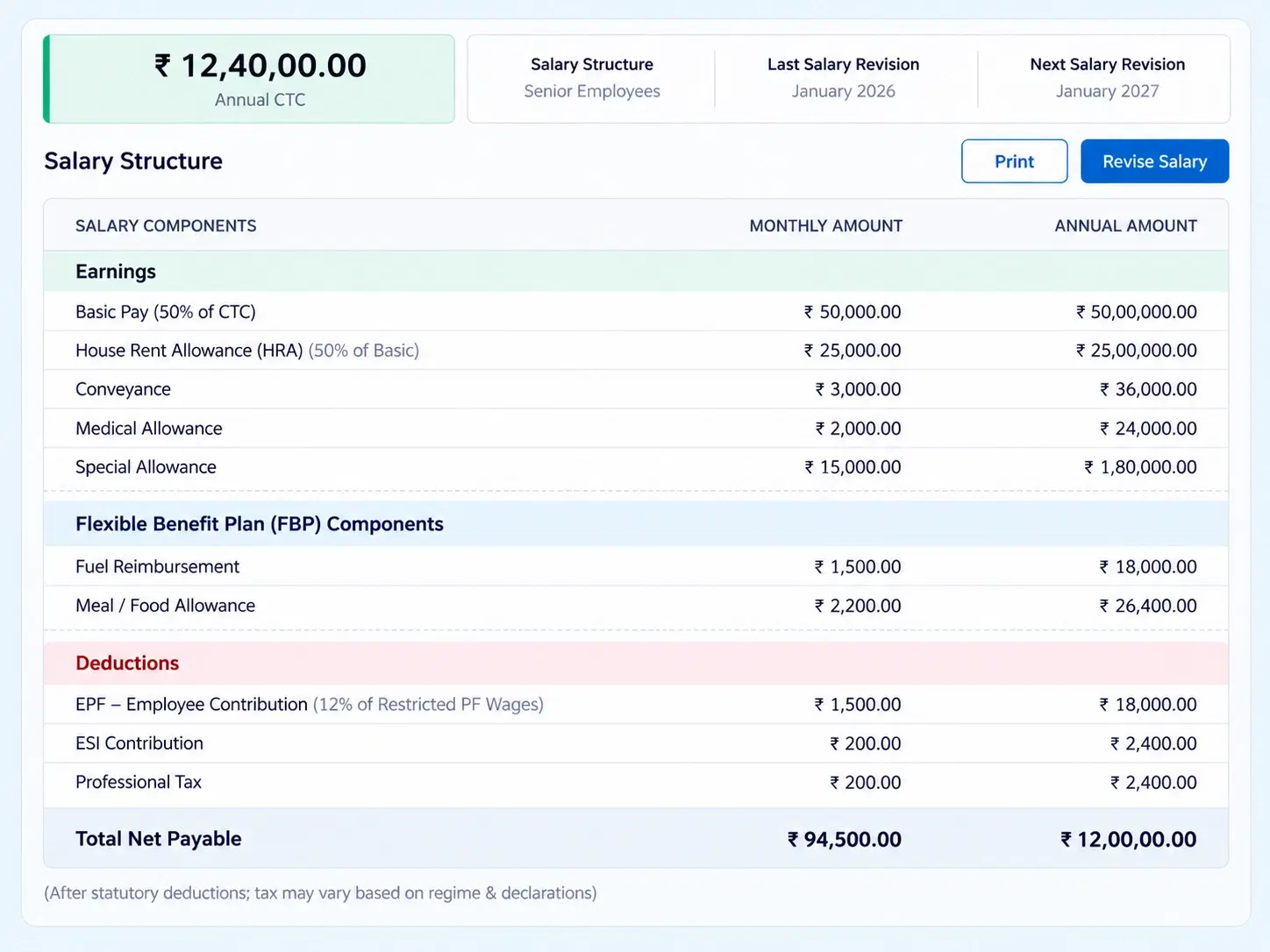
Salary Components & Structures
Define earnings, deductions, reimbursements, and custom benefits under CTC or hourly models.

Directory & Profile Management
A live employee directory with department, CTC, and pay structure visible instantly.

Compensation History
Log salary revisions, track changes over time, and route pending requests through approvals.

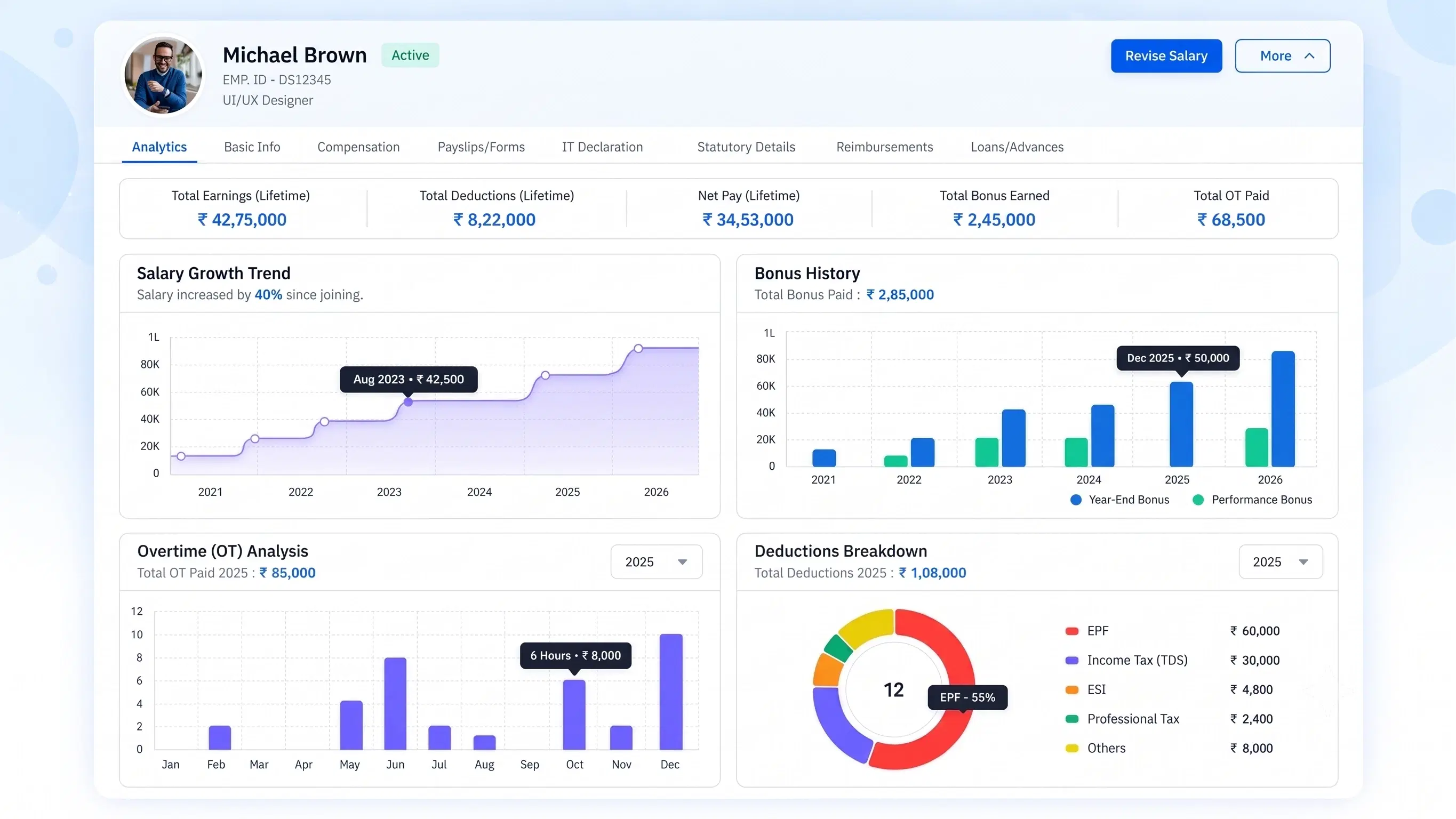
Employee Analytics
Individual tracking of earnings, deductions, overtime, and long-term salary growth.

Company Info Sync
Compensation aligned with the core company profile — name, industry, incorporation date, address.
BUILT FROM COMPONENTS
A Salary Management System That Builds Pay From the Ground Up, Not a Flat Number
A salary isn’t one figure — it’s earnings, deductions, reimbursements, and benefits, each with its own rule. Define gross-to-net calculation logic once, choose CTC or hourly as the foundation, and let decimal rounding stay consistent across every payslip, every cycle, without manual correction.
Custom earnings, deductions, and reimbursement components
CTC or hourly compensation models
Consistent gross-to-net calculation and decimal rounding
REVISION TO RECORD
How a Salary Revision Moves From Request to Reflected Change
Every change logged, routed, and applied on its effective date.
ONE PROFILE, EVERYTHING
Every Employee’s Compensation Picture, In One Place

Active Employee Directory
Real-time data on departments, CTC, and pay structures across the organization.
Payslip History
Full payslip records accessible directly from the employee’s profile.
Statutory & IT Data
Basic info, statutory details, and IT declarations housed within each profile.
Company-Aligned Records
Profiles synced with core company info like industry and incorporation date.Employee Self Service Payroll That Answers “How Much Have I Earned?” Instantly
Employees and managers get individual analytics — total earnings, deductions, overtime, and long-term salary growth trends — without a single request to HR.
Real-time earnings and deduction visibility
Every component of take-home pay, viewable by the employee any time.
Overtime tracked alongside base compensation
Extra hours and their pay shown on the same analytics view.
Long-term salary growth trends, self-viewable
Revision history rendered as a trend, not buried in a form.
QUESTIONS, ANSWERED
Frequently Asked Questions
What is compensation management software?
It’s a system that structures, calculates, and tracks employee salary components — earnings, deductions, reimbursements, and benefits — while managing revisions, approvals, and self-service visibility across the organization.
Does the salary management system support both CTC and hourly models?
Yes, you can configure compensation on either a CTC-based or hourly foundation, with gross-to-net calculation rules and decimal rounding applied consistently across whichever model you choose.
How are salary revisions tracked over time?
Compensation History logs every salary revision, routing pending changes through approval flows and preserving a complete timeline of how an employee’s pay has evolved.
Can I define custom salary components?
Yes, earnings, deductions, reimbursements, and custom benefits can all be configured individually, giving you full control over what makes up an employee’s compensation structure.
What information does an employee profile include?
Each profile houses basic information, statutory data, IT declarations, department and CTC details, and complete payslip history, giving a full compensation picture in one place.
Is there employee self service payroll access?
Yes, employees and managers can view individual analytics covering total earnings, deductions, overtime, and long-term salary growth trends directly, without needing to contact HR.
Build Compensation Once. Let Every Payslip Follow the Rule.
Salary components, revisions, and self-service analytics — all connected to the same employee record, automatically.
Component-level salary structures
Approval-routed revisions
Self-service earnings analytics

HRMS
Manage your workforce -- attendance, payroll, and leave, all in one place.
Operational
Mail Us
support@zunoy.com
Copyright © 2026 - Mentcube Innovations Pvt Ltd.. All Rights Reserved.
v0.1.227