Meetings Happen Once. The Useful Parts Should Stay.
Turn conversations into searchable transcripts, clear summaries, assigned action items, and notes that stay connected to the rest of your work.

Try Zunoy AI free
BYOA supported
Private by default
AI is included in every plan
Works across your entire workspace
The Meeting Ends. The Context Disappears.
Important Conversations Should Not Become Half-Remembered Follow-Ups.
A meeting can move quickly. Someone shares an important update, a decision gets made in passing, and three action items are mentioned before anyone has written down the first one.Afterward, people are left asking what was agreed, who owns the next step, or where the notes were saved. Those gaps create repeat conversations, missed follow-ups, and work that slows down for no good reason.Zunoy AI helps keep the meeting useful after it ends. It captures the conversation, turns it into a clearer record, and makes the important parts easier to find and act on.
A Better Record of Every Conversation
From Talking About Work to Moving Work Forward.
AI Meeting Notes turns meetings, voice notes, and recorded conversations into organized workspace knowledge. Instead of leaving with scattered notes or relying on memory, you leave with a searchable record of what happened and what needs to happen next.
Keep a complete record of the conversation
Pull out the important points without replaying everything
Turn follow-ups into clear action items
Connect meeting context to projects, people, and related notes
The Conversation, Plus What It Means.
AI Meeting Transcript
Get a written record of the conversation so important context does not disappear once the call ends. Review what was said, return to specific moments, and keep the full discussion available when you need it.
Voice Notes With Auto-Transcription
Capture an idea, update, or quick debrief as a voice note. Zunoy turns it into text so spoken thoughts can become usable notes instead of forgotten audio files.
Post-Meeting Summary
Skip the task of turning a long conversation into a clean update from scratch. AI creates a focused summary of the main discussion points, updates, and outcomes.
Action Items
Turn “someone should do this” into a clear next step. Pull out follow-ups from the conversation so owners, tasks, and deadlines are easier to track.
Auto-Link to Related Notes
Meeting notes become more useful when they live beside the work they relate to. Link conversations to projects, research, briefs, client notes, or previous meetings without rebuilding the context manually.
Every Meeting Can Make the Next One Smarter.
Search Past Meetings
Find the discussion, decision, or update you remember without scrolling through old calendars, chat threads, and scattered notes.
Ask AI About Meetings
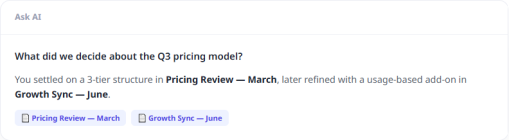
Ask questions such as “What did we decide about the launch date?” or “What follow-ups came out of last week’s client call?” and get answers from your saved meeting context.
Connect Meetings to Workspace Knowledge
A meeting is rarely a standalone event. Connect transcripts and summaries to the projects, documents, research, and people they relate to, so context grows instead of getting buried.
Your Meeting Notes, Already Moving Forward.
Useful for Every Conversation That Leads to Work.
Team Standups
Keep updates, blockers, decisions, and next steps in one record. Team members who missed the standup can catch up without asking everyone to repeat it.
Client Calls
Capture requirements, feedback, commitments, and follow-ups while keeping a clear history of what was discussed across the relationship.
Research Interviews
Turn long interviews into searchable transcripts, key themes, useful quotes, and connected research notes without losing the nuance of the original conversation.
Questions About AI Meeting Notes.
What are AI meeting notes?
AI meeting notes use artificial intelligence to turn meetings into transcripts, summaries, action items, and organized follow-up notes.
Can Zunoy create a transcript from a meeting?
Yes. Zunoy can turn recorded meetings or supported conversations into a written transcript that you can review and search later.
Can I use AI Meeting Notes for voice notes?
Yes. Voice notes can be automatically transcribed so spoken ideas and quick updates become searchable text.
What does the post-meeting summary include?
A post-meeting summary can capture the main discussion points, updates, decisions, and important outcomes from the conversation.
Can AI identify action items from a meeting?
Yes. AI can help surface follow-ups and next steps mentioned during the conversation so they are easier to track afterward.
Can I assign action items to people?
You can turn meeting follow-ups into tasks and assign them within your workspace workflow, depending on your team setup.
Let Every Meeting Leave Something Useful Behind.
Keep the conversation, the decisions, and the next steps together. Turn meetings into knowledge your team can search, share, and act on.


Notes
Zunoy online notes helps you capture every idea, organise the knowledge behind it.
Operational
Contact Us On
Mail Us
support@zunoy.comCopyright © 2026 - Mentcube Innovations Pvt Ltd.. All Rights Reserved.