Twenty AI Actions, One Click From the Field You're Editing
AI Studio applies purpose-built transformations directly to content fields — tone, length, clarity, conversion, compliance — without leaving the editor.
20
One-click AI actions
8
Action groups
2
Embedding models
The Twenty Preset Actions
Quality
enhance, fix, rephrase — Improve writing, correct errors without changing voice, reword entirely
Length
shorten, expand, summarize, continue — Cut to 40–60%, roughly double, condense to 1–3 sentences, keep writing
Tone
formal, friendly, casual, bold, empathetic, academic — Shift register without rewriting substance
Conversion
persuasive, cta, headline — Benefits over features, stronger CTA, five headline options
Clarity
simplify — Rewrite to a Grade 8 reading level, no jargon
Search
seo — Weave in likely search terms without keyword-stuffing
Compliance
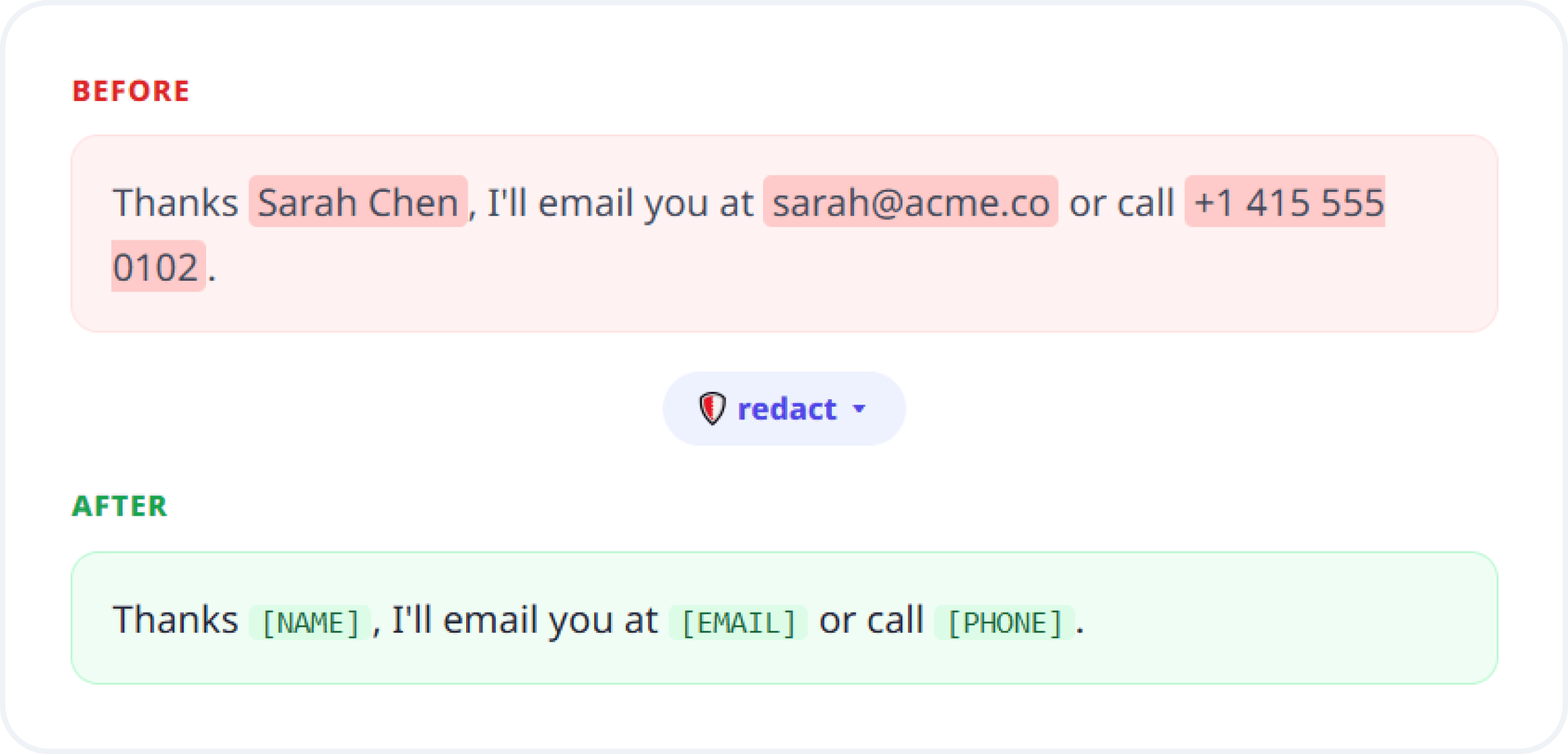
redact — Strip names, emails, phones, addresses, IDs, financial data
Language
translate — Translate to English, or to Spanish if the text is already English
Plus a custom action for a one-off instruction when none of the twenty presets fit.
PRIVACY
One Action Strips Personal Data Before You Publish
The redact action strips personally identifiable information from a field — full names, email addresses, phone numbers, physical addresses, ID numbers, and financial details — replacing each instance with a redaction marker.
Removes PII in place, before a draft is ever published
Useful for turning real support threads into public case studies
Sooner or later someone pastes a customer email thread into a case study draft, and the personal data goes live with it. A one-click PII strip inside the editor is the difference between catching that during review and discovering it in a support ticket.
SEARCH
Search That Matches Meaning, Not Spelling
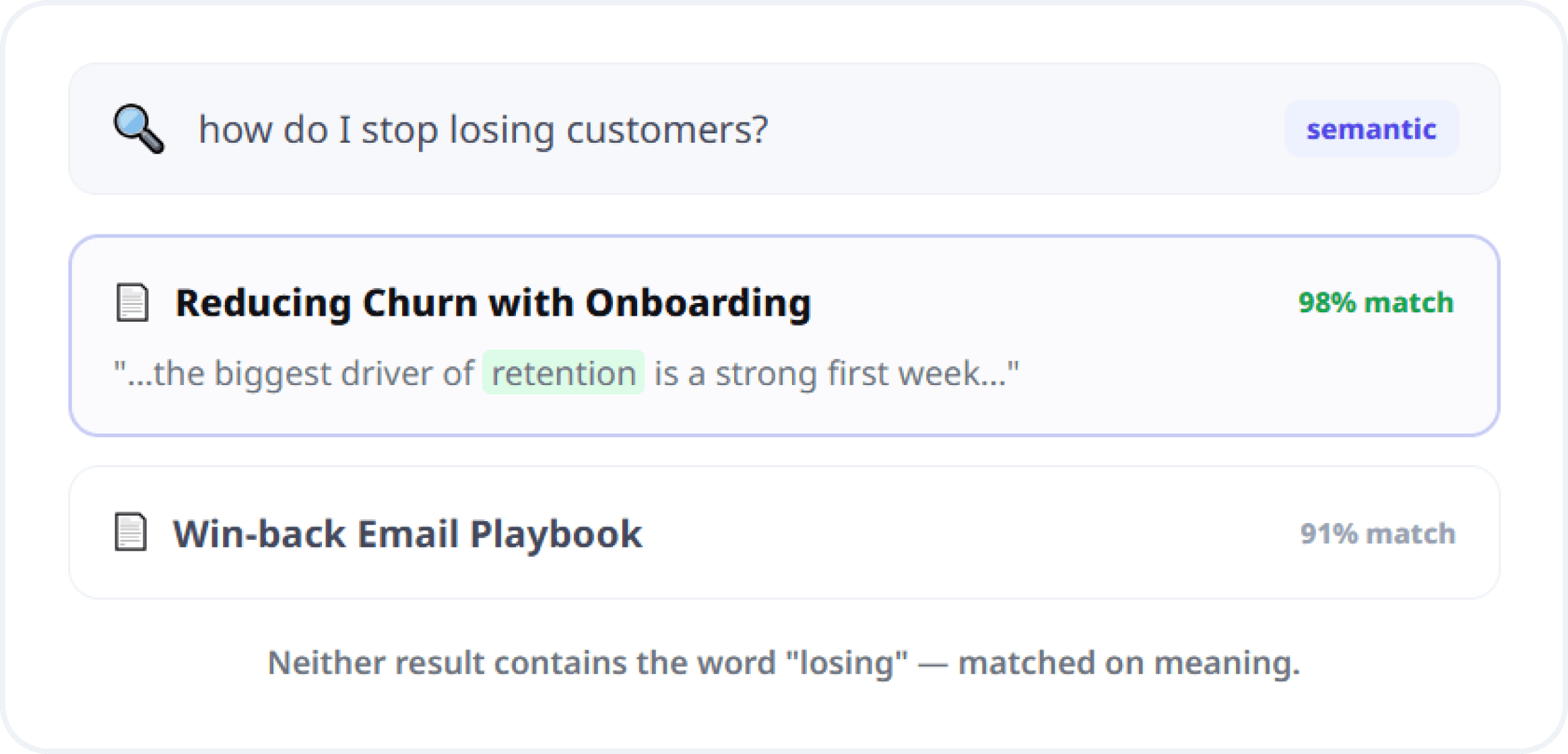
AI Studio indexes published content as embeddings, enabling search that matches meaning rather than keywords. Visitors and editors find relevant entries even when their wording never appears in your content. Two embedding models let you trade search speed for search accuracy.
Semantic retrieval across published entries
Choose a smaller, faster model or a larger, higher-fidelity one
Powers both admin search and public site search
This powers admin-side search for your team and public-facing search on your site from the same index — one retrieval layer rather than two systems that gradually disagree about what your content says.
Form Submissions Are Deliberately Not Indexed
Zunoy does not embed form submission data — putting personal information into a semantic index would create a compliance problem, not a search feature.
Submissions contain personal data belonging to identifiable people
The index covers your content, not people who filled in your forms
Compliance stays intact by design, not by manual review
How AI Studio Handles Your Data and Your Keys
AI Studio matches output to the field it's writing into, lets you use your own AI provider key or Zunoy's, and exposes the same intelligence to outside tools — covering teams with an existing AI vendor and teams who want it working on day one.

Field-aware output
Rich-text fields get clean HTML. Plain text fields get plain text.

Bring your own key
Run on your own provider key, or on platform credits metered by tier.

RAG context API
Serve pre-chunked context to AI agents you build yourself.
How It Works
Configuration is a one-time step; after that, generation is part of writing rather than a separate workflow.
Who This Is For
Writers
The repetitive parts of editing become one click, leaving the judgment calls — what to say and whether it's true — to you.
Tone and length adjustments without a rewrite cycle
Five headline options rather than one suggestion
Marketers
Persuasive, CTA, and headline actions turn a rough draft into publishable copy without routing it through a copywriter first.
Conversion-focused rewrites in the page you're building
SEO action that explicitly avoids keyword-stuffing
Compliance-conscious teams
One-click PII redaction inside the editor, plus an index that structurally excludes form submission data from semantic search.
Bring-your-own-key keeps usage under your own data agreement
Developers
A context API and MCP server that make your content available to agents you're building, not just to features shipped inside the admin.
Pre-chunked RAG context over HTTP
Connected to the Rest of the Platform
One intelligence layer serves the editor, your public site, and external agents.
AI Chatbot
The same index answers visitor questions on your live site
Headless CMS Engine
Actions operate on defined fields and respect their type
MCP Server
Agents reach the same intelligence as callable tools
Localization
Translation alongside per-locale field management
Insights
Query logs show what people actually search for
Visual Page Builder
Refine block copy while composing the page
Common Questions
What can AI Studio do to my content?
It provides twenty one-click actions covering writing quality, length, tone, conversion, plain-language simplification, SEO optimization, PII redaction, and translation, plus a custom action for your own instructions.
Does Zunoy support semantic search over my content?
Yes. Published content is chunked and embedded, enabling search that matches meaning rather than exact keywords, available both in the admin for your team and for public-facing search on your website.
Can I use my own API key?
Yes. Bring-your-own-key plans run AI Studio against your own provider key, keeping usage under your own data agreement. Otherwise it runs on the platform key, metered as AI credits against your plan tier.
Does it work inside the editor or as a separate tool?
Inside the editor. Actions apply directly to a selected content field and return output formatted for that field's type, including clean HTML for rich-text fields rather than markdown requiring conversion.
Is my form submission data used for AI search?
No. Form submissions are deliberately excluded from the embedding index because they contain personal data, so semantic search covers your published content rather than information submitted by identifiable individuals.
Can external AI agents use my content as a knowledge source?
Yes. Zunoy exposes an endpoint returning pre-chunked RAG context that external agents can consume directly, alongside the MCP server for tool-based access to content operations.
Stop Pasting Your Content Into Other Tabs
The AI that edits your content should already know what your content is.