It Shows You the Plan Before It Touches Anything
Zunoy's AI agent lives inside your admin. Ask for the work in plain English. It writes a plan, shows the impact, and waits for you to approve.
4
Steps in every session
0
Changes made before approval
2
Gates before it starts
100%
Actions covered by a plan
HOW IT THINKS
The Agent Checks Your Content Before Writing a Plan
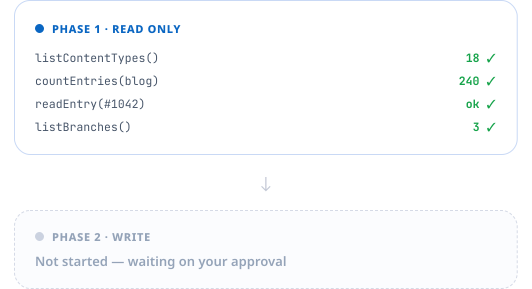
The agent begins with read-only tools — it lists your content types, counts entries, reads a specific entry, and checks your branches before writing a plan, so nothing changes at this stage and it isn't guessing from your description alone.
Reads your types, entries, forms, branches and taxonomy terms
Counts what a change would affect before proposing it
Asks a clarifying question when your request is ambiguous
What the Plan Tells You
Understood
Did it actually get what I meant?
Clarification
What does it still need to know?
Summary
What is it going to do?
Impact
What changes if I say yes?
Steps
What are the individual operations?
Risks
What could go wrong here?
Every plan returns the same six-part shape, before anything runs.
Nothing Runs Until You Approve It
The plan is a proposal, not work already done
Approval is a separate, deliberate action
Your content stays untouched until you approve
Cancel anytime — workspace stays exactly as it was

WHERE IT EARNS ITS KEEP
Good for Bulk Work That Takes You Hours
The agent handles work that is mechanical but slow by hand. None of it is hard. All of it is tedious — exactly the gap a plan-and-approve agent should fill.
Create entries in bulk, or publish a backlog in one pass
Build a taxonomy and tag existing content against it
Add a field to a content type and populate it
Spin up a branch first, so the work stays off your live site
What It Can Actually Change
Write actions cover content structure, entries, taxonomy, forms, branching and reporting. Everything else in the admin stays a human job, which keeps the agent's blast radius small and predictable.

Structure
Create types, fields, and branches

Entries
Create, update, publish, or delete

Taxonomy
Build taxonomies and auto-tag entries

Forms & reports
Create forms, run query reports
WHO IT LISTENS TO
Your Permissions Still Decide
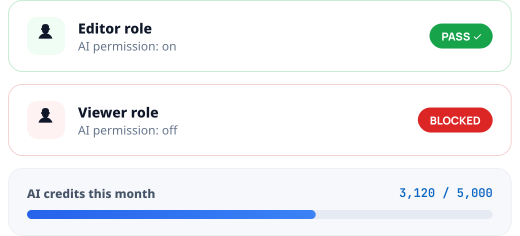
The agent is gated two ways before it starts, and metered as it thinks. A user needs the AI permission on their role, the workspace needs the agent enabled on its plan, and every message you send it draws on your AI credits. It is not a bypass around your access rules.This matters more than it sounds. An agent that ignored your permission model would be a very fast way to give everybody admin rights by accident.
Role permission required before a session can start
Plan-level feature gate on top of that
AI credits metered per message, visible in your usage
How a Session Runs
Four beats, with the approval sitting deliberately in the middle rather than at the end.
Not the Same Thing as the MCP Server
Zunoy has two AI entry points and they solve different problems. The agent lives in your admin and needs no setup. The MCP server connects outside tools like Claude Desktop to your workspace. Many teams use both.
Feature | In-app AI agent | MCP server |
|---|---|---|
Where it runs | Inside the admin, after you log in | In Claude Desktop, Claude Code or Cursor |
Setup | No setup at all | An API key and a client config entry |
How it works | Plans, then waits for your approval | You direct it call by call |
Best for | Bulk work inside the CMS | Building inside your dev workflow |
Where to Go Next
The agent touches several parts of the platform. These are the ones worth reading first.

MCP Server
The other external entry point

Environments
Branch first, keep live site safe

Headless CMS Engine
Content types and fields it uses

Smart Editor
Writing and editing, not bulk ops
Common Questions
Where does the Zunoy AI agent run?
Inside the Zunoy admin, once you are logged in. There is nothing to install and no client to connect. It is a panel in the product rather than an integration you set up.
What can the agent actually do?
It can create content types and fields, create and update entries, publish or delete them in bulk, build taxonomies and tag content, create forms, create branches, and run query reports.
What if my request is unclear?
The plan includes a clarification field. Rather than guessing at an ambiguous instruction, the agent asks the question it needs answered before proposing work.
Does the agent change my content straight away?
No. It returns a plan first, covering what it understood, what it will do, the impact, the individual steps and any risks. Nothing is changed until you approve that plan.
How does it avoid guessing wrong about my content?
It uses read-only lookups first. Before planning, it lists your content types, counts entries, reads examples, and checks your branches, so the plan is based on your real workspace rather than only your description.
Can I stop it once it starts?
You can cancel a session. Cancelling before approval leaves your workspace completely untouched, because the planning stage never writes anything.
Hand Over the Boring Half
Bulk publishing, tagging, backfilling a new field. Describe it once, read the plan, approve it.