The Folder Called final-v3-USE-THIS-ONE
Zunoy's Media Hub is digital asset management inside the CMS. Upload once, reference from anywhere, and let transformation handle every size.
1
Library referenced from every page
0
Duplicate uploads needed
6
Ways to organize and find assets
0
Separate delivery pipeline required
Link to One Asset Instead of Uploading It Twice
Copy-based
1Replacing a headshot on 40 pages means 40 uploads
2Stale duplicates stay live until someone notices
3Storage grows with every reuse
4Brand inconsistency creeps in silently
 1
1One upload updates every page referencing it
2There is only one version, so it can't go stale
3Reuse costs nothing
4Correctness is structural, not a review step
INGESTION & ORGANIZATION
Getting Assets In, and Finding Them Later
The Media Hub covers ingestion and organization as seriously as delivery, because a library you can't populate quickly or search reliably stops being used within a month of launch.

Multi-file upload
Add assets in bulk rather than one file at a time.

Import from URL
Pull an asset straight from a remote address, no download step.

Search and filters
Find assets by name and type as the library reaches thousands.

Folders
Organize assets structurally, browsable by agents through MCP.

Per-asset storage origin
Control where an individual asset lives, not one global setting.

Access logging
See which assets are actually requested, and how often.
MIGRATION
Migrate a Media Library by Pasting In URLs
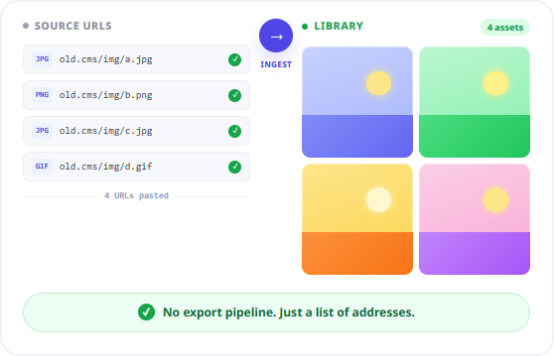
Moving to a new CMS usually means writing a job to extract every asset from the old one. Zunoy accepts a remote URL and ingests the asset directly, so migrating a library becomes a list of addresses rather than a custom export pipeline.Combined with multi-file upload, the first hour on a new platform stops being an exercise in file management and starts being an exercise in content modeling — which is the part that actually deserves the time.
Ingest directly from remote addresses, no local round-trip
Bulk upload for assets you already hold
Existing content references resolve as assets land
DELIVERY
Every Size, Generated When Asked For
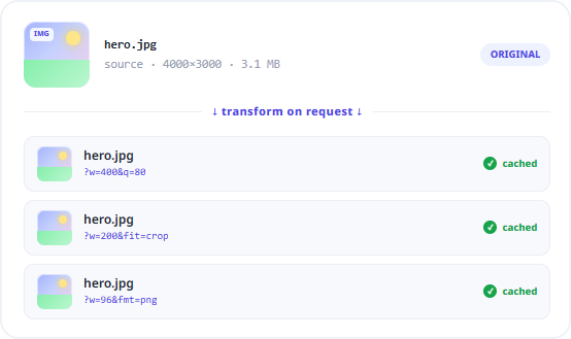
Assets are delivered through the global edge CDN with transformation applied at request time. Width, height, quality, output format, and crop behaviour are set per request, and the resulting variant is cached at the edge.
Resize, crop, re-encode, and compress via URL parameters
Cached at the edge nearest the visitor after first request
No pre-generated variants to store or regenerate
There is no separate step to connect storage to delivery, and no build job producing sizes in advance.
Storage Origin Is Per Asset, Not Per Workspace
Not every asset belongs in the same place. Zunoy tracks storage origin at the asset level rather than forcing one global storage decision, so different assets can live in different origins while still presenting as one unified, searchable library to the people using it.
HOW IT WORKS
How It Works
Four steps, with no configuration between storage and delivery because they are the same module.
Who This Is For
Content teams
Find and reuse the approved asset instead of asking design to send the file again, and know the version you're using is the current one.
Search and filter across the full library
Reuse is a search, not a re-upload
Developers
Reference assets by ID and let transformation parameters handle sizing, rather than coordinating an image pipeline against frontend breakpoints.
No build-time image processing to maintain
Media fields resolve to delivered URLs in API responses
Brand owners
Replace an asset once and know every surface referencing it is now correct, without auditing pages to find stale copies.
One version of every asset, structurally enforced
Agencies
Each client workspace keeps its own library, with per-asset storage origin where a client requires assets to live somewhere specific.
Workspace isolation with shared delivery infrastructure
Connected to the Rest of the Platform
The Media Hub stores; the CDN delivers. Everything else in the platform references them.


FAQS
Common Questions
What is digital asset management in a CMS?
It means storing media centrally and referencing it from content, rather than uploading duplicate copies per page or entry. Zunoy's Media Hub provides this natively, with transformation and edge delivery included in the same module.
Does the Media Hub support real-time image transformation?
Yes. Assets are resized, cropped, re-encoded, and compressed at request time via URL parameters covering width, height, quality, output format, and crop behaviour, with no pre-generated variants required.
Can different assets be stored in different places?
Yes. Storage origin is tracked per asset rather than as a single global setting, while the admin still presents one unified, searchable library regardless of where individual assets live.
Do I need a separate service to deliver media quickly?
No. The Media Hub and global edge CDN are natively connected, so every uploaded asset is edge-delivered and transformable without configuring a separate delivery pipeline or CDN account.
Can an AI agent browse or organize the media library?
Yes. Folder structure and asset metadata are exposed through the MCP server, so an agent can browse, search, and organize the library alongside a human editor rather than needing direct admin access.
Can one image be used across many pages without re-uploading?
Yes. An asset uploaded once can be referenced from any number of content entries, blocks, and pages, and updating that asset updates every surface referencing it rather than leaving stale copies behind.
Can I import assets from an external URL?
Yes. The Media Hub ingests an asset directly from a remote address, alongside single and multi-file upload, which makes migrating a library from another platform substantially faster.
Does the Media Hub convert images to WebP or AVIF?
Not currently. WebP and AVIF output is in active development. Transformation produces JPEG and PNG today, though WebP and AVIF files can be uploaded and stored as assets without issue.
Can I see which assets are requested most?
Yes. Media access and transformation activity is logged and surfaced as delivery analytics, so you can identify which assets and transformations account for the bulk of your delivery volume.
GET STARTED
Retire the final-v3 Folder
Centralize once, and every future asset decision gets easier instead of harder.