Ten Languages, One Content Model
Zunoy stores translations as a layer on top of the same entry. Add a language and none of your existing content moves.

10 languages, one model

Zero-migration rollout

Native RTL, built in
One Entry Holds Every Language, Not a Copy Per Language
Duplicated content
1A schema change must be repeated for every language
2An article exists in five separate places
3Languages drift as edits land unevenly
4Adding a language means a migration
 1
1One schema, changed once, applies everywhere
2One entry holds every language it has
3The structure is shared, so drift cannot happen
4Adding a language moves nothing
Turning Localization On Requires No Migration
Each field's default value already sits where the system expects it.
No backfill job to run
No risk to existing content
No downtime switching it on
Add a language, start translating
What You Get Per Field
You decide what needs translating field by field, not entry by entry. Identifiers, relations and structural fields stay single-valued. Visible copy carries a value per language, with fallback when one is missing.

Field-level control
Mark what needs translating. Structural fields stay as they are.

Clean fallback
An untranslated field shows the default language, never a blank.

Native RTL
Direction belongs to the locale. It is not a CSS afterthought.

Checked catalog
Languages come from a fixed list with native names, not free text.

Regional variants
Tell en-US from en, or fr-CA from fr, where it matters.

Locale-aware API
The API returns the right value per language, with fallback.
RTL SUPPORT
Right-to-Left From Day One
Every language in Zunoy's catalog carries a text direction. Arabic and Hebrew are right-to-left because the system knows they are. Nobody has to remember to add an override on the pages that need it. Adding right-to-left support after launch is famously painful — it touches layout, icons and every asymmetric component you built. Treating direction as part of the language avoids the whole problem.

Direction is a property of the language
Not a per-page override someone has to remember to add

Native names show correctly
The picker reads properly to people who actually speak the language

Regional variants, where it matters
Supported alongside direction, not bolted on separately
LANGUAGE CATALOG
A Fixed List Beats Free Text
Language codes are checked against a fixed catalog instead of accepting any string. It is a small rule that prevents a familiar bug — en-GB in one place, en_GB in another, EN-gb in a third, and content that quietly fails to resolve. Each entry in the catalog carries an English name and a native name.
No mistyped codes — checked against a fixed catalog instead of free text
Native names in the picker — not technical tags
A predictable list — the API can rely on it
How It Works
A few minutes of setup. After that, translating is a normal editing action rather than a second content workflow running alongside the first.
FURTHER THAN CONTENT
Your Consent Banner Speaks the Language Too
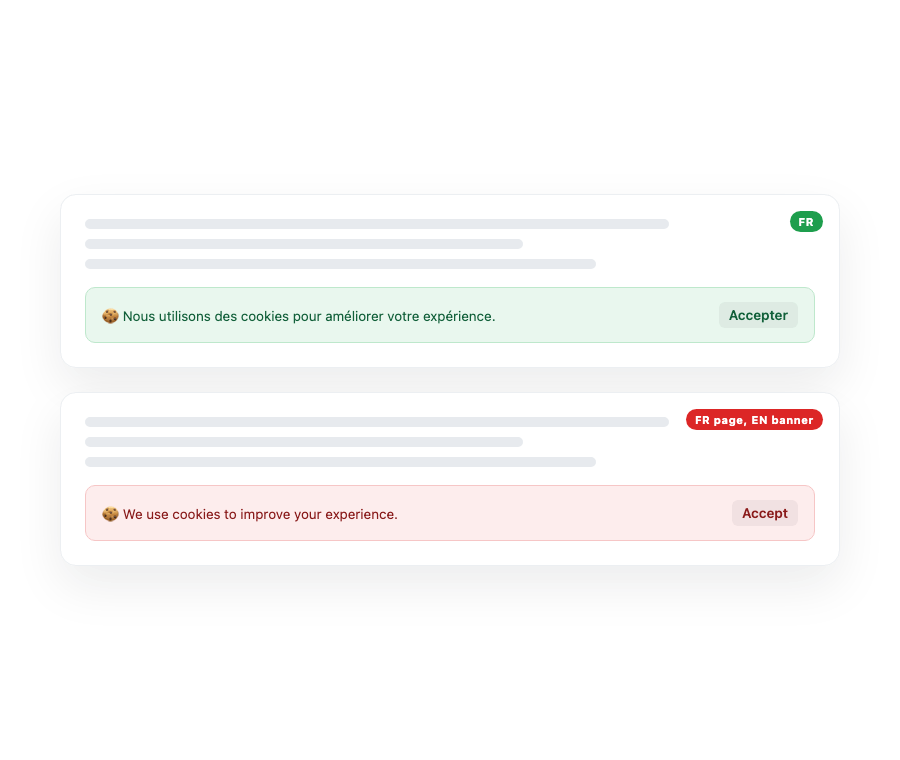
Multi-language support that stops at article bodies is not finished. Zunoy stores consent banner copy per language as well — the title, the body and every button label. An English consent banner on an otherwise French page is exactly the detail that undermines a careful localization effort.

Consent banner copy stored per language

Page and block content carries values per language

AI translation keeps tone and HTML formatting intact
Invisible Until You Need It
A workspace that has never added a language is treated as single-language. No locale tabs, no fallback logic, no extra concepts in the editor. Most sites never go multi-language, and they should not pay a complexity tax for something they will never switch on.
Connected to the Rest of the Platform


Common Questions
Does Zunoy support multi-language websites?
Yes. Zunoy runs multiple languages from a single content model. Translations are stored per field rather than by duplicating content types or entries for each language you add.
What happens if a field is not translated?
It falls back to the default language automatically. Visitors see the original language instead of an empty field, so a partly translated site degrades gracefully rather than looking broken.
Can I use any language code I want?
No, and that is deliberate. Languages come from a checked catalog with English and native names. This stops inconsistent code formatting from quietly breaking content resolution. Regional variants like en-US are supported.
Do I need to restructure content to enable localization?
No. Each field's default language value already sits where the system expects it. Turning localization on needs no migration, no backfill and no changes to your existing content.
Does Zunoy support right-to-left languages?
Yes. Text direction is part of each language in the catalog. Arabic and Hebrew render right-to-left correctly, without per-page CSS overrides bolted on later.
Does localization complicate single-language sites?
No. A workspace with only one language is treated as single-language, and the localization features stay hidden until you choose to add a second one.
Add a Market Without Rebuilding Your Site
One model, many languages, and no migration to get there.