Your Visitors Don't Know Your Vocabulary
Zunoy's semantic search matches what people mean rather than what they typed, so content is findable in the words your audience actually uses.
Meaning, Not String Matching
Keyword search
1Requires the searcher to guess your terminology
2Returns nothing when wording differs
3Synonyms need manual configuration
4No signal about answer quality
 1
1Matches the concept regardless of phrasing
2Returns the relevant entry anyway
3Synonymy is inherent to the embedding
4Every result carries a relevance score
FALLBACK
Falls Back to Keyword Search, and Says So
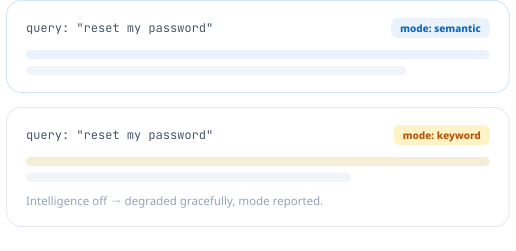
When semantic retrieval is unavailable — intelligence not configured, or no usable embedding — Zunoy falls back to keyword search rather than returning an error, and reports which mode produced the results so you can reason about what you're seeing.
Automatic fallback to keyword matching, never a hard failure
The response states whether results came from semantic or keyword
Configurable result limit and content-type filtering
One Search System, Used Everywhere in the Product
The same embedding index serves internal search for your team, public search on your website, conversational answers through the chatbot, and direct tool access for AI agents.

Admin search
Matches drafts by keyword too

Public site search
Visitors search in their own words

Conversational answers
Feeds the on-site AI chatbot

Agent tool access
intent_search via the MCP server
Only Published Content Is Ever Embedded
Index built from published entries only
Drafts never surface through semantic search
Admin keyword search can still find drafts
Public search never sees drafts, either path

TUNING
Pick a Faster Model or a More Accurate One
Zunoy supports two embedding models — a smaller, faster default and a larger, higher-fidelity option — so the trade-off between retrieval quality and cost is a decision you make, and for most libraries the default is enough, while large or highly technical ones are where the larger model earns its cost.
Two embedding models, switchable per workspace
Reindex on demand when you change models or content
Result limits and type filters set per query
RELEVANCE SCORING
Every Result Shows How Confident the Match Is
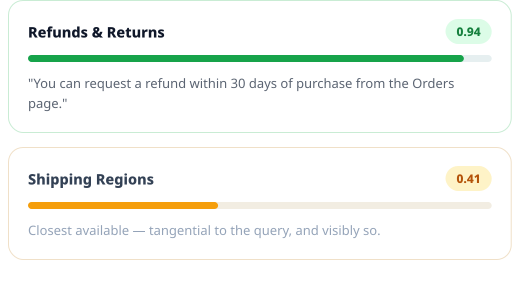
Every result carries a numeric relevance score rather than a binary match or no-match — a high score means the retrieved passage genuinely addresses the query, a low one means it's the closest thing found rather than a good answer, and Zunoy surfaces that score instead of hiding it.
A numeric score per result, not just a rank order
Low scores are visible, not smoothed over
The same score powers the chatbot's "I'm not sure" behavior
How It Works
Indexing happens as a consequence of publishing, so search quality improves as your library grows without a separate maintenance workflow.
Who This Is For
Content teams
Find the entry you half-remember without knowing its exact title, and see which visitor searches your library fails to answer.
Keyword search reaches drafts; semantic search covers what's published
Content gaps surfaced from real query logs
Site visitors
Ask in their own words and find the right page, rather than guessing the internal terminology your team happens to use.
No need to match your exact phrasing
Developers
A retrieval primitive with transparent modes and scoring, usable from the API and callable directly as an MCP tool.
Mode reported per response for debuggability
Configurable limits and type filtering
AI engineers
Semantic retrieval over structured content, plus a pre-chunked context endpoint for agents you build yourself.
intent_search and public_ask as agent tools
Connected to the Rest of the Platform
Retrieval is one layer serving every AI surface in the product.

AI Chatbot
Conversational answers built on this

AI Studio
Same index powers 20 editing actions

MCP Server
intent_search as an agent tool

Insights
Query logs surfacing content gaps
Common Questions
What is intent-based semantic search?
It retrieves content by conceptual similarity rather than shared keywords, embedding both the query and your content as vectors. A query and a document can match strongly while sharing no words at all.
Does public search expose unpublished content?
No. Only published entries are ever embedded for semantic matching. In the admin, keyword search can additionally surface drafts on request, but public search never can, through either method.
Which embedding model does Zunoy use?
Two options are supported — a smaller, faster default and a larger, higher-fidelity alternative — so you choose the balance between retrieval quality and cost for your workspace.
What happens if semantic search is unavailable?
Zunoy falls back to keyword matching rather than returning an error, and the response reports which mode produced the results so the behaviour is transparent rather than a silent degradation.
Can I control how many results come back?
Yes. Result limits are configurable per query, defaulting to ten, and results can be filtered by content type to narrow retrieval to a specific part of your library.
Do I need to reindex when content changes?
Published content is indexed as part of publishing. A manual reindex is available for when you switch embedding models or need to rebuild the index deliberately.
Make Your Content Findable in Your Visitors' Words
They already know what they want. The search box should not require them to know what you called it.