A Page Builder That Doesn't Lie to Your Frontend
Editors arrange pages from reusable blocks with drag-and-drop. Developers get structured JSON. It's the same object, so it can't drift.
Structure, Not Markup
Traditional builders
1Saves HTML, locking content to one presentation
2A second channel means rebuilding the content
3Preview is a separate renderer that drifts
4Layout changes require developer time
 1
1Saves structure; the frontend decides how it renders
2A second frontend can render the same blocks differently
3The thing edited is the thing served
4Layout is an editor decision, rendering stays with developers
What Editors Can Actually Do
The builder covers composition, reuse, and safe iteration — arranging blocks, sharing them across pages, nesting them for complex layouts, and keeping everything in draft until it is deliberately published.

Reusable shared blocks
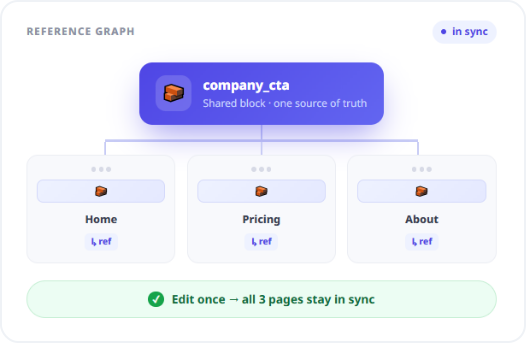
Build once, reference anywhere. Edits propagate to every page using it.

Nested dynamic zones
Zones hold one block or many, and blocks can contain their own blocks.

Block variants
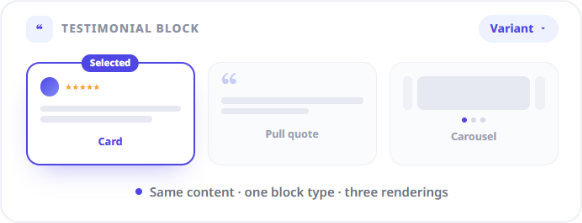
One block type, several presentations, chosen from a variant picker.

Duplicate a page
Clone a page and its sections in one action, starting as a draft.
REUSE
Shared Blocks Are How You Stop Repeating Yourself
Reusable blocks stay referenced rather than copied, so updating a shared block updates every page carrying it. When duplicating a page, embedded blocks are cloned while genuinely shared blocks remain references.
Edit the shared CTA once; every page carrying it updates
Duplication clones embedded blocks, preserves shared references
No copy-paste drift between pages that should match
That distinction is doing real work. "This page's own hero" and "the company-wide CTA" behave differently on duplication, and flattening them into one concept is how site-wide copy changes turn into forty manual edits.
FLEXIBILITY
Variants Keep Layout Requests Away From Engineering
Nested blocks present a variant picker, letting one block type cover several presentations. A testimonial can render as a card, a pull quote, or a carousel item without defining three near-identical block types.
One block type, multiple presentations
Fewer near-duplicate blocks cluttering the library
Layout iteration without a deploy
The practical effect is that the long tail of "can we make this section look like that other section" stops reaching a developer. Most of those requests become a dropdown selection made by the person who wanted the change.
The Editor Preview Can't Go Out of Sync With the Live Site
Decoupled previews break because they're two implementations of one layout, slowly drifting apart. Zunoy renders one representation everywhere.
No separate preview renderer to drift
The builder arranges the same blocks the API serves
What's edited is what ships
One representation, not two
How It Works
Developers define the vocabulary of blocks; editors compose with it. Neither side needs the other to be in the room.
Who This Is For
Marketers
Ship a landing page today and iterate tomorrow, without a developer in the loop for either. Layout is yours; you're not filing a ticket to move a section.
Drag-and-drop composition from an approved block library
Draft-first, so nothing goes live before you mean it
Developers
Define blocks once and keep complete control of rendering, while handing layout decisions to the people who should be making them.
Structured output, not markup you have to parse
Page and section tooling exposed through MCP
Agencies
Build a block library per client brand and hand over a builder non-technical stakeholders can operate without breaking anything.
Client edits constrained to blocks you approved
Branch a redesign and demo it before launch
Multi-channel teams
The same page structure drives a website and an app, because it was never HTML in the first place.
One composition, rendered differently per channel
Connected to the Rest of the Platform
Blocks are content types, which is why the builder inherits everything else the platform does.
Headless CMS Engine
Blocks and pages use the same schema and field types
Media Hub
Blocks reference central assets, delivered via the CDN
Forms
Place native forms into pages as blocks
Environments
Branch a redesign, merge when it's ready
Localization
Page content carries per-locale values on one structure
AI Studio
Draft and refine block copy without leaving the canvas
Common Questions
What is a drag-and-drop page builder in a headless CMS?
It is a visual interface for assembling layouts from predefined blocks without writing markup, where the result is stored as structured data served through the content API rather than as HTML tied to a single frontend.
Can the same block be reused across multiple pages?
Yes. Shared blocks stay referenced rather than copied, so editing one updates every page referencing it. When duplicating a page, embedded blocks are cloned while shared blocks remain references.
Can the builder handle complex nested layouts?
Yes. Dynamic zones hold a single block or an array of blocks, blocks can nest inside other blocks, and nested blocks offer a variant picker for alternative presentations of the same block type.
Do pages go live as soon as I edit them?
No. Pages start in draft and stay off the live content API until explicitly published. Larger work can be isolated on a branch so an entire redesign merges as one release.
Does the page builder require any coding?
No. Editors assemble and update pages without writing code, while developers retain control over block definitions and exactly how each block renders on the frontend.
Give Both Teams What They Actually Want
A canvas for the people who build pages. Structured JSON for the people who build systems. One object underneath.