Full Tool Coverage. Local or Remote. No Middleware.
Zunoy ships a production MCP server, so Claude Desktop, Claude Code, or any MCP-compatible client works against your content model directly.
1
Brief tool the agent reads before touching anything
0
Custom middleware needed
WHAT MCP IS
The Standard That Replaced Custom Integrations
Model Context Protocol is an open standard for exposing tools and data to AI assistants — an MCP server describes what it can do in a format any compatible client understands, so instead of a bespoke integration per assistant, one server works across every MCP client.
One server, many clients — no per-assistant rework
Tools are self-describing, so the model knows what's available
An open standard, not a vendor-specific plugin format

The Tool Surface, by Area
The tool surface covers content modeling, authoring and publishing, page composition, media, forms, keys, webhooks, analytics, and the intelligence layer — the same operations available in the admin, exposed as callable functions an agent can invoke directly.
Content & Structure
List, create, update, delete, promote
List, create, update, publish, hide, delete
List, create, update, delete, read sections
List and install templates
List assets/folders, view logs & stats
List, create, delete, view submissions
Access & Intelligence
List, create, revoke
List, create, delete
Usage and traffic data
Config, reindex, ask, status
Published entries, intent search, ask
Project brief, architecture rules
The Server Teaches the Agent Before It Acts
Exposes a get_project_brief tool, called first every session
Returns the full architecture brief: MCP/REST split, field patterns, integration rules
Written for the agent, not for you
Leads to correct architectural choices, not plausible-sounding wrong ones
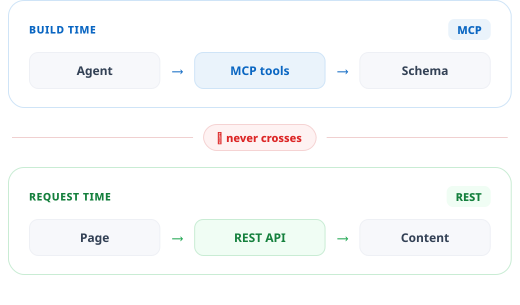
THE RULE THAT MATTERS
MCP for Management, REST for Runtime
Zunoy's brief draws a hard line: MCP tools handle content management — creating types, entries, and pages — while the REST content API handles runtime data fetching in your frontend, preventing the most common architectural mistake agents make when given CMS access.
MCP → build and manage the content structure
REST → fetch content when a page renders
The brief states this explicitly, so agents follow it
Connect Locally or Over the Internet
Zunoy's MCP server runs in stdio mode for local clients and HTTP mode for remote ones, so the same tool surface serves a developer's laptop and a hosted assistant without maintaining two integrations.

stdio — local
For Claude Code, Cursor, VS Code

HTTP — remote
For Claude.ai and hosted clients

API key auth
Scoped, revocable workspace admin keys

Same tools either way
Same tools, just different transport
Connecting a Client
Setup is a config entry and a key. There is no SDK to install into your application and no adapter service to deploy and monitor.
Who This Is For

Developers
Scaffold models by conversation, not forms
Full CRUD on types, entries, and pages as callable tools
API key and webhook management without leaving your editor

AI engineers
Build agentic workflows against real MCP
stdio and HTTP transports from one implementation
Intelligence tools including intent_search and ask_ai

Content ops
Delegate bulk publishing and tagging work
Batch operations as a conversation, not a script

Agencies
Stand up client structures in minutes
Template installation and schema creation via agent
Not the Same Thing as the In-App Agent
Zunoy has two AI entry points. The MCP server connects outside tools to your workspace and you direct each call. The in-app agent lives in the admin, plans work, and waits for your approval. Plenty of teams run both.
Feature | MCP server | In-app AI agent |
|---|---|---|
Where it runs | In Claude Desktop, Claude Code or Cursor | Inside the admin, after you log in |
Setup | An API key and a client config entry | No setup at all |
How it works | You direct it call by call | Plans first, then waits for approval |
Best for | Building inside your dev workflow | Bulk work inside the CMS |
Connected to the Rest of the Platform
MCP exposes the platform's real operations, so every module is reachable through the same connection.

In-App AI Agent
Plans work, waits for approval

Intent Search
Semantic retrieval as an agent tool

Headless CMS Engine
Schema agents create and modify

Forms
Form creation and submissions via agent
Common Questions
What is an MCP server?
Model Context Protocol is an open standard for exposing tools and data to AI assistants. An MCP server describes its capabilities in a format any compatible client understands, so one integration works across every MCP client.
What range of operations can an agent perform?
A wide range spanning content types, entries, pages, templates, media, forms, API keys, webhooks, analytics, and the intelligence layer — covering the same operations available in the admin interface, exposed as callable tools.
How is access authenticated?
Through scoped workspace API keys created and revoked from the Zunoy admin, so agent access can be granted and withdrawn without affecting other integrations or credentials.
Which AI clients can connect to Zunoy?
Any MCP-compatible client. Zunoy provides stdio transport for local tools such as Claude Code, Cursor, and VS Code, and HTTP transport for remote clients including Claude.ai projects.
Can an agent write, or only read?
It can write. Agents can create and update content types, author and update entries, publish and unpublish them, create pages and forms, install templates, and manage keys and webhooks.
Should I use MCP to fetch content for my website?
No. Zunoy's architecture brief is explicit that MCP handles content management while the REST content API handles runtime data fetching. Using MCP as a runtime data source is the mistake the brief exists to prevent.
Point Your Assistant at Your Content Model
One key, one config entry, and the whole admin surface your agent can call from the next message onward.