Editing Is Where the Time Actually Goes
Zunoy's AI writing assistant transforms the field you're already in — twenty actions for tone, length, clarity, conversion, and compliance.
Edits Your Existing Text Instead of Replacing It
Chat-box workflow
1Describe the task in full, every single time
2Returns a fresh draft you must reconcile
3Copy out, paste back, fix the formatting
4Returns markdown you have to convert
 1
1Select text, choose an action, done
2Transforms what's there, keeping what worked
3Never leaves the field you're editing
4Returns clean HTML for rich-text fields
Which Action, and When
The twenty actions are worth learning as a small vocabulary. Most editing sessions use four or five of them repeatedly, and knowing which to reach for is the difference between a fast pass and a wandering conversation.
- enhance — Tighten writing that's nearly right
- fix — Fix errors without altering voice
- rephrase — Escape phrasing you're stuck on
- shorten or expand — Fit a hard length constraint
- summarize — Write an intro or standfirst
- continue — Get unstuck mid-paragraph
- formal, casual, academic — Address a different seniority or audience
- friendly or empathetic — Warm up copy that reads cold
- persuasive or bold — Strengthen a flat pitch
- cta — Improve a weak closing ask
- headline — Choose between headline directions
- simplify — Make dense content accessible
- seo — Prepare a page for search
- redact — Remove personal data before publishing
- translate — Convert between English and Spanish
- custom — Anything the above doesn't cover
FORMATTING
Rich-Text Fields Get Clean HTML, Not Raw Markdown
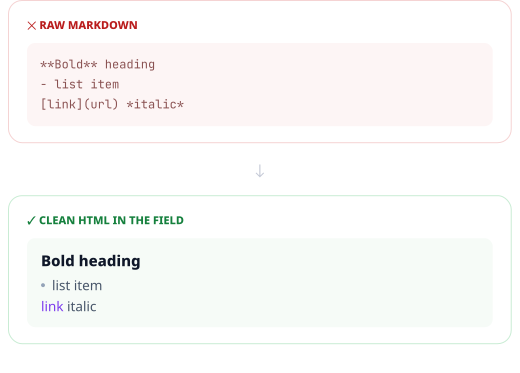
When an action runs on a rich-text field, output comes back as clean HTML using proper paragraphs, bold, italics, lists, and headings. Plain text fields receive plain text. The output fits the field it's going into.This sounds minor until you've pasted markdown asterisks into a rich-text editor forty times. Field-type awareness removes a small, constant friction that otherwise makes an AI feature feel like more work than doing it manually.
Rich-text fields get semantic HTML, correctly structured
Plain fields get plain text, with no stray formatting
Existing formatting is preserved through transformations
HEADLINES
The Headline Action Gives You Five Options, Not One
A single AI headline suggestion tends to get accepted out of politeness. Five distinct angles force an actual editorial decision, and the one you pick is usually better than the one you would have written unprompted.
Question
Turns the headline into the question the reader already wants answered.
Statement
A direct, declarative claim, stated plainly.
How-To
Frames the piece as a step-by-step answer.
Benefit-Driven
Leads with the outcome the reader actually wants.
Curiosity Gap
Withholds just enough to pull the reader into the piece.
The Redact Action Removes Personal Data Before You Publish
One click, before anything goes public.
Strips names, email addresses, and phone numbers
Removes physical addresses and ID numbers
Replaces financial details with a marker
Turns a real support thread into a safe case study
A Typical Editing Session
The value compounds across a session rather than in any single action, because each pass costs a click instead of a context switch to another tool.
- 01
Draft or paste your content
Write in the editor, or bring in a draft from elsewhere.
- 02
Run a structural pass
shorten or expand to hit length, enhance to tighten what stays.
- 03
Run a tone pass
Shift register for the audience the page is actually addressing.
- 04
Finish and check
Strengthen the CTA, generate headline options, redact if needed.
Who This Is For
Writers
The mechanical passes stop costing attention, so more of the session goes to the parts that need judgment — argument, accuracy, and structure.
Length and tone changes without a manual rewrite
Five headline angles instead of one suggestion
Connected to the Rest of the Platform
The editor is one surface of the intelligence layer that also powers search, chat, and agent access.

AI Studio
The wider AI layer — keys, models, and configuration

Visual Page Builder
Refine block copy without leaving the canvas

Localization
Per-locale field management for multi-language sites

Headless CMS Engine
Actions respect the field types you defined
Common Questions
What does the smart editor actually do to my text?
It transforms the content already in a field based on the action you choose — rewriting, shortening, expanding, shifting tone, or redacting — rather than discarding it and generating an unrelated replacement draft.
Will it break my formatting?
No. Actions are field-type aware. Rich-text fields receive clean HTML with proper paragraphs, lists, and headings, while plain text fields receive plain text with no stray formatting characters.
What is the headline action for?
It generates exactly five headline variations across five distinct styles — question, statement, how-to, benefit-driven, and curiosity gap — so you make an editorial choice rather than accepting a single suggestion.
How many actions are available?
Twenty preset actions, covering writing quality, length, tone, conversion, plain-language simplification, SEO optimization, PII redaction, and English-Spanish translation, plus a custom action for instructions the others do not cover.
Does it replace my content automatically?
The result returns into the field for you to review. You decide whether to keep it, and publishing remains a separate deliberate step through the normal content workflow.
Can it remove personal data before I publish?
Yes. The redact action strips names, email addresses, phone numbers, physical addresses, ID numbers, and financial details, replacing each with a redaction marker in a single pass.
Spend Your Attention on the Judgment Calls
The mechanical passes should cost a click. Everything else is where you actually add value.