Your Forms Shouldn't Live in Someone Else's Dashboard
Zunoy's form builder is part of the CMS. Forms are content objects. Same admin, same branches, same permissions, same API.
1
Endpoint for JSON or form-encoded posts
0
Vendor SDKs required
5
Roles governing form permissions
4
Lifecycle states forms inherit
BUILT IN
What Being Built Into the CMS Gets You
A Zunoy form is a real object in your workspace, not a record held by a vendor. It inherits branching, permissions, export and agent access from the platform. You do not wire any of that up yourself.

Submissions in the CMS
Payload, time, IP and user agent. Stored and readable in the admin.

Instant notification
An alert fires on submit and links straight to the submission.

Branch-aware
A form built on a branch stays off your live site until you merge.

Agent-accessible
Create forms and read submissions through the MCP server.
COMPATIBILITY
Works With a Plain HTML Form, No JavaScript Needed
The endpoint takes JSON and standard form-encoded posts. A bare HTML form can point straight at it. Add a redirect and the visitor lands on your thank-you page. No JavaScript is needed anywhere.This matters more than it sounds. A landing page with no framework, a legacy template, an email-embedded page — all of them can post to the same endpoint your React app uses. And you ship no vendor SDK to make it work.

GOVERNANCE
Submissions Are Your Data, Not a Vendor's
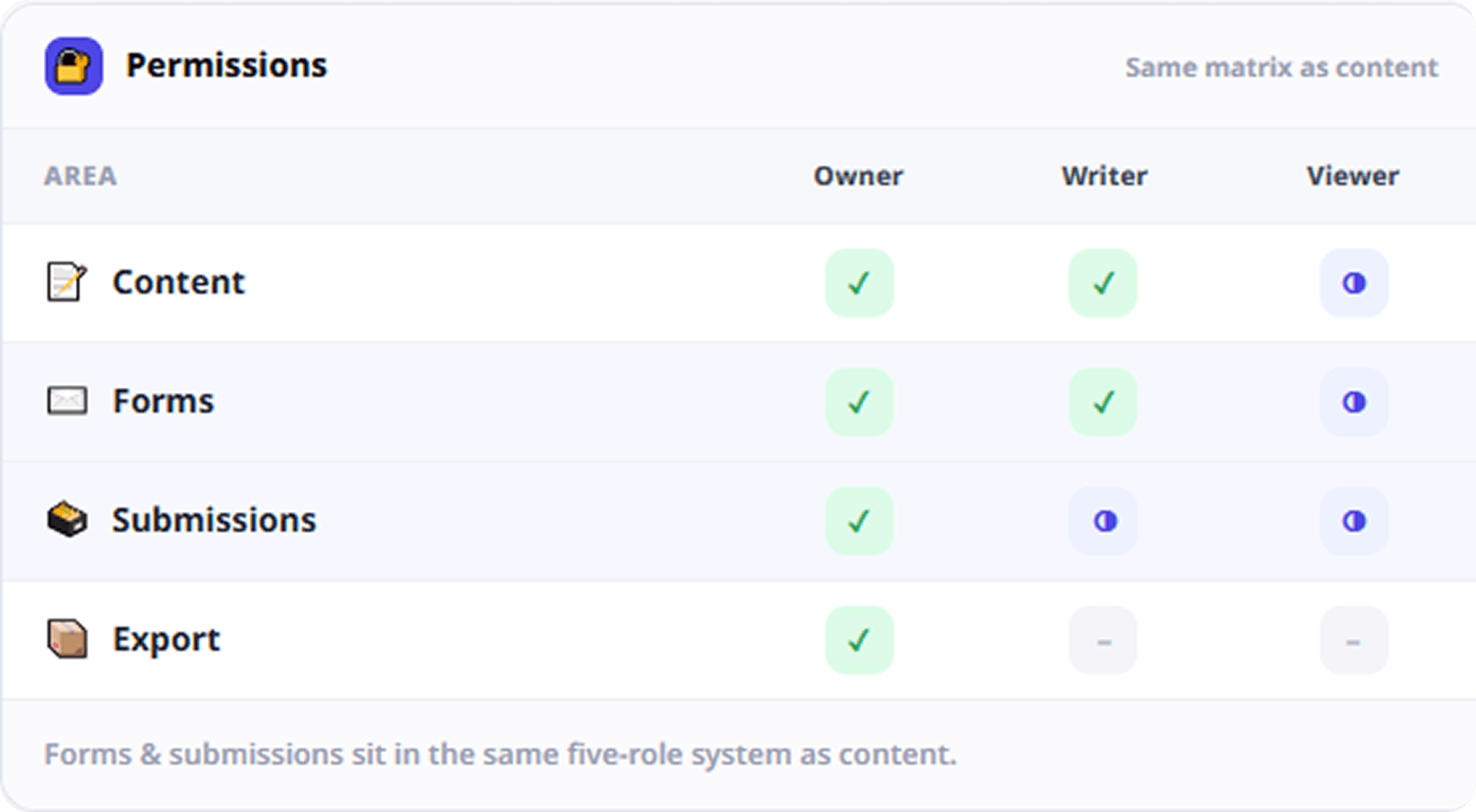
Submissions live inside Zunoy. They follow the same role permissions as your content. They are included in workspace export. Delete a form and its submissions go with it, rather than being stranded elsewhere.The usual mistake here is not technical. It is treating submission data as a marketing artifact. Once it sits in an external tool, it falls outside your permissions, your export and your audit trail.
Covered by the same five-role permission system as content
Included in workspace data export
Deleting a form cleans up its submissions
HOW IT WORKS
How It Works
The path from a visitor clicking submit to your team seeing it is short on purpose. Every extra hop is a place a lead can go missing.
ROADMAP (P2)
Spam Protection and Submission Webhooks
Both are in development and not available yet. Spam filtering at the point of entry is coming. For now, abuse is capped by monthly submission limits on your plan. Submission webhooks are coming too — Zunoy already sends webhooks for content entry events, so the delivery plumbing exists. Extending it to submissions is what remains.
Who This Is For
Developers
One endpoint. Two accepted content types. Predictable responses. And no vendor SDK to add to your bundle.
Works with or without a JavaScript framework
Form tools exposed through the MCP server
Marketers
See submissions next to the content that produced them. Get told the moment one lands, instead of checking a second dashboard.
Submission counts shown in the forms list
Alerts link straight to the submission
Agencies
Every client's forms sit in that client's workspace. Onboarding a site does not mean buying another form-tool seat.
No per-client form subscription to manage
AI-forward teams
Describe the form you want to your MCP client. It builds the form and pulls submissions back without you opening the admin.
Form creation and submission reading as agent tools
Connected to the Rest of the Platform
Forms inherit the platform's plumbing. That is the whole argument for keeping them here.


FAQS
Common Questions
Does Zunoy include a native form builder?
Yes. Forms are built and managed in the Zunoy admin next to your content types. Form definitions and submission data live in the same workspace as your content, not with a third-party vendor.
Can I submit from a plain HTML form without JavaScript?
Yes. The endpoint accepts both JSON and standard form-encoded posts. It also supports a redirect parameter, so a plain HTML form can send the visitor to a thank-you page after submitting.
Can submissions be sent to an external CRM automatically?
Not yet. Submission webhooks are in development. Zunoy currently sends webhooks for content entry events, while form submissions raise an in-app notification instead.
Can an AI agent create forms or read submissions?
Yes. Zunoy's MCP server exposes form creation, form listing and submission listing as callable tools. An assistant can build a form or fetch submissions from a plain English request.
Where are form submissions stored?
Inside your Zunoy workspace, against the form that produced them. Each one records the payload, the time, the IP address and the user agent. All of it is readable in the admin.
Does Zunoy Forms include spam protection?
Not yet. Built-in spam protection is still in development. For now, abuse is limited by monthly submission quotas on your plan rather than by filtering individual submissions as they arrive.
Are forms affected by content branching?
Yes. Forms belong to a branch. A form created on a working branch stays off your live site until that branch is merged, exactly like content types, entries and pages.
Is there a limit on submissions?
Yes. Monthly submission volume is metered per workspace against your plan. When you reach the limit the API returns a clear upgrade signal rather than dropping submissions silently.
GET STARTED
Collect Submissions Where Your Content Already Lives
You already have permissions, branches, an API and an audit trail. Your forms may as well use all four.