You Hit Publish. The Page Is Already Live.
Zunoy tells your site exactly which page changed. That page refreshes. Everything else stays cached. No full rebuild, no waiting around.
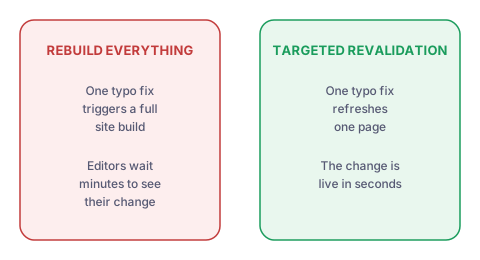
Refresh One Page, Not the Whole Site
A full rebuild regenerates every page to change one. Zunoy sends your site a targeted signal instead. It names the content type, the entry slug and the page slug, so only what changed gets refreshed.
What actually changes
Build minutes scale with your page count, until now
Big sites stay just as fast to edit as small ones
WHAT GETS SENT
What Zunoy Sends Your Site When You Publish
When you publish, Zunoy posts to your site's revalidate endpoint. The call runs in the background with a short timeout, so publishing always completes even if your site is slow to answer. Editors are never left staring at a spinner because a deployment is having a bad day.

Content Type
Which schema changed, e.g. blog-post

Entry Slug
Which specific entry changed

Page Slug
The exact route your site should refresh

Shared Secret
Authenticates the request so only Zunoy can trigger it
Three Scopes, For Three Situations
Not every change is the same size. Editing one article is different from changing a shared block, which is different from a template change that touches everything. Zunoy handles all three.

Entry
An article or product changed. Refresh the pages showing it.

Page
A page's own content or status changed. Refresh that page.

Full site
Something global changed. Trigger a full refresh on demand.
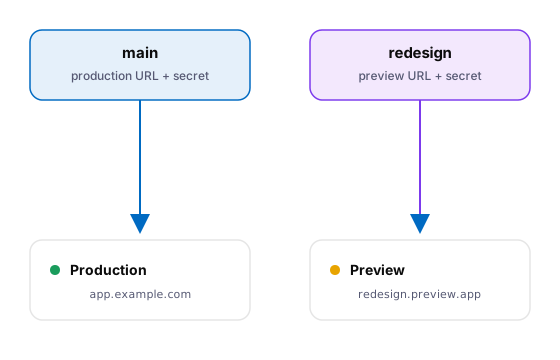
PER-BRANCH DEPLOYS
Every Branch Can Have Its Own Deployment
Each branch stores its own site URL and its own secret. Your redesign branch points at a preview deployment. Your main branch points at production. Publishing on one never touches the other. This is what makes branch-based work genuinely safe.
Per-branch site URL and revalidation secret
Main falls back to your default configuration
A branch with no deployment configured is simply skipped
Skips are logged, not raised as failures
See What Will Go Live Before It Does
Zunoy compares your content against the last publish and shows you what has changed since. Each item is labelled so you can tell a brand new page from an edit to an existing one.
- New — Created since your last publish
- Modified — Already live, but edited since
- Entries and pages — Listed only if they are not drafts
- Content types and forms — Listed on change — they have no draft state
- Last published at — The point everything is compared against
Drafts Are Deliberately Left Out of That List
Publishing does not publish your drafts.
Showing drafts as pending changes would be telling you something untrue
Zunoy filters them out of the "will go live" list on purpose
What you see in that list is what actually ships
How to Set It Up
One endpoint on your site, one configuration entry in Zunoy. After that it runs on its own, on every publish, forever.
Connected to the Rest of the Platform


Who Feels the Difference
Marketers
Fix a typo and see it live. No build queue, no asking a developer whether the site has updated yet, no refreshing and hoping.
Changes appear in seconds, not build cycles
A clear list of what your publish will actually change
Developers
Stop paying for full rebuilds on every content edit. Build minutes stop scaling with your page count, and content changes stop touching CI at all.
Targeted cache clearing per route
Secret-authenticated, async, and non-blocking
Agencies
Give each client branch its own preview deployment. Show work in progress on a real URL without ever risking their live site.
Per-branch deployment targets and secrets
Large sites
Publishing speed stops depending on how big the site is. A ten thousand page site updates as quickly as a small one.
Flat publish cost regardless of page count
Common Questions
What is on-demand revalidation?
It is a way to refresh a single page's cache instead of rebuilding a whole site. When you publish, Zunoy tells your site which content changed, and only the affected pages are regenerated.
What does Zunoy actually send to my site?
A small request containing a shared secret, the content type, the entry slug and the page slug. Your revalidate endpoint uses those values to decide exactly which routes to clear.
Can different branches point at different deployments?
Yes. Each branch stores its own site URL and secret. A redesign branch can refresh a preview deployment while your main branch refreshes production, with no crossover between them.
Do I have to rebuild my site every time I publish?
No. Zunoy sends a targeted signal naming the content type, entry slug and page slug. Your site clears the cache for those routes. Everything else stays cached and untouched.
Will a slow site slow down publishing?
No. The revalidation call runs in the background with a short timeout. Publishing completes regardless, so editors never wait on a deployment that is responding slowly.
What happens if a branch has no deployment set up?
Revalidation is skipped for that branch and the skip is logged. It is not treated as an error, so working on a branch without a preview site never breaks publishing.
Make Publish Mean Published
The change is live before the editor has finished refreshing the tab.