Stop Generating Image Variants Nobody Requests
Zunoy's global edge CDN transforms images at request time from URL parameters, then caches the result at the edge nearest your visitor.
5
Transform parameters
85
Default output quality
0
Build steps required
0
Pre-generated variants stored
THE MODEL
Compute Once, Not Store Everything
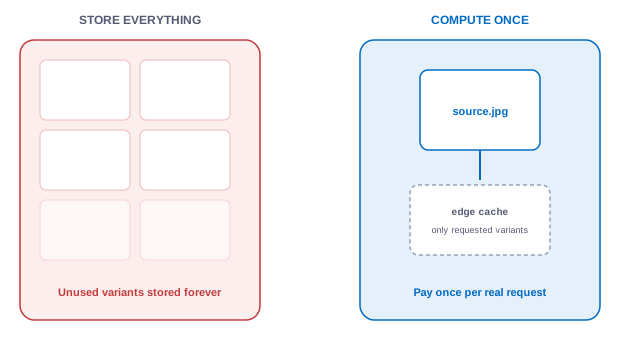
Real-time transformation means the delivered version of an image is computed when requested, from URL parameters, rather than pre-generated and stored. The result is cached at the edge, so compute happens once per genuinely requested variant.This inverts the usual cost model. Instead of paying storage for every possible variant of every asset forever, you pay compute once for the variants people actually request. The long tail of sizes nobody asks for is never created at all.
Change a breakpoint by changing a URL, not by reprocessing a library
No build-time image pipeline to maintain or debug
Variants that go unrequested cost nothing
PARAMETERS
The Transformation Parameters
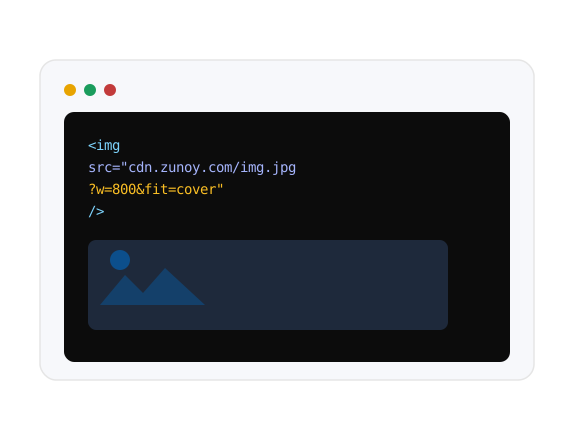
Every transformation is expressed as URL parameters covering width, height, quality, output format, and crop behaviour. Because it lives in the URL, transformation works anywhere a URL works — templates, srcset attributes, CMS fields, and CSS backgrounds.
PARAM | Values | What it does |
|---|---|---|
w | integer or auto | Target width in pixels |
h | integer | Target height in pixels |
q | 1–100 | Output quality, defaulting to 85 |
fmt | jpeg, png | Output format, defaults to source |
fit | contain, cover | How the image fills the box |
Two Ways to Fit an Image Into a Box: Crop or Shrink
The fit parameter controls cropping. Contain scales an image to fit within the requested dimensions while preserving aspect ratio without cropping. Cover scales the image to fill those dimensions exactly and crops the overflow, guaranteeing the box is filled.Use contain for logos, product shots on white, and anything where cropping destroys meaning. Use cover for heroes, cards, and thumbnails where filling the frame matters more than showing the whole image. Reversing these is the single most common cause of "why is our product cropped in half."

fit=contain
Scales to fit within the box, preserving aspect ratio. Nothing is cropped — the safer default when unsure.

fit=cover
Fills the box exactly and crops the overflow. Guarantees a filled frame, at the cost of edges.
BEYOND RESIZING
Three Things Most CDNs Don't Do
Beyond resizing and caching, Zunoy's CDN reads browser Client Hints to resolve widths automatically, transforms images hosted elsewhere, and logs delivery activity so optimization decisions are based on data rather than guesswork.

w=auto
Resolves real width from browser Client Hints, degrading safely when unavailable.

Remote URLs
Transform images you don't host — useful mid-migration or with partner assets.

Delivery logs
See which assets and which transformations account for your delivery volume.
About w=auto — Know What It Is
Client Hints are a best-effort browser signal, not universally supported. When no usable hint arrives, Zunoy serves the image unresized rather than guessing a width. For guaranteed control across all browsers, use explicit w= values in a srcset. Use w=auto for opportunistic optimization without maintaining a size matrix.
HOW IT WORKS
How It Works
From upload to optimized delivery there are no configuration steps, which is the point. Assets join the CDN pool automatically and transformation is requested inline.
Who Benefits Most
Developers
Eliminate build-time image processing, complex variant pipelines, and tedious reprocessing jobs when design updates breakpoints. Request the exact dimension, quality, and format right from the asset URL.
URL-based transformations
Migration-friendly
Automated format negotiation
Zero build overhead
ROADMAP (P2)
WebP and AVIF Output
Automatic conversion to next-generation image formats is in active development and not available in the current release. The pipeline currently outputs JPEG and PNG with full quality and dimension control. WebP and AVIF files can already be uploaded and stored as assets today — what's coming is converting to them on delivery.
Connected to the Rest of the Platform
The CDN is the delivery half of the Media Hub, which is why there's nothing to connect.


FAQS
Common Questions
Does Zunoy require a separate CDN subscription?
No. The global edge CDN is built into the platform and handles transformation and caching for every asset in the Media Hub, so there is no third-party CDN or image optimization service to procure and configure separately.
What is the difference between fit=contain and fit=cover?
Contain scales an image to fit within the requested dimensions while preserving aspect ratio without cropping. Cover scales the image to fill those dimensions exactly and crops the overflow, guaranteeing the box is completely filled.
What does the w=auto parameter do?
It resolves a target width from the browser's Client Hints, serving a size matched to what the browser reports it needs. Where no usable hint is available, it serves the image unresized rather than guessing a width.
Do I need to configure caching rules manually?
No. Edge caching is applied automatically to assets served through the CDN, with no manual cache configuration required for standard media delivery.
Does the CDN work with responsive srcset images?
Yes. Because every transformation is a plain URL, a standard srcset attribute can list several width-parameterized URLs of the same asset, and w=auto works well as a fallback default when explicit widths aren't set for every breakpoint.
What does real-time image transformation mean?
The delivered version of an image is generated at request time from URL parameters covering width, height, quality, format, and fit, rather than requiring every size and format variant to be pre-generated and stored ahead of time.
Does Zunoy convert images to WebP or AVIF?
Not in the current release. WebP and AVIF output is in active development. The pipeline outputs JPEG and PNG with quality and dimension control today, though WebP and AVIF files can be uploaded and stored as assets.
Can Zunoy transform images it doesn't host?
Yes. A transform endpoint accepts a remote image URL and applies the same width, height, quality, format, and fit parameters, which is useful during migrations or when assets live in a legacy system.
Can I see which transformations are actually being requested?
Yes. Media access and transformation activity is logged and surfaced as delivery analytics, so you can identify which assets and which specific transformations account for your delivery volume.
GET STARTED
Serve Every Image at the Size It's Actually Needed
The best image pipeline is the one nobody has to maintain. Upload once, request what you need, let the cache handle the rest.