Different Laws, Different Continents, One Config
Zunoy resolves each visitor's region and applies the matching consent rule — opt-in for the EU, opt-out for the US, notice-only elsewhere.
5
Consent categories
13
Vendor presets
4
Region rules
1
Config for every market
DETECTION
Region Detection Always Falls Back to a Safe Default
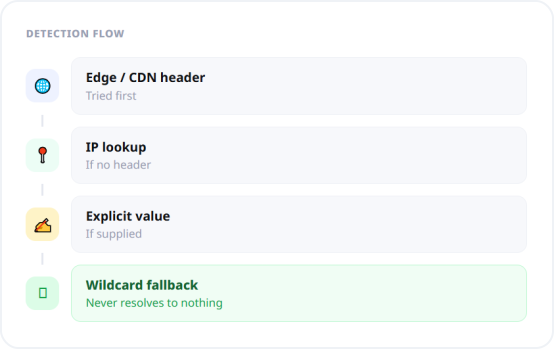
Region can be resolved from an edge or CDN header, from IP lookup, or from an explicitly supplied value, with an automatic mode trying strategies in order. When nothing resolves, the visitor falls through to the wildcard rule rather than an undefined state.That "never fails" property is the difference between a compliance feature and a compliance incident. Ambiguity in a consent system should resolve to a defined default, not to an exception nobody catches until an audit.
Read from an edge header, resolve by IP, or pass it in directly
Automatic mode tries strategies in order with a fallback
Unresolved regions hit the wildcard rule, never nothing
REGION RULES
Region Rules, Sensible by Default

EU / UK
Opt-inGDPR requires prior consent for non-essential cookies

US
Opt-outCCPA is opt-out with an ongoing right to withdraw

India
Notice-onlyMatches a notice-based rather than prior-consent expectation

Everywhere else
HiddenDon't degrade UX where no such requirement exists
CONSENT CATEGORIES
Five Categories, One You Can't Delete
Consent is meaningless if it's all-or-nothing. Zunoy ships five categories, each mapping to a distinct purpose a visitor can accept or refuse independently, with the necessary category protected by validation.

Necessary
Required for the site to work. Always on, cannot be deleted or disabled.

Analytics
Understanding how visitors move through and use the site.

Marketing
Delivering relevant ads and measuring campaign performance.

Preferences
Remembering visitor choices to personalize the experience.

Functional
Enhanced functionality such as chat and support widgets.

Validated config
Duplicate IDs, blank IDs, and orphan vendor mappings are rejected.
VENDORS
Thirteen Presets, Already Categorized
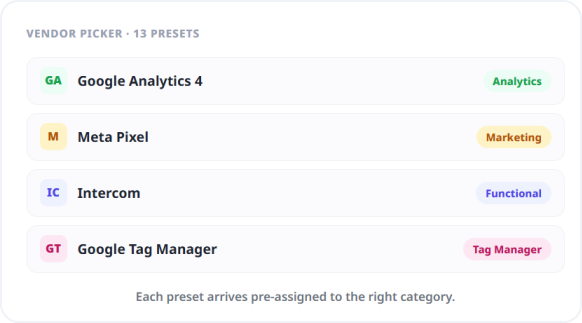
Most consent implementations fail at the mapping step, where someone must decide which category each third-party script belongs to and get it right. Zunoy ships presets with that mapping already made, so adding a vendor is a selection rather than a research task.Analytics tools land in Analytics, ad pixels in Marketing, chat widgets in Functional — assigned correctly out of the box.
Tag managers — Google Tag Manager
Analytics — GA4, Plausible, PostHog, Microsoft Clarity, Hotjar
Marketing — Meta Pixel, LinkedIn Insight, Google Ads, TikTok Pixel
Support — Intercom, Crisp, Tawk.to
Leave "Reject All" Switched On
Regulators have been consistent that making refusal harder than acceptance undermines the validity of consent entirely. Zunoy defaults the Reject All button to visible. You can turn it off, you generally shouldn't, and the default reflects that rather than optimizing for a short-term acceptance rate.
EVIDENCE
Every Consent Decision Is Logged and Provable
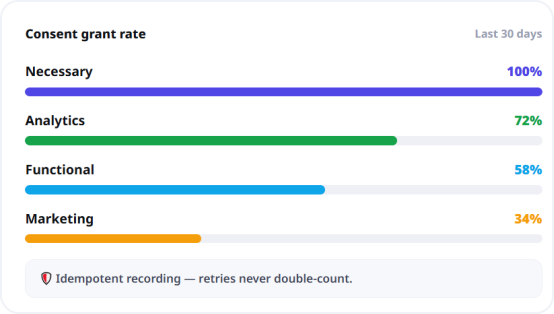
Zunoy records consent events and aggregates them into statistics by action taken and by category granted. Compliance frequently isn't about what your banner did — it's whether you can demonstrate what it did, months later, when somebody asks.Event recording is idempotent, so a client retrying after a network blip doesn't inflate your numbers with phantom duplicates. The aggregate is also a genuine product signal: if most visitors refuse Marketing, that's worth knowing.
Consent events logged with action and category grants
Idempotent recording, so retries don't create duplicates
Grant rates surface as a usable analytics signal
HOW IT WORKS
How It Works
Every workspace starts with defaults already in place and the module switched off, so enabling it is a review rather than a build.
Who This Is For
Marketers
Keep analytics and ad pixels running in jurisdictions where they're permitted, instead of a blanket opt-in wall degrading measurement everywhere.
Region-appropriate behaviour rather than one global banner
Grant-rate data showing what visitors actually accept
Legal & compliance
Categorized script blocking, region-appropriate defaults, and a consent event log you can point at during a review.
Necessary category protected against misconfiguration
Idempotent event recording for defensible records
Developers
A client SDK and a configuration model with validation that prevents structurally invalid states, rather than a script tag and optimism.
Config validation rejects orphan and duplicate mappings
Agencies
One consent approach across every client site, including clients with audiences spanning several regulatory regimes at once.
Per-workspace config with shared defaults
Connected to the Rest of the Platform
Consent touches every page you publish, which is why it belongs in the platform rather than beside it.


FAQS
Common Questions
Does Zunoy actually block scripts, or just show a banner?
It blocks scripts. Configured vendor scripts are prevented from executing until the applicable regional consent rule is satisfied, rather than displaying a notice over scripts that have already loaded and fired.
How is a visitor's region determined?
From an edge or CDN header, from IP lookup, or from an explicitly supplied value, with an automatic mode that tries strategies in order. If nothing resolves, the visitor falls through to a wildcard rule.
Which third-party tools have built-in presets?
Thirteen, including Google Tag Manager, GA4, Plausible, PostHog, Microsoft Clarity, Hotjar, Meta Pixel, LinkedIn Insight, Google Ads, TikTok Pixel, Intercom, Crisp, and Tawk.to — each pre-assigned to the correct category.
Does Zunoy keep a record of consent decisions?
Yes. Consent events are logged and aggregated by action and by category grant, so you can demonstrate what was collected. Recording is idempotent, so client retries after network issues don't create duplicate records.
Does Zunoy show different banners in different countries?
Yes. Zunoy resolves the visitor's region and applies a matching rule, defaulting to opt-in for the EU and UK, opt-out with a persistent preferences link for the US, notice-only for India, and hidden elsewhere.
What consent categories are included by default?
Five — Necessary, Analytics, Marketing, Preferences, and Functional. The Necessary category is always required and cannot be deleted or made optional, which prevents a configuration that would break your own site.
Can the banner match my brand?
Yes. Position, layout, background, text and accent colours, and whether Reject All and Customize appear are configurable, and every piece of banner copy is editable and stored per language.
Do I need a separate consent platform alongside Zunoy?
No. Consent management is a native module covering script blocking, regional rules, vendor presets, banner customization, and consent logging, with no third-party compliance subscription required.
GET STARTED
Get Consent Right in Every Market You Sell In
One configuration, regionally correct behaviour, and a log that proves it. Included, not billed separately.