We'd Rather Earn the Comparison Than Avoid It
Every headless CMS claims to be developer-friendly and easy for editors. This page names the specific capabilities behind that claim, and is just as specific about where Zunoy is still catching up.
The Modules Most Platforms Make You Assemble Yourself
Forms, edge delivery, cookie compliance, and AI content generation are built into Zunoy rather than sold as separate integrations. That's four vendor relationships — four logins, four bills, four support queues — most teams don't have to establish before launch.

Forms
Native builder, submissions stored beside your content.

Global CDN
Request-time image transformation, no separate account.

Cookie Consent
Geo-targeted rules with real script blocking, built in.

AI Studio
Editing, drafting, and search from one intelligence layer.
The Trade-Off Most Platforms Still Force You to Make
A headless CMS evaluation usually reduces to one choice: a clean API built for developers with a thin editing experience, or a page builder with a weak API underneath. Zunoy's bet is that this trade-off is no longer necessary once AI operates on the content model directly instead of sitting beside it as a chat widget.
The usual trade-off
A clean API, or a visual builder — rarely both done well
AI as a separate writing assistant you paste into
Forms, CDN, and consent sourced from three vendors
Content edited live, with a draft flag as the only safety net
Connecting an AI agent means building an integration

Both, over one structure that can't drift apart
AI operating on your types, fields, and relations directly
Native modules, one permissions model, one bill
Git-style branches with a deliberate merge step
A native MCP server, working from day one
THE FIRST DIFFERENCE
An Agent That Can Build Your Content Model, Not Just Draft a Paragraph
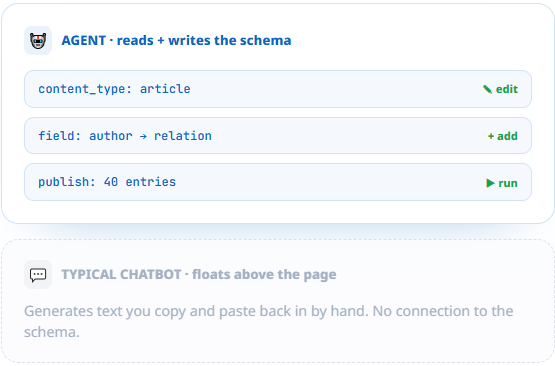
A chatbot that drafts paragraphs is table stakes now. Zunoy ships a native MCP server and an in-app AI agent that both operate on your actual schema — creating content types, authoring entries, publishing, and building forms — rather than generating text you then paste into a field by hand.
The MCP server connects Claude Desktop, Claude Code, or any MCP client
The in-app agent plans a change and waits for your approval before acting
Both read and write against the same content model your frontend uses
THE SECOND DIFFERENCE
A Visual Builder That Can't Drift From What the API Serves
Pages are assembled from blocks, and blocks are content types — not a proprietary page-builder format layered on top of the CMS. What an editor arranges in the visual builder is the exact structure your frontend receives, with no separate rendering layer to keep in sync.

No preview drift
No preview drift between the editor and the live site

Full developer control
Developers keep full control of how every block actually renders

One structure, any client
The same structure can render a website, an app, or any other client
THE THIRD DIFFERENCE
Content Changes Get the Same Safety Net Your Code Already Has
Creating a branch clones your content types, entries, and pages into an isolated copy. A schema change, a bulk rewrite, or a full redesign can happen there without touching the live site, then merge in deliberately — with an approval step your team controls, not a draft flag hoping nobody clicks publish too early.
Structural + content changes merge together
Structural and content changes branch and merge together, as one release
A dedicated approver role
A dedicated approver role can gate the merge, separate from who can edit
Analytics stay honest
Workspace analytics track only the live branch, so metrics stay honest
Why Teams Actually Switch, Not Just Why They Look
From a page builder
Teams outgrowing a visual-only tool switch for the real content API underneath — the same visual workflow, but content that can also power an app, a second site, or an AI agent.
Structured content instead of markup locked to one theme
A typed API a development team can actually build against
From a pure headless CMS
Teams outgrowing an API-only platform switch because editors were never going to learn to write JSON by hand, and marketing was waiting on every layout change.
A visual builder that doesn't require a separate rendering layer
Native forms, CDN, and consent instead of four more integrations
From WordPress
Teams migrating off WordPress switch for the content model and the security posture — no plugin-conflict roulette, and a real API instead of scraping HTML.
White-glove migration support included on every paid plan
Structured content from day one, not retrofitted with a REST plugin
See the Named Comparisons
Specific platforms, specific differences — not this page restated with a competitor's logo swapped in.


Common Questions
What makes Zunoy different from a typical headless CMS?
The AI layer operates directly on the content model — types, fields, and relationships — through a native MCP server and an in-app agent, rather than being a chat assistant bolted on top of a generic API.
Is the visual builder just a theme system, or real structured content?
It's structured content. Pages are assembled from blocks that are content types themselves, so the visual builder and the content API describe the exact same structure with nothing to keep in sync.
How does branching make content changes safer?
A branch clones your content types, entries, and pages into an isolated copy, so structural changes and content edits can be reviewed together and merged deliberately, rather than going live the moment someone clicks save.
Does Zunoy require third-party tools for forms, CDN, or consent?
No. All three are native modules governed by the same permissions and API as your content, rather than separate vendor integrations you have to procure and maintain.
What can an AI agent actually do in Zunoy?
Through the MCP server or the in-app agent, it can create content types, author and publish entries, build forms, and manage pages — full read and write against your real schema, not just text generation.
Can I see how Zunoy compares to a specific platform I'm evaluating?
Yes. Dedicated comparison pages cover Strapi, Contentful, and Sanity directly, with more added as they're written.
See the Difference on Your Own Content
The best way to judge a comparison page is to stop reading one. Start free and model your actual content.

CMS
A headless CMS to model content and ship it anywhere.
Operational
Integrations
Mail Us
support@zunoy.com
Copyright © 2026 - Mentcube Innovations Pvt Ltd.. All Rights Reserved.
v0.1.101 · Built Aug 12, 2026, 4:13 AM