The AI Layer Behind Every Monitor
AI-based uptime monitoring in Zunoy Uptime doesn’t just watch. It acts. Ask for a monitor, and it’s created. Watch it long enough, and something catches trouble before you do, then explains what happened and suggests what’s next. Three AI-powered tools carry that thread, MCP Server, AI SRE, and AI Agent, each picking up where the last one leaves off.
WHY
Let AI Take the Boring Parts
- 01
Setting up a check
Nobody actually enjoys a ten-field form. Just ask instead.
- 02
Watching for trouble
You can't stare at a dashboard all day. Something else can.
- 03
When it breaks
Piecing together logs at 2 AM is nobody's idea of a good time.
- 04
After it's over
An AI postmortem is easier to edit than to write from a blank page.
MCP SERVER
Just Tell It What You Need
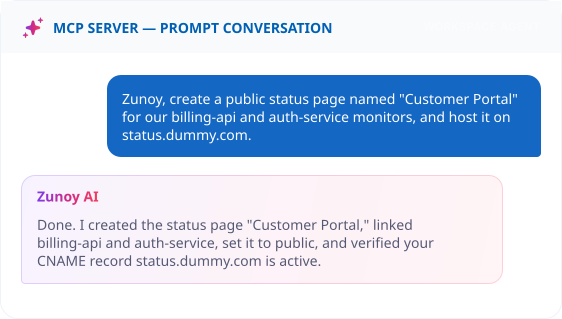
MCP Server connects Zunoy Uptime to AI tools like Claude or your terminal, so you can create, check, and adjust monitors by just saying what you want, no dashboard required.
Set Up a Check by Just Asking
Set Up a Check by Just Asking
Check In Without Opening a Tab
Check In Without Opening a Tab
Ask "what's the status of checkout.zunoy.com?" and get the current state back in plain language, mid-conversation.
Adjust Sensitivity Without a Settings Page
Adjust Sensitivity Without a Settings Page
Say "only alert me if it fails three times in a row," and the sensitivity updates instantly.
AI SRE
It Never Clocks Out
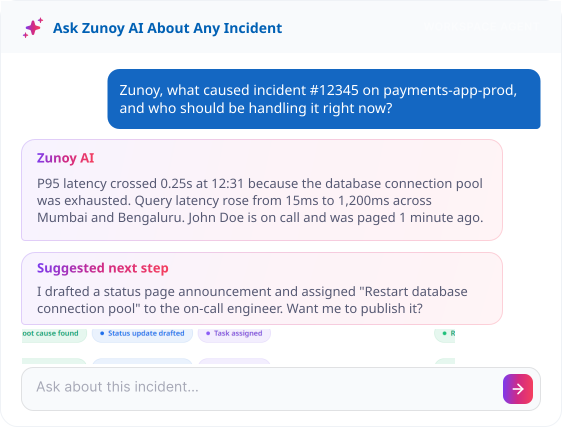
AI SRE keeps an eye on your monitor data around the clock, catching anomalies, cutting through alert noise, and tracking down root causes before you'd have even noticed something was off.
Catches the Pattern Before It's a Problem
Catches the Pattern Before It's a Problem
Fewer Pages, More Signal
Fewer Pages, More Signal
Consolidates related triggers into one alert instead of ten, so your phone buzzes once, not repeatedly.
Skips the Guesswork
Skips the Guesswork
Traces a failure back to what actually changed, and surfaces it directly inside the incident, not buried in a log somewhere.
Routes It to the Right Person Automatically
Routes It to the Right Person Automatically
Reads the incident's severity and team assignment, and escalates accordingly instead of paging everyone at once.
Know Exactly What AI Is Up To
Having three AI tools make decisions for you only feels okay if you can actually see what they've been doing.

Choose your provider
Choose any LLM you prefer to integrate with Zunoy Uptime.
Watch your usage
Track AI credit spend before it's a surprise on the invoice.
Read the log
See exactly what AI caught while you were not online.
Use Cases
Where This Actually Saves Time
- SAAS
SaaS Teams
A login monitor gets created by asking, and by the time anyone notices a spike, AI Agent has already explained it.
- DEVOPS
DevOps Teams
Root cause analysis points straight at the deploy that broke things, instead of a two-hour log dive.
- AGENCIES
Agency Teams
Query a dozen client monitors from one terminal window, without opening a single dashboard.
- IT
Enterprise IT
Escalation routes by severity automatically, so a minor alert never wakes up the wrong person.
FAQ
Questions About AI-Based Uptime Monitoring
What is MCP Server?
MCP Server lets you create monitors, check their status, and adjust alert policies in plain language, right from your terminal or IDE, instead of a dashboard.
Can AI Agent resolve an incident on its own?
No. It writes a smart incident summary of what happened, explains the impact, and suggests a next step, but a person still closes the incident out.
How does anomaly detection know what's normal?
It learns each monitor’s typical pattern over time, so smart incident detection can flag a real deviation instead of reacting to every small fluctuation.
Does AI SRE replace my monitors?
No. It works alongside your existing monitors, watching their check data continuously to catch anomalies and reduce noise before an incident even starts.
Does AI Monitor Creation work for every check type?
Yes. Ask for any check type, HTTPS, Port, Synthetic, or otherwise, and it gets created the same way.
Can I turn off AI features?
Yes. Manage all three AI functionalities, MCP Server, AI SRE, and AI Agent, from AI Settings, along with your AI credit usage and LLM provider choice.
Get Started
Let AI Take It From Here
Create a monitor by asking, and let the rest of the chain start watching immediately.
Pick your LLM
MCP Server Included
Manage AI Credits
AI-Based Uptime Monitoring