Uptime Monitoring Platform for Every Service
Zunoy’s uptime monitoring platform checks your websites, APIs, servers, and background jobs as often as every 30 seconds. It filters false alerts, notifies your team of real issues, and helps you launch your first monitor in minutes. Explore every monitor type below and choose the right one for your setup.
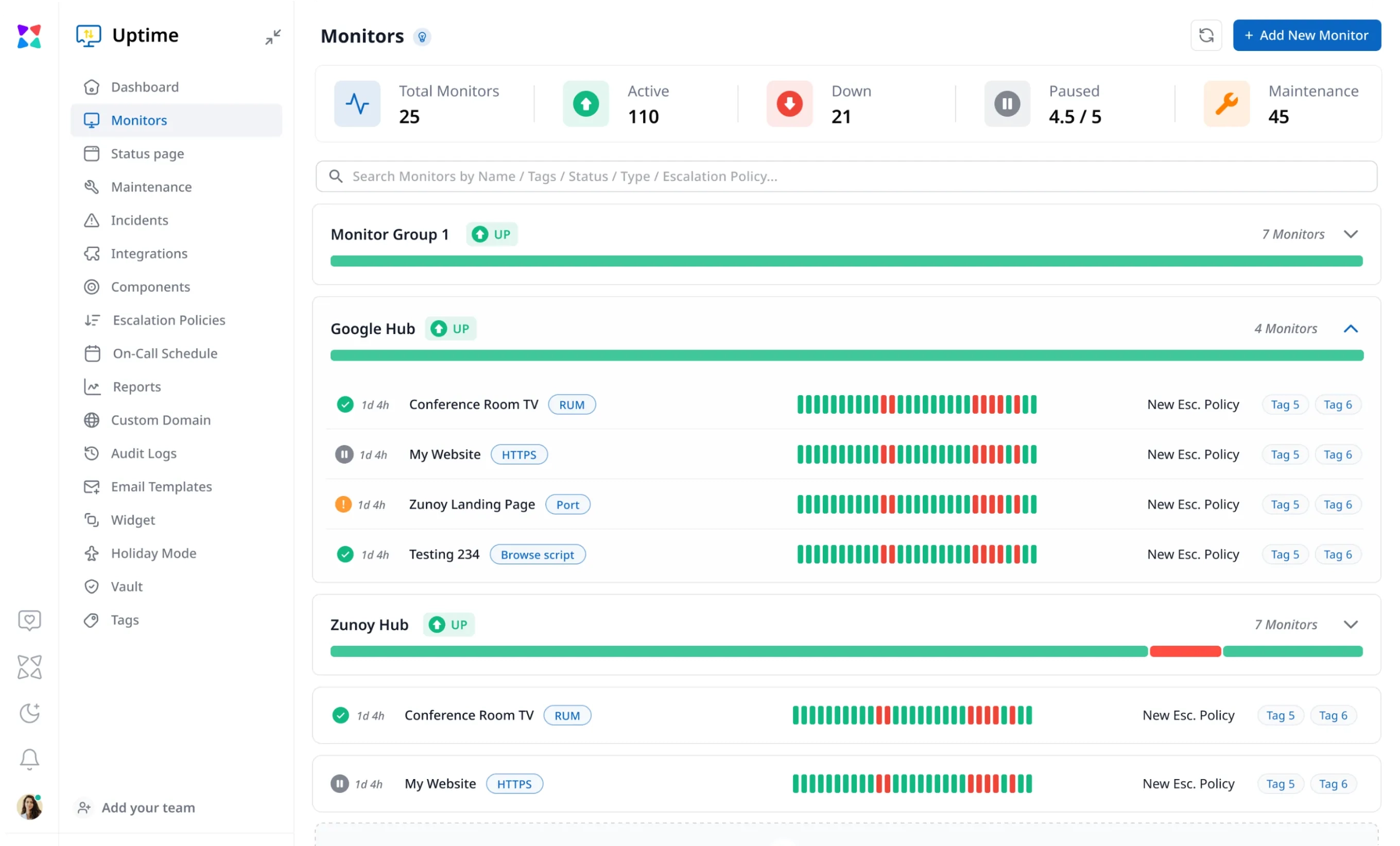
30s–60m
check intervals
10+
global regions
10+
alert channels
Free
Forever Plans
No
credit card required
PREMIUM MONITORS
Go Beyond Uptime Monitoring
An uptime check confirms a service responded. It doesn't tell you if a real visitor had a smooth experience, or if your checkout flow actually completed. RUM and Synthetic Monitoring, two premium monitoring solutions, close that gap: one watches real traffic as it happens, the other rehearses real journeys before customers hit them.

Real User Monitoring (RUM)
Real User Monitoring records how actual visitors experience your site: load speed, layout shifts, and script errors, captured straight from their browsers instead of a lab test.
Real-time monitoring tracks Core Web Vitals from live visitor sessions
Captures client-side JavaScript errors as they happen
Compares load times across regions, networks, and browsers
Flags slow-loading resources and API calls in the browser
- Explore RUM

Synthetic Monitoring
Synthetic Monitoring runs scripted visits to your site on a schedule—a login, a signup, or a checkout—so you catch a broken flow before a customer does.
Tests multi-step journeys before customers encounter failures
Runs scheduled checks from global monitoring locations
Catches broken checkout, login, and signup flows
Validates critical paths with consistent test conditions
- Explore Synthetic Monitoring
MONITOR CATALOGUE
Find the Right Monitoring Tools for Every Critical Service
Search the Uptime monitoring hub by monitor type or use case, then choose the monitor that fits your service, workflow, or customer journey.
- CATEGORY
- USE CASE
- SORT BY
22 monitors
in
All Monitors

HTTPS Monitoring
Continuous HTTPS checks from global nodes spot downtime, SSL lapses, status code errors, and bad redirects before customers notice.
BENEFITS

Validates SSL certificates, HTTP status codes, and headers
Global edge checks from 15+ locations every 30s
Multi-channel instant alerts via Slack, SMS, Email, and Webhooks
Automated screenshot and payload capture on failure

Ping Monitoring
Continuous ICMP ping checks from global test locations to detect network outages, host downtime, and packet loss before users complain.
BENEFITS
Fast ICMP echo checks every 30 seconds
Track packet loss, round-trip time, and latency jitter
Multi-region consensus prevents false alarms
Pinpoint regional ISP routing drops instantly

Port Monitoring
Real-time TCP/UDP port availability checks for databases, SSH bastions, mail servers, and custom backend daemons.
BENEFITS
Monitors standard & custom ports (MySQL 3306, Postgres 5432, Redis 6379, SSH 22)
Detects hung processes refusing connections
Measures TCP handshake latency per node
Triggers automated incident escalation when ports close

SSL Monitoring
Tracks SSL/TLS certificate validity, revocation status, cipher strength, and expiration timelines to prevent security warnings and expired cert downtime.
BENEFITS
60, 30, 14, and 7-day advance expiry alerts
Validates certificate chain, root CA trust, and intermediate certs
Detects insecure TLS 1.0/1.1 protocols and weak ciphers
Auto-discovers newly renewed certificates

Heartbeat Monitoring
Reverse monitoring for scheduled backups, ETL pipelines, and recurring daemons that ping Zunoy on completion.
BENEFITS
Alerts the moment a scheduled task fails to check in
Supports dynamic execution grace periods and retry windows
Zero firewall holes required — jobs push outbound HTTPS pings
Captures execution runtime and payload exit codes

DNS Monitoring
Continuous verification of A, AAAA, MX, CNAME, TXT, NS, and SOA records to catch accidental record modifications, hijacking, and propagation issues.
BENEFITS
Watches critical DNS records across global resolvers
Alerts on unauthorized record changes within minutes
Verifies DKIM, SPF, and DMARC mail authentication records
Tracks DNS lookup latency and nameserver health

API Monitoring
Deep REST, GraphQL, and webhook endpoint monitoring with custom headers, JSON body assertion, status code validation, and response SLA tracking.
BENEFITS
Validates JSON schema, specific response fields, and status codes
Supports custom headers, Bearer tokens, and Basic Auth
Monitors GET, POST, PUT, PATCH, and DELETE methods
Alerts when endpoint response time exceeds SLA thresholds

Keyword Monitoring
Scans HTML responses for required keywords (e.g. In Stock, Welcome) or forbidden error strings (e.g. Database Error, Out of Stock).
BENEFITS
Asserts required text presence or absence on dynamic pages
Catches soft 200 errors like Under Maintenance or Connection Failed
Monitors e-commerce inventory, pricing tags, and compliance notices
Supports regex matching and case-sensitive evaluation

Response Time Monitoring
Continuous latency tracking broken down by DNS lookup, TCP connect, TLS handshake, TTFB, and total transfer duration.
BENEFITS
Granular latency phase breakdown (DNS, Connect, SSL, TTFB)
Performance budget alerts before full outages occur
Identifies slow regional CDN nodes and database bottlenecks
Tracks 95th and 99th percentile response time trends

IPv4 Monitoring
Dedicated IPv4 stack reachability and latency checks to ensure legacy networks and IPv4-only visitors experience zero degradation.
BENEFITS
Forces pure IPv4 transport across all test nodes
Detects dual-stack routing imbalances and carrier drops
Tracks IPv4 latency benchmarks across global regions
Isolates IPv4-specific DNS resolution failures

IPv6 Monitoring
Targeted IPv6 connectivity checks ensuring modern mobile networks and next-gen ISP traffic connect without silent fallbacks.
BENEFITS
Native IPv6 testing from all global probe nodes
Identifies broken AAAA records and route peering blackholes
Monitors IPv6 TLS handshake and latency metrics
Ensures compliance with mobile-first IPv6 mandates

Cron Job Monitoring
Schedule-aware task monitoring with support for complex cron expressions, daylight savings shifts, and execution duration bounds.
BENEFITS
Evaluates precise standard 5-part cron syntax schedules
Alerts if jobs run longer than expected execution window
Tracks historical run durations and failure frequencies
Dead-simple single curl ping integration in crontab

Domain Monitoring
WHOIS and RDAP registrar tracking to monitor domain expiration, registrar lock status, and nameserver delegation changes.
BENEFITS
90, 60, 30, and 7-day domain expiration warnings
Detects unauthorized nameserver delegation updates
Alerts if registrar transfer lock or privacy is altered
Multi-registrar compatibility (GoDaddy, Namecheap, Route53, Cloudflare)

UDP Monitoring
Monitors connectionless UDP services including DNS servers, VoIP gateways, syslog daemons, and streaming infrastructure.
BENEFITS
Sends custom packet payloads and validates return packets
Detects ICMP port unreachable and silent packet drops
Monitors VoIP, NTP, DNS, and game protocol availability
Tracks jitter and UDP response times globally

TCP Monitoring
Raw socket connection checks for non-HTTP services, custom game servers, message brokers, and enterprise middleware.
BENEFITS
Verifies socket connection and handshake establishment
Supports string payload send/expect matching
Tracks connection timeout and connect latency
Compatible with RabbitMQ, Kafka, custom sockets, and proxies

Blacklist & Email Deliverability
Continuous RBL/DNSBL checks against 50+ major spam blacklists to safeguard domain sender reputation and ensure email delivery.
BENEFITS
Monitors sending IPs and domain against 50+ RBL blacklists
Validates SPF, DKIM, and DMARC policy alignment
Instant notification upon blacklist listing with delisting guidance
Protects transactional emails from landing in spam folders

Visual Ping Monitoring
Automated visual diff checks that render pages in real headless browsers to catch layout shifts, missing buttons, broken images, and defacement.
BENEFITS
Pixel-by-pixel side-by-side visual regression detection
Selectable region cropping or full-page comparison
Ignores dynamic ads and animations with threshold tuning
Catches silent frontend breakages that still return HTTP 200

Page Speed Monitoring
Scheduled Google Lighthouse audits tracking Core Web Vitals (LCP, INP, CLS, FCP) on both mobile and desktop profiles.
BENEFITS
Automated Google Lighthouse audits on scheduled intervals
Monitors Core Web Vitals (LCP, INP, CLS) and SEO score
Separate performance budgets for mobile and desktop
Actionable diagnostic insights for asset and script bloat

Manual Monitoring
Human-controlled status toggles for offline maintenance, third-party vendor dependencies, hardware outages, and non-automated services.
BENEFITS
Manual status controls directly wired to your status page
Create and resolve incidents on-demand with custom commentary
Tracks downtime history alongside automated monitors
Quick AI assistant setup for custom service tracking

Database Monitoring
Direct connection health and query response checks for PostgreSQL, MySQL, Redis, MongoDB, and managed cloud databases.
BENEFITS
Tests connection establishment, authentication, and query execution
Measures query round-trip time and connection pool latency
Alerts before connection exhaustion triggers application downtime
Supports read-only service account queries across global nodes

Synthetic Monitoring
Multi-step browser journey and API chain simulations that log in, click buttons, fill forms, and verify critical conversion paths 24/7.
BENEFITS
Multi-step browser automation for auth, checkout, and cart flows
Sequential API chain testing with token extraction and assertions
Captures video recordings, DOM snapshots, and console logs on failure
Pinpoints the exact step and selector that failed during execution

Real User Monitoring
Client-side telemetry capturing live visitor page load speeds, Core Web Vitals, browser errors, and geo-specific performance across actual devices.
BENEFITS
Real-time Core Web Vitals telemetry from live customer sessions
Breakdowns by country, browser, device type, and connection speed
Correlates frontend performance with user bounce and conversion rates
Lightweight, privacy-compliant zero-dependency snippet
LIVE SIGNALS
Full Control Over Monitor Health
Monitoring Signals

Uptime Percentage
Track historical availability against your SLA commitments.
Response Time
Watch connection speed, DNS lookup time, and page render delays.
Region-Based Failures
Compare latency across our 10 monitoring regions to rule out a local routing issue.
Downtime Log
Review a chronological history of outages, response headers, and recovery times.
Monitor Health
Use real-time monitoring to see every check as active, failing, slow, paused, under maintenance, or misconfigured.
Advanced Configuration
Proxy Routing
Send checks through your own gateway when you need controlled network access.
Location Filtering
Choose the regions that actually match your users.
Request Configuration
Set custom HTTP methods, headers, and payloads.
Monitor Sensitivity
Choose how many consecutive failures trigger an alert.
Domain & SSL Rules
Get warned before a domain or certificate expires.
STATUS
How to Build Trust With Status Pages
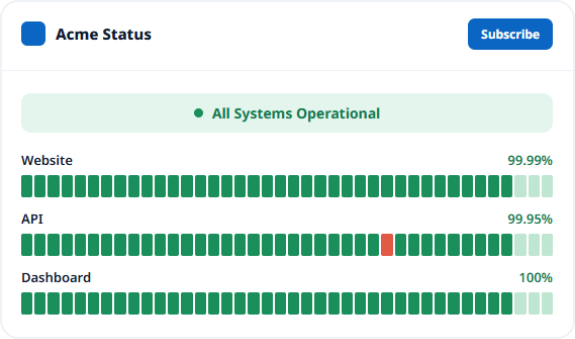
Your uptime monitoring platform tells your team something broke. A status page tells customers you already caught it before they have to ask.
Live status, uptime, and response time for every linked monitor
Your branding, custom domain, and public or private access
Subscriber alerts by email, SMS, Slack, Discord, webhook, or RSS
Running more than one product? Group multiple status pages under one Status Hub.
AI WIZARD
Save Time With AI Features
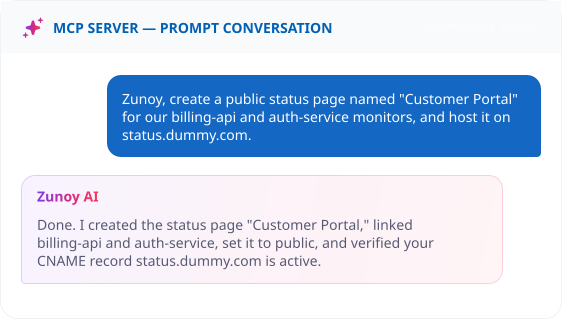
Not sure which monitor fits your setup? Ask the AI Wizard, it suggests the right check for your use case or sets it up for you.The same conversation works from your terminal or IDE through the MCP Server, no dashboard needed. Once monitors are live, AI Agents explain what each incident means, and AI SRE filters out the noise so only real spikes reach you.
FREE TOOL
Down Right Now?
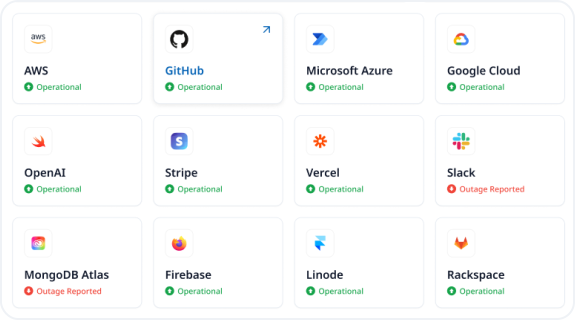
Before you set up a monitor, sometimes you just need one quick answer: is the problem on your end, or theirs? The free Is It Down tool checks the live status of major services like Netflix, AWS, Amazon, Instagram, or X, no new account needed.On the Pro plan, you can also subscribe to any web service and get alerted automatically the moment it goes down or comes back up.
REAL SCENARIOS
What Your Monitors Actually Catch
FAQ
Quick Answers About the Uptime Monitoring Platform
What is uptime monitoring?
Uptime monitoring is the process of using monitoring software to check whether websites, APIs, servers, ports, SSL certificates, and other services are online and responding. It helps teams detect downtime early, route alerts, and track response times.
What does the Zunoy uptime monitoring hub include?
Zunoy has dedicated pages for HTTPS, keyword, ping, port, SSL, heartbeat, domain, DNS, API, TCP, UDP, IPv4, IPv6, website, response time, page speed, cron job, synthetic, browser script, browser flow, API chain, blacklist and email deliverability, visual ping, and manual monitoring. This provides targeted documentation for each of our monitoring services.
How many monitoring locations does Zunoy support?
Zunoy operates 10 global monitoring regions, checking your services from nodes across Mumbai, Bengaluru, San Francisco, N. California, New York, London, Paris, Frankfurt, Toronto, and Tokyo to ensure broad geographic availability.
When does an alert trigger?
Alerts trigger based on your monitor sensitivity settings. You can configure a check to trigger an alert after 1, 2, or 3 consecutive failures to balance fast detection against unnecessary noise.
Can failed monitors create incidents automatically?
Yes. Failed checks can create incidents automatically based on your alert routing rules, allowing responders to track ownership, status, comments, and SLA impact in a single timeline.
How do I choose the right monitor type?
Choose between different types of uptime monitoring tools based on the failure you want to prevent. Use HTTPS for web endpoints, ping for reachability, SSL for certificate expiration, heartbeat for background processes, API for backend responses, and synthetic checks for user flows.
What check intervals does Zunoy support?
Zunoy supports monitor check intervals from 30 seconds to 60 minutes, including 30s, 1 min, 2 min, 5 min, 10 min, 15 min, 30 min, and 60 min. The available check frequency depends on your chosen plan.
Which alert channels does Zunoy support?
Zunoy supports 10 alert channels, including email, SMS, Slack, webhooks, Microsoft Teams, Discord, phone, Telegram, n8n, and Zapier. The n8n and Zapier integrations allow teams to build custom alert workflows.
What does the free plan include?
Zunoy's free plan includes up to 10 monitors, 3 team members, and 1 workspace. It also includes 5-minute check intervals, a public status page, and incident management.
Can monitor data appear on a status page?
Yes. Uptime percentages, latency charts, incident history, and current status can be synced to public or private status pages automatically.
Start Monitoring
Start With Signals
Use Zunoy’s uptime monitoring platform to track website availability, response time, global failures, and public status pages from one dashboard.