Uptime Monitoring Integrations That Reach Your Team However They Work
An uptime monitoring integration connects Zunoy Uptime to the connected tools your team already uses, Slack, a phone, a webhook, so an alert doesn’t just sit in a dashboard waiting to be noticed.
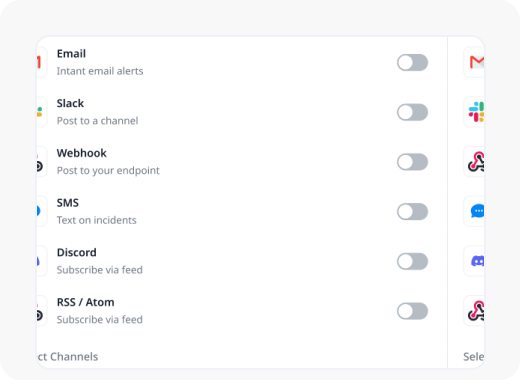
Catalog
Third-Party Integrations for the Tools You Already Use

Email
The dependable default, alerts delivered wherever an inbox already gets checked.

SMS
Text alerts straight to your phone, no app or login required.

VoIP Call
An automated call for when it's serious enough that a notification alone might get missed.

Slack
Alerts and incident updates, posted straight into the channel your team is already watching.

Microsoft Teams
The same real-time alerting, inside the productivity tools your org already runs on.

Discord
Route incidents and status changes into a server channel, built for teams that live there.

Telegram
Push alerts to a Telegram chat or channel, no dashboard tab required.

Webhooks
Send event data to any endpoint you control, the foundation for API integrations and everything custom.
Setup
Connect One in Under a Minute
Don't See What You Need?
Tell us which software integrations you’d want connected. New integrations get prioritized based on demand.
Logs
Know the Moment Something Actually Changes
These four are just examples, not the full list. Alerts fire for plenty of other events too, this is what it looks like when they do.
Monitor Created
Get notified the moment a new monitor actually goes live and starts checking.
Monitor Down
Know within seconds when a monitor fails its check and drops down.
Vendor Service Interrupted
Catch it when a vendor you depend on goes down, not just your own stuff.
SLA Breach
Get notified the instant a monitor crosses its own SLA threshold.
Alerts Don't Need a Desktop
Every uptime monitoring integration you connect still works when you’re away from your desk.
Push notifications reach the app the same moment they'd reach Slack.
Respond to an incident straight from your phone.
No integration to set up separately, it's already connected.
See the Mobile App



Real Scenarios
Where This Actually Helps
- SRE TEAMS
SRE Teams
Critical alerts land in one Slack channel, routine ones in another, without a second monitor to manage.
- AGENCIES
Agencies
Each client's alerts routed to their own Discord server, kept separate by project.
- AUTOMATION
Automation-Heavy Teams
An incident triggers an n8n workflow integration that updates a ticket automatically, no manual handoff.
- SUPPORT
Support Teams
A failed delivery shows up in the logs immediately, instead of someone asking why they never got paged.
FAQ
Quick Answers About Integrations
Which providers can I connect?
Email, SMS, and VoIP calls directly, plus Slack, Microsoft Teams, Discord, Telegram, Webhooks, and platform integrations with automation tools like n8n and Zapier.
Can I test an uptime monitoring integration before relying on it?
Yes. Send a test alert to confirm delivery before it ever handles a real one.
Can I inspect the actual data sent to a provider?
Yes. Preview the exact payload delivered for any event in the logs.
Can I connect more than one integration to the same provider?
Yes. Run multiple Slack integrations, for example, each scoped to a different project or alert type.
Can I see whether a notification actually delivered?
Yes. Every integration log shows delivery status, response code, and attempt count.
Can I search my integration logs?
Yes. Search by event type, project, trigger source, or timestamp.
Get Started
Connect Your First Uptime Monitoring Integration
Stop checking a dashboard for alerts that should already be in your inbox, or your Slack, or your workflow.