On-Call Scheduling Without the Guesswork
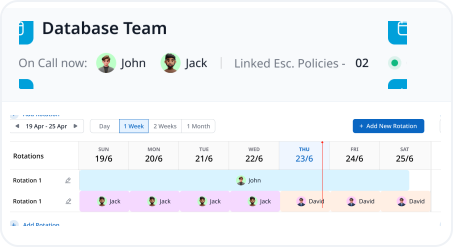
On-call scheduling decides who's actually responsible right now, not just whose name is on a spreadsheet. Zunoy Uptime lets you stack daily, weekly, monthly, and custom rotations into one schedule, instead of forcing everything into a single rigid schedule.
Rigid Cadence
Rigid Cadence
Per-Seat Costs
Per-Seat Costs
Paying more every time you add a backup responder.
Timezone Guesswork
Timezone Guesswork
Manually recalculating shifts across regions in a spreadsheet.
Coverage Gaps
Coverage Gaps
Two rotations overlap awkwardly, or worse, nobody's covering a slot at all.
THE PROBLEM
Tired of Juggling Separate Calendars?
Most teams manage on-call scheduling with whatever’s convenient, until it isn’t.
Setup
Build a Schedule in Four Short Steps
Create a Schedule
Create a new schedule, give it a name, add a summary, and set its primary timezone.
Add a Rotation
Add users, a rotation frequency, and a priority order to your on-call rotation.
Layer More On Top
Stack another rotation for the coverage you're still missing, weekends, holidays, a different region.
Preview Before You Save
See upcoming assignments laid out on your on-call calendar before the schedule goes live.
Small Settings, Big Control
A few small settings handle the exceptions, without touching the rest of the schedule.

Shift Overrides
Swap One Shift, Not the Whole Schedule
Cover a day off or a custom window without touching the underlying rotation rules.

Restrictions
Quiet Hours, On Purpose
Limit a rotation to business hours only, or pause it entirely during scheduled time off.
Escalation Policies
Your Schedule Powers Escalation Too
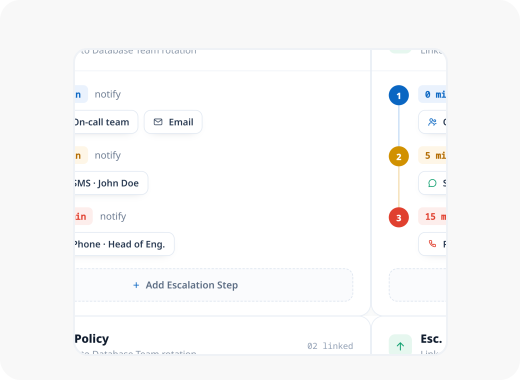
With incident on-call scheduling, a schedule isn’t just for tracking who’s on call, it can also be the target of an escalation stage, so a policy always reaches whoever’s actually covering.
AI
Minimal Effort With Your AI Companion
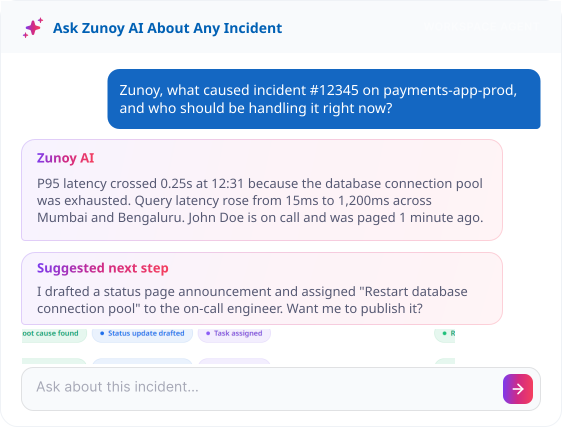
Skip the rotation builder. Ask your MCP-connected terminal to set one up in plain language, rotations, priorities, timezones, and who's actually on them.
Real Scenarios
Where This Actually Helps
Multinational Companies
One region's business-hours rotation stacked on top of another's, timezone handled per rotation, not guessed.
Compliance-Heavy Teams
A documented, timestamped rotation history, ready whenever an audit asks who was actually on call.
Fast-Growing Teams
Add a fourth rotation layer without touching the three that already work.
Lean Ops Teams
One console shows exactly who's covering, without pinging around to ask.
Quick Answers About On-Call Scheduling
Can I mix daily and weekly rotations in one schedule?
Yes. Layer a weekly rotation for weekdays and a separate daily rotation on top for weekends, all in one schedule.
Can I override a single shift without changing the whole schedule?
Yes. Apply a date override for a day off or a custom window, the underlying rotation rules stay untouched.
Can I see who’s on call without opening the on-call rotation?
Yes. The schedule management console shows the current on-call member directly in the list view.
How do overlapping rotations get resolved?
Each rotation has a priority order. When rotations overlap, the higher-priority one determines who's actually on call.
Does each rotation have its own timezone?
Yes. Set a timezone per rotation, so a global team's shifts stay accurate without manual recalculation.
Can I restrict a rotation to certain hours?
Yes. Limit a rotation to specific business hours so it doesn't alert anyone outside that window.
Built to Stack
Bring Peace to Your Team's Rotations
Stop maintaining two calendars to cover one team. Build a schedule that actually stacks, weekdays, weekends, and holidays, without a second on-call scheduling tool to keep in sync. Once it's set, coverage takes care of itself.
Layers multiple rotations into one
Handles time zones automatically
Escalates if nobody's actually covering