Escalation Policies That Never Miss a Beat
Escalation policies decide what happens next, whether it’s an alert nobody’s acknowledged, or an incident that’s dragging past when it should’ve been resolved. Zunoy Uptime routes it to the next stage automatically, on the right channel, after the delay you set.
Silent Miss
Silent Miss
Alert Fatigue
Alert Fatigue
Every notification wakes the whole team, critical or not.
Buried Priority
Buried Priority
Real incidents wait behind low-priority noise.
No accountability
No accountability
No record of who was actually responsible when it mattered.
The Problem
When an Alert Just Stops at One Person
Most escalation workflows fail quietly, not with an error, just silence. Here’s where that silence actually costs you.
SETUP
Watch a Policy Come Together
Name It
Give your policy a name so your team can actually find its escalation guidelines later.
Add a Stage
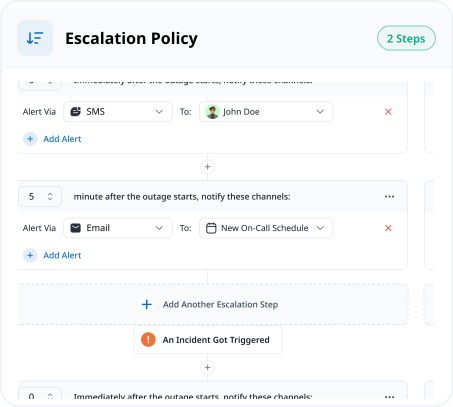
Set a delay and choose who it notifies on an on-call schedule.
Add the Actions
Trigger more than one notification channel from the same stage.
Link Your Monitors
Add every monitor that should fall under this policy.
Escalate to Protect Your SLA Targets
An SLA target isn’t just a number on a report, it’s a promise. When a critical incident risks blowing past it, your incident escalation policy needs to reach further than the on-call engineer.

AI
Set Up by AI SRE, Updated by AI SRE
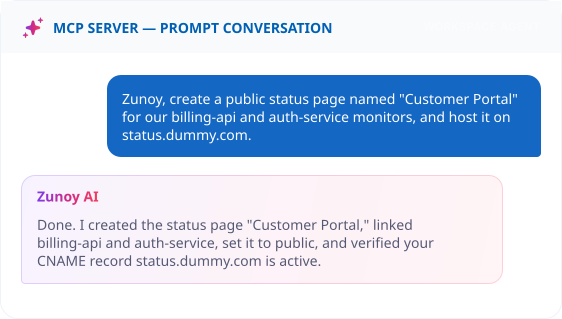
Ask AI SRE to build escalation policies in plain language, stages, delays, and channels included.
Once it's running, AI SRE keeps you posted, a policy escalated, a stage got skipped, who ended up handling it.
Connected
The Details That Make It Work
A policy is more than a list of stages. Here's what actually makes it work day to day, coverage, reach, redundancy, and reuse, without you rebuilding any of it.
See Exactly What a Policy Covers
Link one or more monitors directly to a policy. Its listing shows exactly how many monitors and how many alerts are configured, no guessing what's covered.
Reach Whoever's Actually On Shift
Escalate to "SRE On-Call" instead of one fixed name, and it reaches whoever's covering that week, automatically.
One Stage, More Than One Alert
Trigger an email and an SMS from the same stage. If a phone's on silent, the email still lands.
One Policy, Every Critical Service
Build your alert escalation rules once as a policy, and apply it to every monitor that needs the same response, instead of rebuilding it for each one.
Alerts Where Your Team Already Is
Route escalation alerts straight into the tools your team already lives in, no extra app to check. Every integration shows a live connectivity status, so you always know an alert will actually land.

SMS


Webhooks

MS Teams

Discord

Slack

Telegram

VoIP
SMS
Webhooks
MS Teams
Discord
Slack
Telegram
VoIP
SMS
Webhooks
MS Teams
Discord
Slack
Telegram
VoIP
FAQ
Quick Answers About Escalation Policies
What is an escalation policy?
A set of alert escalation rules that decides who gets notified, on which channel, and in what order, when an alert isn’t acknowledged or an incident isn’t resolved in time.
Can I escalate to a schedule instead of a specific person?
Yes. A stage can notify an entire on-call schedule, reaching whoever's currently on shift.
What happens if nobody acknowledges any stage?
The policy keeps escalating through each configured stage until someone acknowledges it or the stages run out.
How does a time-delayed stage work?
You set a wait time for each stage, for example, 5 minutes. If nobody acknowledges before it expires, the next stage of the escalation workflow fires automatically.
Can a single stage send more than one type of notification?
Yes. Configure multiple notification actions within the same stage, an email and an SMS at once, for example.
Which channels can a stage use?
Email and SMS are built in, and the same alert routing connects to Slack, Microsoft Teams, Discord, Telegram, VoIP, and webhooks.
Zero Guesswork
Give Every Alert Somewhere to Go
Stop hoping the right person sees it. Build escalation policies that make sure they do, stage by stage, until someone actually responds. Set it up once, and every incident that follows already knows where to go.
Escalates automatically if ignored
Reaches individuals or full schedules
Logged for every incident it touches