Reports for Every Uptime and Incident Metric
Reports turns your monitoring, incident, and SLA data into something you can actually read, filter, and hand to a stakeholder. Study your entire uptime and incident management journey, not just this week's snapshot.
A Report for Every Metric That Matters
Most tools give you one kind of report. Zunoy Uptime gives you a full range of uptime and incident reports, organized into categories that follow the same order you'd actually think through an incident: what happened, what was planned, how fast you responded, and whether you held up your end.
Incident Reports
See What Broke, Where, and How Often
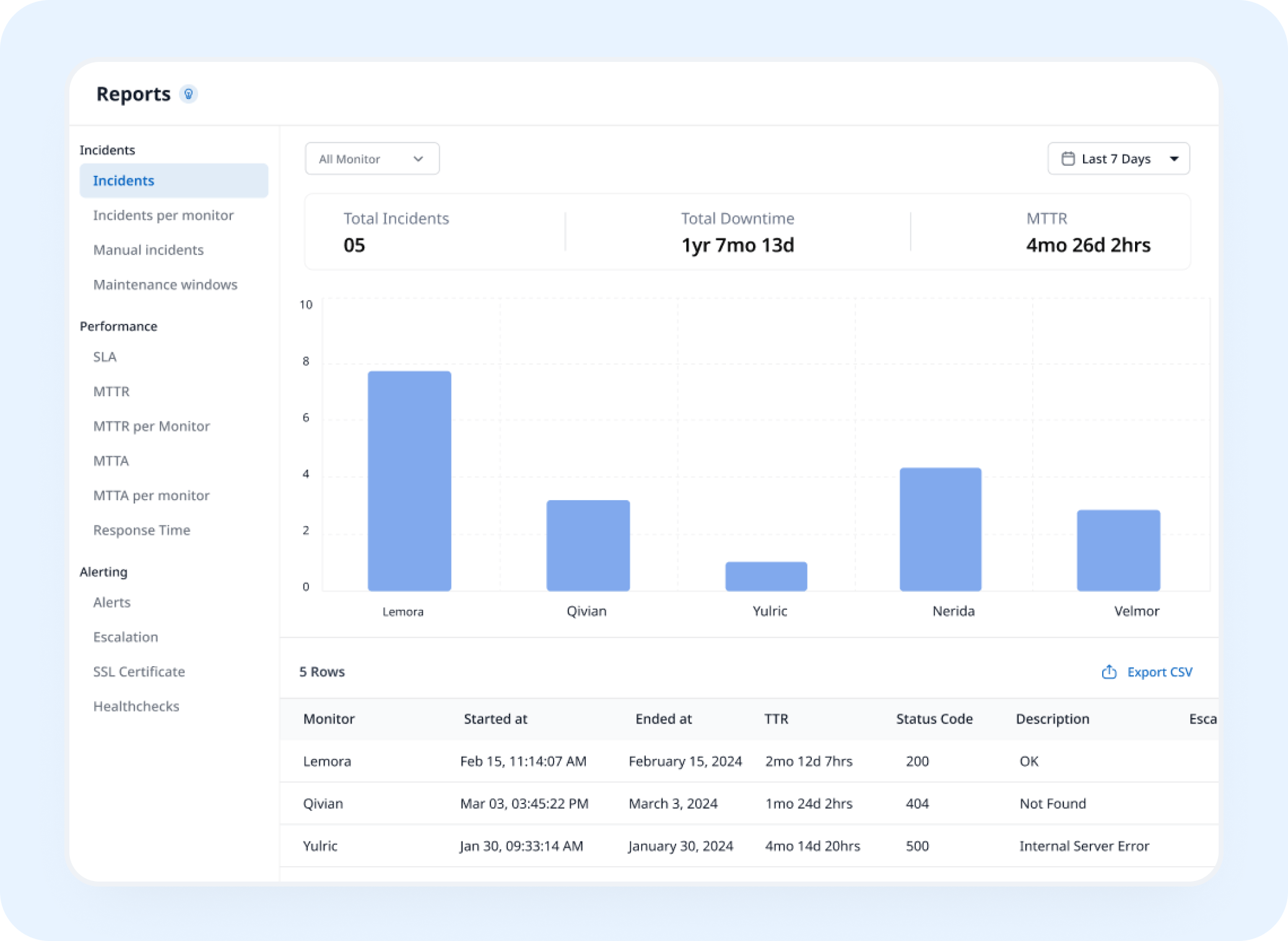
Incidents, Incidents per Monitor, and Manual Incidents, the full record of what actually went wrong.
Planned Downtime Reports
The Downtime That Was Supposed to Happen
Maintenance Windows, tracked separately so planned work never gets counted against you.
Response Reports
How Fast Your Team Actually Responds
MTTR, MTTR per Monitor, MTTA, and MTTA per Monitor, the numbers behind your response time.
Reliability Reports
The Numbers That Prove You're Holding Up
SLA, Response Time, and Alerts, what you promised, measured against what actually happened.
Calculator
See How Much Downtime Your SLA Allows
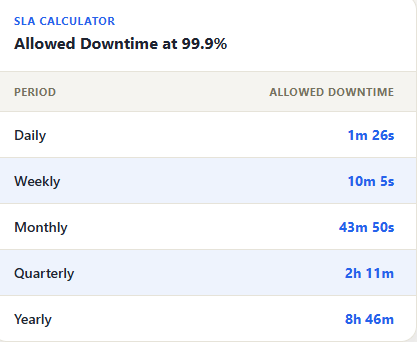
Type in your SLA target, and see exactly how much downtime it actually allows, before you're the one finding out the hard way.

2m 35s of downtime today
SLA breached, the day's allowance is already gone.

99.35% uptime this period
Below target, SLA breached.
An incident marked 30 seconds ago
In progress, SLA still maintained, for now.
Setup
How Do I Create a Report?
Create a report ready to be exported, in 4 easy steps, with real analytics and insights..
- 1
Filter by Monitor
Pick one monitor, a handful, or everything.
- 2
Filter by Period
- 3
Read the Summary
Total Incidents, Total Downtime, and MTTR, at a glance before you dig further.
- 4
Drill Into the Table
Monitor, Start Time, End Time, Time to Resolution, Status Code, Description.
- 5
Ask Zunoy AI
Skip the filters. Ask AI Agent to create a report on your incidents, and it pulls the numbers directly.
Get Your Reports by Email
Each email links straight to your dashboard for the full breakdown, the report is the headline, not the whole story.
Weekly Reports
Sent every Monday morning
Last 7 days of uptime, incidents, and downtime
Built for your own team to stay close to the numbers
Monthly Reports
Sent on the 1st of each month
Last 30 days of uptime, downtime, and incidents.
Built for a founder update or a client check-in
Real Scenarios
Who Actually Pulls a Report
SRE Teams
Pull MTTR trends across the quarter, spot which monitor keeps dragging response times down.
Founders
Export a monthly PDF for the board without touching a spreadsheet.
Support Leads
Check incidents per monitor before a customer call, so the numbers back up the answer.
Compliance Teams
An SLA report ready the moment an auditor asks for one.
Engineering Managers
Compare MTTA across every monitor, and spot which service consistently takes longest to acknowledge.
FAQ
Quick Answers About Reports
What types of reports can I generate in Zunoy Uptime?
Zunoy Uptime offers eleven report categories, grouped into four types: incident reports, response reports, reliability reports, and planned downtime reports.
Can I filter reports by monitor and time period?
Yes. Filter by one monitor, several monitors, or your entire workspace, and choose a preset date range or a custom period. You can also narrow the Alerts report to a single monitor to see its full alert history.
Can I schedule uptime reports by email?
Yes. Zunoy Uptime can email reports automatically on a daily, weekly, or monthly schedule.
What’s included in a Zunoy Uptime report?
Each report opens with three summary metrics: Total Incidents, Total Downtime, and MTTR. Below that, a detailed table lists the monitor, start time, end time, time to resolution, status code, and description for each event. Report data is also shown as charts alongside the table.
Can I export uptime reports?
Yes. Export any report as a CSV or PDF, depending on where it’s going.
How is SLA reporting different from other reports?
SLA reporting has its own dedicated view, showing your target SLA, response time SLA, and full uptime and downtime history. Use it for internal reviews or share it directly with customers as proof of compliance.
Get Started
Turn Your Data Into Something Worth Sharing
Stop rebuilding the same numbers every month. Generate the report instead.